
Access Control for Streaming: Securing Kafka Topics and Consumer Groups
In traditional database systems, access control is straightforward: you grant users permissions to read, write, or modify specific tables. But streaming platforms work differently. Data flows continuously through topics, multiple consumers may read the same stream simultaneously, and producers can inject events at any moment. This creates unique security challenges.
Consider a financial services company streaming payment transactions. The fraud detection team needs read access, the analytics team needs different data, and the payment processing service needs write access. Without proper access control, a misconfigured consumer could read sensitive customer data, or a rogue producer could inject fraudulent transactions.
Unlike databases where access patterns are relatively static, streaming platforms serve multiple teams with different security clearances, compliance requirements, and data access needs. A single topic might contain data that some teams can read entirely, others can read partially, and some shouldn't access at all. This is where streaming-specific access control becomes critical.
Why Access Control Matters in Streaming
Kafka ACLs: The Foundation
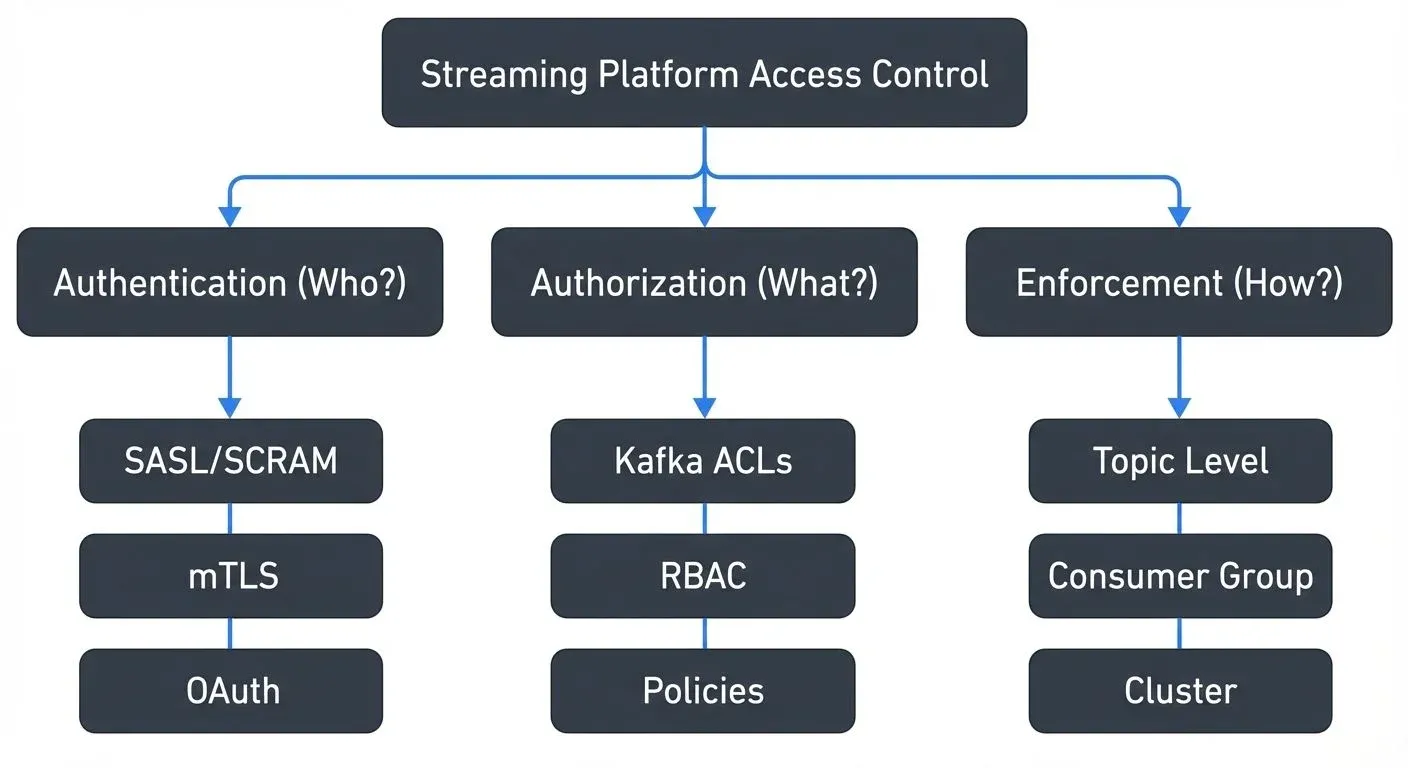
Apache Kafka implements access control through Access Control Lists (ACLs). An ACL defines who (principal) can perform which operations (Read, Write, Create, etc.) on which resources (topics, consumer groups, cluster).
Key concepts:
- Default-deny model: Without explicit ACLs, authenticated users have no permissions
- Combining permissions: Consumers need Read on both topic AND consumer group; producers need Write on topics plus IdempotentWrite for exactly-once semantics
- Prefixed patterns: Use
team-alpha.*to grant access to all topics with that prefix, dramatically reducing ACL management overhead
For comprehensive coverage of ACL components, authorization flows, and production management strategies, see Kafka ACLs and Authorization Patterns.
Authentication: Proving Identity
Before Kafka can enforce ACLs, it must verify identity through authentication. Kafka supports several mechanisms including SASL/PLAIN, SASL/SCRAM, mutual TLS (mTLS), and SASL/OAUTHBEARER.
For detailed coverage of authentication mechanisms, configuration examples, and security tradeoffs, see Kafka Authentication: SASL, SSL, OAuth.
Most enterprises combine authentication methods: mTLS for internal services, OAuth for user-facing applications, and SASL/SCRAM for legacy systems.
Getting Started: Enabling ACLs and First Steps
Before using ACLs, you must enable authorization in your Kafka cluster by setting the authorizer.class.name property in server.properties:
# For KRaft mode (Kafka 3.0+, default in Kafka 4.0+)
authorizer.class.name=org.apache.kafka.metadata.authorizer.StandardAuthorizer

# For ZooKeeper mode (legacy, replaced by KRaft in Kafka 4.0+)
authorizer.class.name=kafka.security.authorizer.AclAuthorizer

# Configure super users who bypass ACL checks (use carefully)
super.users=User:admin;User:kafka
After enabling ACLs, all access is denied by default. Use the kafka-acls command-line tool to grant permissions. For complete CLI examples covering consumer access, producer permissions, prefixed patterns, and ACL management, see Kafka ACLs and Authorization Patterns.
Authorization Patterns and Granularity
Kafka supports permissions at multiple levels: cluster-wide administrative operations, topic-level read/write access, consumer group membership controls, and transactional ID permissions for exactly-once semantics.
Common patterns:
- Producers: Write on topics + IdempotentWrite for exactly-once
- Consumers: Read on topics + Read on consumer groups
- Admins: Create/Delete/Alter on cluster resources
For team-based access patterns, environment separation strategies, and service-based permission models, see the authorization patterns section in Kafka ACLs and Authorization Patterns.
Multi-Tenancy and Isolation
Multi-tenant streaming platforms serve multiple teams or business units on shared infrastructure. Access control becomes critical for isolation, preventing one tenant from accessing another's data.
The simplest approach uses topic prefixes: team-alpha., team-beta.. Each team gets Read and Write permissions only on their prefix. However, this doesn't prevent teams from seeing topic names or metadata from other teams.
More sophisticated multi-tenancy requires:
- Namespace isolation: Logical separation where teams cannot even discover other teams' resources. This requires custom authorizers or platform layers above Kafka.
- Quota management: Per-tenant throughput quotas prevent noisy neighbors from monopolizing cluster resources.
- Separate security principals: Each team uses different SASL credentials or client certificates, making audit trails clearer.
- Metadata filtering: Custom authorizers that filter Describe operations, so teams only see their own topics.
Multi-tenancy also impacts operational tools. Monitoring dashboards, schema registries, and stream processing frameworks all need tenant-aware access control to prevent information leakage.
Virtual Clusters for Simplified Multi-Tenant Access Control
Managing access control across multiple teams sharing a Kafka cluster requires careful ACL coordination that becomes unwieldy at scale. Conduktor Virtual Clusters simplify this by creating complete logical isolation within a single physical cluster, each tenant operates in what appears to be a dedicated Kafka environment with their own topics, consumer groups, and access policies, eliminating cross-tenant visibility entirely.
Virtual Clusters enable per-tenant security postures where each virtual cluster enforces its own authentication requirements and ACL policies. Platform teams can delegate access control management to business unit administrators who manage permissions within their virtual cluster without requiring central team intervention for every change. For implementation guidance, see the Virtual Clusters documentation.
Enterprise Integration and Modern Approaches
Enterprise environments demand integration with existing identity systems. Rather than managing Kafka-specific credentials, organizations want to use LDAP, Active Directory, or cloud identity providers.
LDAP/AD integration typically works through SASL/PLAIN or SASL/GSSAPI (Kerberos). Kafka validates credentials against the directory service, and group memberships can inform authorization decisions through custom authorizers.
From ACLs to RBAC
While Kafka ACLs provide fine-grained control, managing thousands of individual ACL entries becomes unwieldy at enterprise scale. Role-Based Access Control (RBAC) solves this by introducing an abstraction layer above ACLs.
Instead of granting permissions directly to users:
User:alice -> Read on topic:orders
User:bob -> Read on topic:orders
User:charlie -> Read on topic:orders
RBAC uses roles:
Role:data-analyst -> Read on topic:orders
User:alice -> Role:data-analyst
User:bob -> Role:data-analyst
User:charlie -> Role:data-analyst
Benefits of RBAC:
- Simplified management: Grant role to user instead of maintaining dozens of ACLs per user
- Consistency: All analysts get identical permissions through the same role
- Auditability: "Who has access to orders?" becomes "Who has the data-analyst role?"
- Onboarding/offboarding: Add/remove role assignment, not individual ACLs
Conduktor provides enterprise RBAC for Kafka that extends beyond Confluent's implementation. It enables organizations to:
- Define custom roles aligned with organizational structure (data-engineer, ML-researcher, compliance-auditor)
- Integrate with SSO providers (Okta, Azure AD) for centralized identity management
- Apply RBAC across multiple Kafka clusters from a single interface
- Enforce policies at the topic, consumer group, and schema level
- Enable self-service access requests: Developers request roles/permissions through UI, managers approve via workflow, permissions auto-provision
- Maintain audit trails showing role assignments and permission changes over time
This becomes essential for regulated industries where proving "who had access to what data, when" is a compliance requirement. Self-service capabilities reduce bottlenecks on platform teams while maintaining governance controls, developers get access in minutes instead of waiting days for manual ACL configuration.
- Policy-as-code treats access control definitions as version-controlled configuration. Tools like Terraform or GitOps workflows define ACLs and roles declaratively, ensuring changes are reviewed, auditable, and reproducible. This prevents permission sprawl where access accumulates without oversight.
- Attribute-based access control (ABAC) makes authorization decisions based on attributes like time of day, client IP, data classification, or user department. While Kafka doesn't natively support ABAC, custom authorizers can implement these policies.
Securing Your Streaming Architecture
Access control is foundational to streaming platform security. Start by enabling authentication, implement least-privilege ACLs, and integrate with enterprise identity systems. As your platform grows, invest in RBAC abstractions, policy-as-code workflows, and automated access provisioning.
Remember that access control is just one layer of defense. Combine it with encryption in transit (TLS), encryption at rest, network segmentation, and data masking for sensitive fields. Monitor authorization failures as potential security incidents.
The streaming paradigm's continuous data flow and multiple consumers make access control more complex than traditional databases, but Kafka's ACL model provides the flexibility to implement enterprise-grade security. With proper planning and tooling, you can build a streaming platform that serves multiple teams securely.
For production deployments, consider platforms that provide unified governance across your streaming infrastructure, making it easier to manage access control, monitor compliance, and maintain security as your streaming architecture grows.
Related Concepts
- Kafka ACLs and Authorization Patterns - Detailed implementation patterns for Kafka's native ACL system and modern authorization approaches.
- Data Access Control: RBAC and ABAC - Role-based and attribute-based access control models for streaming platforms.
- Multi-Tenancy in Kafka Environments - Access control strategies for shared Kafka infrastructure serving multiple teams.
Sources and References
- Apache Kafka Security Documentation - Official documentation on Kafka's security features including authentication, authorization, and encryption
- Confluent RBAC for Apache Kafka - Guide to Role-Based Access Control implementation on Confluent Platform
- Kafka Authorization and ACLs - Comprehensive guide to Kafka Access Control Lists and authorization models
- SASL/OAUTHBEARER in Apache Kafka - Kafka Improvement Proposal for OAuth 2.0 authentication integration
- AWS MSK Security Best Practices - Security best practices for Amazon Managed Streaming for Apache Kafka