
Great Expectations: Data Testing Framework
Important: This article covers Great Expectations 1.0+ (released August 2024), which introduced breaking API changes from previous versions. If you're using GX 0.x, see the official migration guide.
Data quality problems tend to surface only after they've already hit downstream systems or business decisions. Great Expectations (GX) addresses this by providing a Python-based framework for testing, documenting, and profiling your data pipelines. 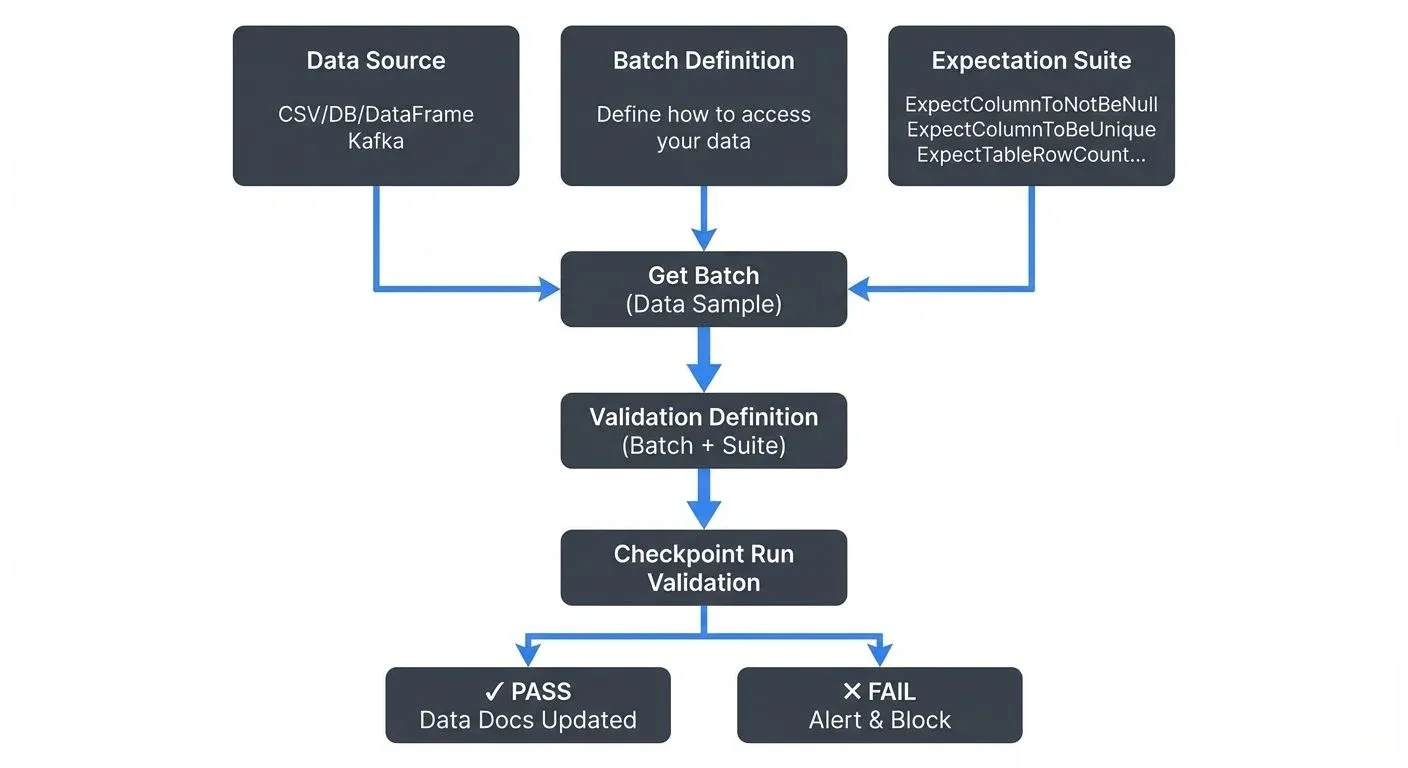
What is Great Expectations?
Great Expectations is an open-source data validation framework that enables data teams to express what they "expect" from their data through assertions called Expectations. Think of it as unit testing for your data, instead of testing code behavior, you're testing data quality, schema compliance, and business logic.
The framework goes beyond simple validation by generating data documentation, maintaining data quality metrics over time, and integrating seamlessly into modern data workflows.
Getting Started
Install Great Expectations and initialize a project:
pip install great_expectations
great_expectations init  # Creates project structure
Core Concepts
Expectations
Expectations are declarative assertions about your data. They're the building blocks of data quality tests. Great Expectations provides over 300 built-in Expectations covering common validation scenarios:
import great_expectations as gx

# Initialize a Data Context
context = gx.get_context()

# Set up a pandas datasource with fluent API
data_source = context.data_sources.add_pandas("pandas_datasource")
data_asset = data_source.add_dataframe_asset(name="customer_data")
batch_definition = data_asset.add_batch_definition_whole_dataframe("customer_batch")

# Create an Expectation Suite
suite = context.suites.add(
    gx.core.expectation_suite.ExpectationSuite(name="customer_suite")
)

# Add expectations to the suite
suite.add_expectation(
    gx.expectations.ExpectTableRowCountToBeBetween(
        min_value=1000, max_value=1000000
    )
)
suite.add_expectation(
    gx.expectations.ExpectColumnValuesToNotBeNull(column="customer_id")
)
suite.add_expectation(
    gx.expectations.ExpectColumnValuesToBeUnique(column="customer_id")
)
suite.add_expectation(
    gx.expectations.ExpectColumnValuesToBeInSet(
        column="status",
        value_set=["active", "inactive", "pending"]
    )
)
Batch Definitions
Batch Definitions specify how to access your data. They replaced the batch_request pattern from GX 0.x:
# For a CSV file
csv_asset = data_source.add_csv_asset(
    name="customer_csv",
    filepath_or_buffer="customer_data.csv"
)
batch_definition = csv_asset.add_batch_definition_whole_file("customer_batch")

# For dataframes (in-memory)
df_asset = data_source.add_dataframe_asset(name="customer_df")
batch_definition = df_asset.add_batch_definition_whole_dataframe("df_batch")
Data Assistants (Auto-Profiling)
Data Assistants automatically generate Expectation Suites by analyzing your data:
from great_expectations.rule_based_profiler.data_assistant import OnboardingDataAssistant

# Get a batch for profiling
batch = batch_definition.get_batch()

# Use OnboardingDataAssistant to auto-generate expectations
data_assistant = OnboardingDataAssistant(
    name="onboarding_assistant",
    batch_request=batch.batch_request
)

# Generate suite
result = data_assistant.run()
suite = result.get_expectation_suite()
Validation Definitions and Checkpoints
Validation Definitions link a Batch Definition to an Expectation Suite. Checkpoints then execute one or more validations:
# Create a Validation Definition
validation_definition = context.validation_definitions.add(
    gx.core.validation_definition.ValidationDefinition(
        name="customer_validation",
        data=batch_definition,
        suite=suite,
    )
)

# Create a Checkpoint
checkpoint = context.checkpoints.add(
    gx.checkpoint.checkpoint.Checkpoint(
        name="customer_checkpoint",
        validation_definitions=[validation_definition]
    )
)

# Run validation
checkpoint_result = checkpoint.run()

# Check results
if checkpoint_result.success:
    print("✅ All validations passed!")
else:
    print("❌ Validation failed:")
    for result in checkpoint_result.run_results.values():
        for validation_result in result["validation_result"].results:
            if not validation_result.success:
                print(f"  - {validation_result.expectation_config.type}")
                print(f"    {validation_result.result}")
Data Docs: Validation results automatically generate HTML documentation showing data quality metrics, trends, and validation history. These docs serve as living documentation of your data contracts.
Batch Data Validation
For traditional batch processing pipelines, Great Expectations integrates with data warehouses, lakes, and processing frameworks using the fluent SQL datasource API:
# PostgreSQL database validation
datasource = context.data_sources.add_postgres(
    name="postgres_datasource",
    connection_string="postgresql://user:password@localhost:5432/database"
)

# Add a table asset
table_asset = datasource.add_table_asset(
    name="orders",
    table_name="orders"
)

# Create batch definition for the entire table
batch_definition = table_asset.add_batch_definition_whole_table("orders_batch")

# Create expectations for the orders table
orders_suite = context.suites.add(
    gx.core.expectation_suite.ExpectationSuite(name="orders_suite")
)
orders_suite.add_expectation(
    gx.expectations.ExpectColumnValuesToNotBeNull(column="order_id")
)
orders_suite.add_expectation(
    gx.expectations.ExpectColumnValuesToBeUnique(column="order_id")
)

# Create validation definition and checkpoint
validation_def = context.validation_definitions.add(
    gx.core.validation_definition.ValidationDefinition(
        name="orders_validation",
        data=batch_definition,
        suite=orders_suite,
    )
)
orders_checkpoint = context.checkpoints.add(
    gx.checkpoint.checkpoint.Checkpoint(
        name="orders_checkpoint",
        validation_definitions=[validation_def]
    )
)

# Run validation
result = orders_checkpoint.run()
Streaming Data Validation
Modern data architectures increasingly rely on streaming data. Great Expectations can validate streaming data by integrating with Apache Kafka, Kinesis, or other streaming platforms.
Kafka Integration
Here's how to validate streaming data from Kafka using GX 1.0+:
from kafka import KafkaConsumer, KafkaProducer
import json
import pandas as pd
import great_expectations as gx
import logging

logger = logging.getLogger(__name__)

# Initialize GX context
context = gx.get_context()

# Set up dataframe datasource for streaming validation
data_source = context.data_sources.add_pandas("streaming_pandas")
df_asset = data_source.add_dataframe_asset(name="streaming_events")
batch_definition = df_asset.add_batch_definition_whole_dataframe("streaming_batch")

# Create expectation suite for streaming events
streaming_suite = context.suites.add(
    gx.core.expectation_suite.ExpectationSuite(name="streaming_events_suite")
)
streaming_suite.add_expectation(
    gx.expectations.ExpectColumnValuesToNotBeNull(column="customer_id")
)
streaming_suite.add_expectation(
    gx.expectations.ExpectColumnValuesToBeInSet(
        column="event_type",
        value_set=["page_view", "purchase", "signup"]
    )
)

# Kafka consumer setup
consumer = KafkaConsumer(
    'customer-events',
    bootstrap_servers=['localhost:9092'],
    value_deserializer=lambda m: json.loads(m.decode('utf-8')),
    auto_offset_reset='latest',
    enable_auto_commit=False,  # Manual commit after successful validation
)

# Dead letter queue producer for failed validations
dlq_producer = KafkaProducer(
    bootstrap_servers=['localhost:9092'],
    value_serializer=lambda m: json.dumps(m).encode('utf-8')
)

def handle_validation_failure(messages, checkpoint_result):
    """Send failed messages to dead letter queue with error details"""
    for result in checkpoint_result.run_results.values():
        validation_result = result["validation_result"]
        if not validation_result.success:
            failure_details = {
                "messages": messages,
                "validation_errors": [
                    {
                        "expectation": r.expectation_config.type,
                        "result": str(r.result)
                    }
                    for r in validation_result.results if not r.success
                ],
                "statistics": validation_result.statistics
            }
            dlq_producer.send('data-quality-dlq', value=failure_details)
            logger.error(f"Validation failed: {validation_result.statistics}")

# Streaming validation function
def validate_streaming_batch(messages):
    """Validate a micro-batch of streaming messages"""
    df = pd.DataFrame(messages)

    # Get batch with dataframe
    batch = batch_definition.get_batch(batch_parameters={"dataframe": df})

    # Create validation definition
    validation_def = context.validation_definitions.add(
        gx.core.validation_definition.ValidationDefinition(
            name=f"streaming_validation_{pd.Timestamp.now().timestamp()}",
            data=batch_definition,
            suite=streaming_suite,
        )
    )

    # Create and run checkpoint
    checkpoint = context.checkpoints.add(
        gx.checkpoint.checkpoint.Checkpoint(
            name=f"streaming_checkpoint_{pd.Timestamp.now().timestamp()}",
            validation_definitions=[validation_def]
        )
    )

    checkpoint_result = checkpoint.run()

    if not checkpoint_result.success:
        handle_validation_failure(messages, checkpoint_result)

    return checkpoint_result.success

# Process streaming data in micro-batches
batch_size = 100
message_buffer = []

try:
    for message in consumer:
        message_buffer.append(message.value)

        if len(message_buffer) >= batch_size:
            success = validate_streaming_batch(message_buffer)

            if success:
                # Commit offset after successful validation
                consumer.commit()

            # Clear buffer regardless of validation result
            message_buffer = []
finally:
    consumer.close()
    dlq_producer.close()
Custom Expectations
For domain-specific validation logic, you can create custom Expectations. The ColumnMapExpectation base class pattern remains available in GX 1.0+:
from great_expectations.expectations.expectation import ColumnMapExpectation

class ExpectColumnValuesToBeValidEmail(ColumnMapExpectation):
    """Expect column values to be valid email addresses"""

    map_metric = "column_values.match_regex"
    success_keys = ("mostly", "regex")

    default_kwarg_values = {
        "regex": r"^[a-zA-Z0-9._%+-]+@[a-zA-Z0-9.-]+\.[a-zA-Z]{2,}$",
        "mostly": 1.0,
    }

# Usage
suite.add_expectation(
    ExpectColumnValuesToBeValidEmail(column="email_address")
)Note: Custom expectation development patterns may have evolved in GX 1.0+. Consult the official custom expectations documentation for the latest implementation guidance.
Best Practices
- Start Simple: Begin with basic Expectations like null checks and uniqueness constraints before adding complex validations.
- Version Control: Store Expectation Suites in version control alongside your data pipeline code.
- Incremental Adoption: Implement GX incrementally, starting with critical datasets.
- Monitor Trends: Use Data Docs to track data quality metrics over time and identify degradation patterns.
- Fail Fast: Configure validation workflows to halt pipelines on critical validation failures. Use conditional logic based on
checkpoint_result.success. - Performance in Streaming: For high-throughput streams, consider:
- Sampling: Validate every Nth message instead of every message
- Time windows: Batch messages over fixed time intervals (e.g., validate every 10 seconds)
- Adaptive validation: Increase validation frequency when anomalies are detected
- Integration with Orchestration: Integrate GX with orchestration tools like Airflow, Prefect, or Dagster for production deployments. Use the
airflow-provider-great-expectationspackage for Airflow integration.
Conclusion
Great Expectations turns data quality from a reactive debugging exercise into a proactive testing discipline. By defining Expectations, creating validation suites, and integrating checks into batch and streaming pipelines, data teams can catch issues early and reduce time spent on data quality incidents.
Whether you're validating nightly batch loads in Snowflake or real-time events streaming through Kafka, Great Expectations gives you the framework to ensure your data meets the standards your business depends on.
Related Concepts
- dbt Tests and Data Quality Checks - Complementary testing approach within transformation pipelines
- Automated Data Quality Testing - Broader automation strategies for data quality
- Data Contracts for Reliable Pipelines - Defining and enforcing data quality expectations