
Optimizing Delta Tables: OPTIMIZE and Z-ORDER
As Delta tables grow in production environments, maintaining query performance becomes increasingly challenging. Small files accumulate from frequent writes, and data layout becomes suboptimal for common query patterns. Delta Lake provides two commands, OPTIMIZE and Z-ORDER, that address these issues through file compaction and intelligent data clustering. 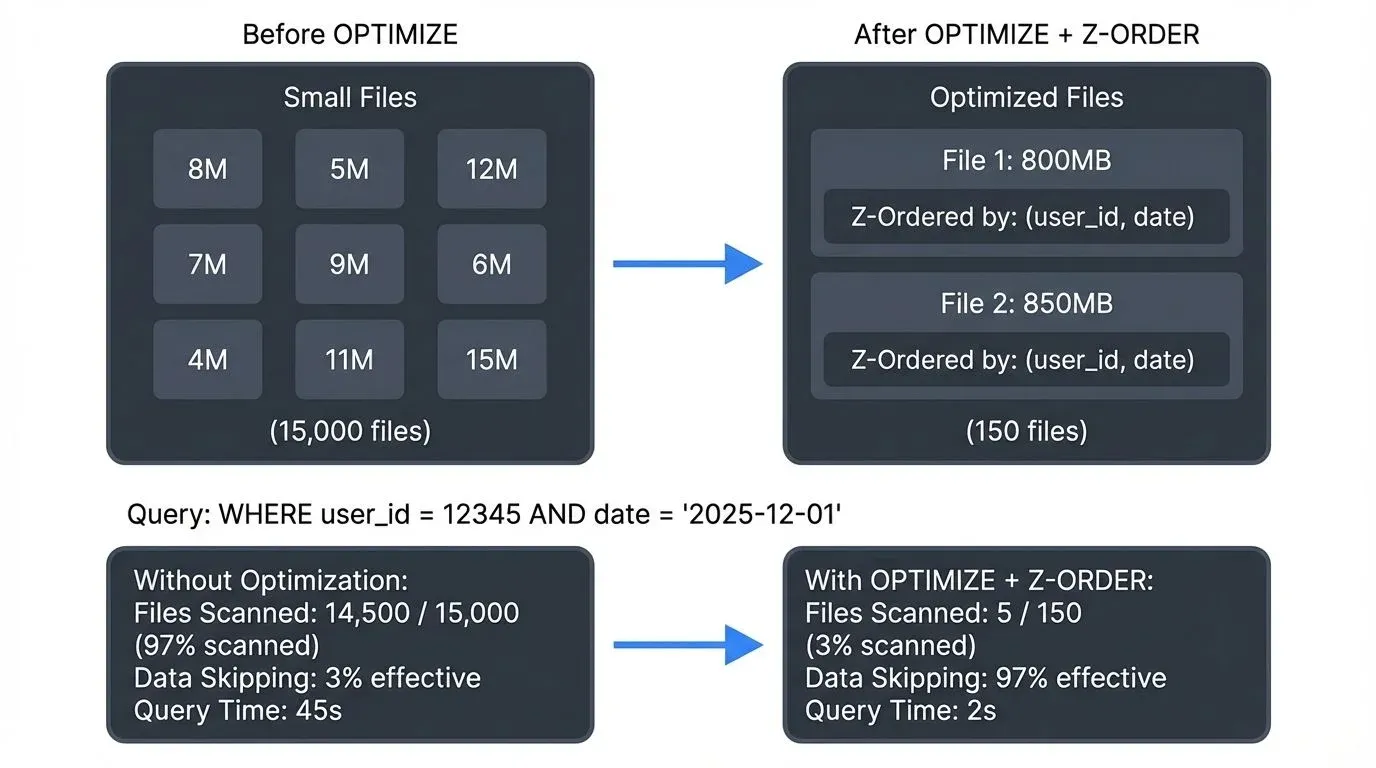
Note: This guide focuses on Delta Lake optimization. For similar techniques in Apache Iceberg, see Maintaining Iceberg Tables: Compaction and Cleanup. For a broader comparison of table formats, refer to Apache Iceberg.
Understanding the Small File Problem
Delta Lake's ACID transaction support and append-only architecture create a natural tendency toward file fragmentation. Each write operation, whether from batch jobs or streaming pipelines, generates new Parquet files. Over time, this leads to:
- Metadata overhead: Reading thousands of small files requires significant I/O operations just to process file metadata
- Inefficient parallelization: Query engines struggle to distribute small files efficiently across executors
- Reduced data skipping effectiveness: Statistics at the file level become less useful when data is scattered across many files
A table with 10,000 files of 10 MB each performs significantly worse than the same data consolidated into 100 files of 1 GB each. The OPTIMIZE command addresses this directly.
The OPTIMIZE Command: File Compaction
The OPTIMIZE command performs bin-packing (efficiently grouping items to minimize wasted space) to combine small files into larger, more efficiently sized files. This process rewrites data files while preserving the transaction log integrity.
Basic Syntax
-- Optimize entire table
OPTIMIZE delta_table;

-- Optimize specific partition
OPTIMIZE delta_table WHERE DATE = '2025-12-01';
Configuration and Performance Metrics
The target file size is controlled by the delta.targetFileSize table property (default: 1 GB). For streaming workloads with frequent small writes, setting this appropriately is critical:
ALTER TABLE delta_table SET TBLPROPERTIES (
  'delta.targetFileSize' = '134217728'  -- 128 MB for streaming
);
Real-world performance improvements from OPTIMIZE operations:
- Query latency reduction: 40-60% faster queries on tables with severe fragmentation
- Metadata processing: Up to 80% reduction in time spent reading file metadata
- Cloud storage costs: Fewer API calls to object storage (S3, ADLS, GCS)
A production e-commerce table with 15,000 small files (avg 8 MB) was optimized to 150 files (avg 800 MB), reducing typical aggregate queries from 45 seconds to 18 seconds, a 60% improvement.
Z-ORDER: Multi-Dimensional Clustering
While file compaction addresses the quantity of files, Z-ORDER addresses their internal organization. Z-ORDER is a technique that co-locates related data within the same file set, maximizing the effectiveness of Delta Lake's data skipping.
How Z-ORDER Works
Z-ORDER uses a space-filling curve (Z-curve or Morton curve) to map multi-dimensional data into a single dimension while preserving locality. Think of it as a path that weaves through multi-dimensional space, visiting nearby points in sequence. When you Z-ORDER by multiple columns, data with similar values across those dimensions is stored physically close together, like organizing a library by both subject and publication date simultaneously, rather than choosing just one.
OPTIMIZE delta_table
ZORDER BY (customer_id, event_date);
This command reorganizes data so that queries filtering on customer_id, event_date, or both benefit from enhanced data skipping.
Data Skipping in Action
- Data skipping is the technique of avoiding reading files that cannot contain query results, based on min/max statistics stored in file metadata. Delta Lake maintains these statistics automatically for each data file. When a query includes filters, the engine uses these statistics to skip entire files that cannot contain matching data, dramatically reducing I/O and compute. Z-ORDER maximizes this effectiveness:
- Without Z-ORDER:
- Query:
SELECT * FROM events WHERE customer_id = 12345 AND event_date = '2025-12-01' - Files scanned: 450 out of 500 files
- Data skipping effectiveness: 10%
With Z-ORDER on (customer_id, event_date):
- Query: Same query
- Files scanned: 45 out of 500 files
- Data skipping effectiveness: 91%
The performance impact is substantial. A financial services company reduced query times on a 5 TB transaction table from 3 minutes to 22 seconds by implementing Z-ORDER on account_id and transaction_date.
Choosing Z-ORDER Columns
Selecting the right columns for Z-ORDER requires understanding your query patterns:
- High cardinality columns: Cardinality refers to the number of unique values in a column. High cardinality columns (e.g., user_id with millions of values) provide excellent data skipping opportunities. Low cardinality columns (e.g., status with 3 values) provide minimal benefit.
- Frequently filtered columns: Columns used in WHERE clauses benefit most
- Column order matters: Place the most selective column first when possible
- Limit to 3-4 columns: Z-ORDER effectiveness diminishes beyond 3-4 dimensions
-- Good: High cardinality, frequently queried together
OPTIMIZE transactions
ZORDER BY (user_id, transaction_date, merchant_id);

-- Poor: Low cardinality, rarely queried together
OPTIMIZE transactions
ZORDER BY (status, is_refunded);
Streaming Ecosystem Integration
In streaming architectures, OPTIMIZE and Z-ORDER play complementary roles to batch optimization strategies. Streaming workloads generate small files continuously, making regular optimization essential. For a comprehensive guide on writing streaming data to Delta Lake, see Streaming to Lakehouse Tables.
Structured Streaming and Auto-Optimize
Delta Lake supports auto-optimization features that work seamlessly with Spark Structured Streaming. Note: The configuration examples below use Databricks-specific settings. For open-source Delta Lake, you'll need to run OPTIMIZE commands separately.
# Enable auto-optimize for streaming writes (Databricks-specific)
spark.conf.set("spark.databricks.delta.properties.defaults.autoOptimize.optimizeWrite", "true")
spark.conf.set("spark.databricks.delta.properties.defaults.autoOptimize.autoCompact", "true")

streaming_df.writeStream \
  .format("delta") \
  .outputMode("append") \
  .option("checkpointLocation", "/checkpoints/events") \
  .trigger(processingTime="5 minutes") \
  .start("/delta/events")
Auto-optimize strategies:
- Optimize Write: Reduces small file creation during writes by shuffling data before writing
- Auto Compaction: Runs OPTIMIZE automatically after writes when fragmentation thresholds are exceeded
For open-source Delta Lake (2025): Delta Lake 3.2+ includes optimized writes by default, automatically sizing files more efficiently during writes without requiring Databricks-specific configuration.
Scheduled Optimization for Streaming Tables
For high-throughput streaming tables, scheduled optimization jobs provide better control:
-- Run hourly for recent partitions
OPTIMIZE streaming_events
WHERE event_hour >= CURRENT_TIMESTAMP() - INTERVAL 24 HOURS;

-- Run daily with Z-ORDER for historical partitions
OPTIMIZE streaming_events
WHERE event_date = CURRENT_DATE() - INTERVAL 1 DAY
ZORDER BY (user_id, event_type);
Governance and Visibility
Managing optimization across multiple streaming pipelines requires visibility into table health and performance. Modern data governance platforms provide capabilities for streaming data platforms, including:
- Table health monitoring: Track file counts, average file sizes, and fragmentation metrics across Delta tables
- Optimization audit trails: Monitor when OPTIMIZE operations run and their impact on query performance
- Policy enforcement: Set organization-wide standards for optimization schedules and Z-ORDER configurations
- Cross-platform visibility: Unified view of Delta tables across different compute engines (Spark, Flink, Trino)
For Kafka and streaming-centric architectures, platforms like Conduktor provide governance capabilities that extend from Kafka topics through to lakehouse tables, ensuring end-to-end data quality and observability. Manage your streaming data sources with Conduktor's topic management and Kafka Connect for lakehouse ingestion pipelines.
This governance layer becomes essential in enterprises with dozens of data engineering teams managing hundreds of Delta tables. It bridges the gap between streaming ingestion and analytical consumption, ensuring that optimization strategies align with organizational SLAs and cost targets.
Best Practices and Operational Considerations
When to Run OPTIMIZE: A Decision Guide
Not all tables need optimization, and over-optimizing wastes resources. Use this guide:
Run OPTIMIZE when:
- File count exceeds 1,000 files per partition
- Average file size drops below 100 MB
- Query performance degrades noticeably
- After high-volume ingestion periods (e.g., daily batch loads)
Skip OPTIMIZE when:
- Table is append-only with infrequent queries
- Files are already near target size (800 MB - 1 GB)
- Table is temporary or short-lived
- Write volume is low (< 10 files/day)
Optimization Scheduling
Running OPTIMIZE during peak query hours can impact performance and costs. Recommended approaches:
-- Partition-aware optimization (processes only recent data)
OPTIMIZE events
WHERE DATE >= CURRENT_DATE() - INTERVAL 7 DAYS;

-- Time-windowed execution (runs during off-peak hours)
-- Schedule via cron/Airflow/orchestration tools during 2-6 AM UTC
Scheduling tools: Use workflow orchestrators like Apache Airflow, Dagster, or cloud-native schedulers (AWS Step Functions, Azure Data Factory) to automate optimization during off-peak hours.
Monitoring Optimization Impact
Track these metrics to measure effectiveness:
-- Check table file statistics
DESCRIBE DETAIL delta_table;

-- View optimization history
DESCRIBE HISTORY delta_table;

-- Analyze data skipping effectiveness (Databricks)
SELECT * FROM (
  SELECT input_file_name() AS file, COUNT(*) AS records
  FROM delta_table
  WHERE DATE = '2025-12-01'
  GROUP BY 1
);
Cost Considerations
OPTIMIZE operations rewrite data, incurring compute and storage costs:
- Compute: Rewriting 1 TB typically costs $2-5 depending on cluster configuration
- Storage: Temporary 2x storage until old files are vacuumed via the VACUUM command (removes old file versions)
- ROI: Query performance improvements and reduced scanning typically offset costs within days
A data warehouse team reduced their monthly query costs by $12,000 while spending $1,500/month on scheduled optimization, an 8x return.
Delta Lake 3.x Optimization Improvements (2025)
Recent Delta Lake releases introduce significant optimization enhancements:
Incremental OPTIMIZE (Delta 3.1+):
-- Only optimizes files that have changed since last optimization
OPTIMIZE delta_table WHERE DATE >= '2025-12-01';
This incremental approach dramatically reduces optimization costs by avoiding re-processing of already-optimized data.
Multi-threaded OPTIMIZE (Delta 3.2+): Delta Lake 3.2 introduces parallel file rewriting, reducing OPTIMIZE execution time by up to 5x on large tables. Enable with:
spark.conf.set("spark.databricks.delta.optimize.maxThreads", "8")Checkpoint Optimization: For tables with extensive transaction histories, Delta Lake automatically creates checkpoints every 10 commits, speeding up metadata operations and query planning. Monitor checkpoint health with:
DESCRIBE DETAIL delta_table; -- Check lastCheckpoint columnAdvanced Techniques
Liquid Clustering (Delta 3.0+)
For workloads with evolving query patterns, Delta Lake 3.0 introduces Liquid Clustering as an alternative to Z-ORDER:
CREATE TABLE events (
  user_id BIGINT,
  event_date DATE,
  event_type STRING
)
USING DELTA
CLUSTER BY (user_id, event_date);
Liquid Clustering vs Z-ORDER:
Liquid Clustering automatically maintains clustering without manual Z-ORDER commands, adapting to query patterns over time. Key differences:
| Feature | Z-ORDER | Liquid Clustering |
|---|---|---|
| Setup | Manual OPTIMIZE ZORDER BY commands | Declared at table creation |
| Maintenance | Run manually or scheduled | Automatic during writes |
| Query Pattern Adaptation | Static - requires re-running with different columns | Dynamic - adapts to actual queries |
| Partitioning | Works with traditional partitions | Replaces partitioning entirely |
| Best For | Known, stable query patterns | Evolving workloads, multiple access patterns |
- When to use Liquid Clustering: New tables, evolving analytics workloads, or tables accessed by multiple teams with different query patterns. See the Delta Lake Liquid Clustering guide for migration strategies.
Bloom Filter Indexes
For high-cardinality columns with equality filters (e.g., WHERE user_id = 12345), combine Z-ORDER with Bloom filters. Bloom filters are space-efficient probabilistic data structures that quickly determine if a value definitely doesn't exist in a file, further enhancing data skipping.
Note: Bloom filter index syntax varies by platform. The example below uses Databricks syntax:
-- Databricks-specific syntax
CREATE BLOOMFILTER INDEX ON delta_table FOR COLUMNS (user_id);

OPTIMIZE delta_table
ZORDER BY (event_date, region);
This provides near-constant lookup performance for user_id while maintaining Z-ORDER benefits for other columns. Bloom filters excel when you have frequent point lookups on high-cardinality columns.
Summary
Optimizing Delta Tables through OPTIMIZE and Z-ORDER is essential for maintaining production performance at scale. OPTIMIZE addresses file fragmentation through intelligent compaction, while Z-ORDER enhances data skipping through multi-dimensional clustering. Together, they can reduce query latency by 50-90% on fragmented tables.
Key takeaways:
- Run OPTIMIZE regularly on high-write tables to combat fragmentation (aim for files between 800 MB - 1 GB)
- Apply Z-ORDER to high-cardinality columns used in common query filters (limit to 3-4 columns)
- Leverage Delta Lake 3.x features (2025): incremental OPTIMIZE, multi-threaded processing, and automatic checkpoint management
- For evolving query patterns, consider Liquid Clustering instead of Z-ORDER
- Enable auto-optimization for streaming workloads or schedule manual optimization during off-peak hours
- Monitor table health metrics and optimization history to measure ROI
- Use governance platforms like Conduktor for enterprise-scale visibility across streaming data pipelines
As Delta tables grow from gigabytes to petabytes, these optimization techniques move from optional enhancements to operational necessities. Regular optimization pays off through faster queries, reduced costs, and improved data platform reliability.
Related Concepts
- Delta Lake Liquid Clustering: Modern Partitioning - The modern alternative to Z-ORDER for adaptive clustering
- Delta Lake Transaction Log: How It Works - How OPTIMIZE operations are tracked in the transaction log
- Streaming to Lakehouse Tables - Auto-optimization strategies for streaming workloads
Sources and References
- Delta Lake Official Documentation - OPTIMIZE
- Databricks Z-ORDER Technical Documentation
- Delta Lake GitHub Repository
- Research Paper: "The Delta Lake Project: Building Reliable Data Lakes at Scale"
- Apache Spark Structured Streaming Guide
- Parquet File Format Specification
- Z-Order Curve (Morton Code) - Wikipedia