
Building a Data Lake with Kafka and S3 (Without Breaking It)

A team running a high-volume e-commerce platform got paged at 3 AM on a Tuesday. A hundred Spark jobs had failed, 240,000 orders were backing up in Kafka, and downstream services were timing out. The data lake was frozen solid.
Six hours later they traced it to a single schema-incompatible Parquet file in S3. The file had passed schema validation. The S3 Sink Connector had written it without complaint. But Spark couldn't read it, and the schema mismatch took down every job that touched that partition. They deleted the bad file, replayed the Kafka topic, and regenerated the data. Six hours of downtime for one bad file.
That file should never have made it to S3 in the first place.
Why bad data in S3 is so much worse than bad data in Kafka
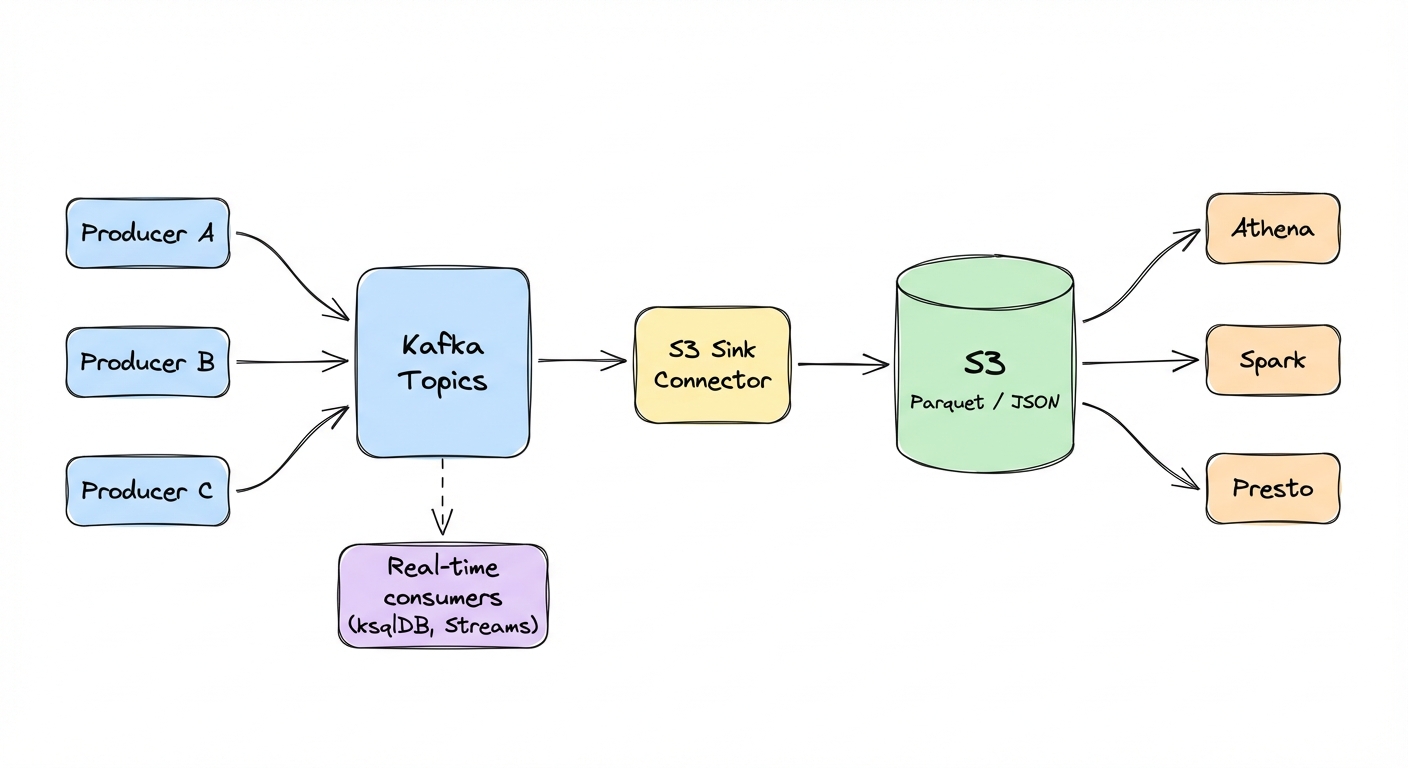
Most data lakes look the same: Kafka topics stream into S3 via Sink Connectors, S3 becomes the source of truth for historical data, and Spark/Athena/Presto query those files for analytics and ML.
This pattern works well for historical analytics and ML training where minutes-to-hours latency is fine. For real-time dashboards with sub-second requirements, query Kafka directly via ksqlDB or materialized views.
Bad data in Kafka is painful but recoverable -- consumers can be configured to skip bad records or route them to a dead-letter topic. Bad data in S3 is a different animal entirely. Queries break, dashboards go blank, ML pipelines stall, and you can't just skip a corrupt file the way you skip a bad Kafka message. You have to find it, delete it, and rewrite it.
Parquet makes this worse. If a Parquet file has schema corruption, there's no patching it in place. You delete the file and regenerate it from the source. If the source Kafka topic has been compacted or its retention has expired, that data is gone for good.
In practice, bad data in S3 tends to show up in three ways:
Schema mismatches: a producer sends data with schema v3, the Sink Connector expects v2, the resulting Parquet file has mismatched columns, and Spark chokes on it.
Null violations: a required field gets a null value. The Parquet file writes fine (null is syntactically valid) but queries return garbage. Your analytics show a 50% drop in users that isn't real.
Encoding problems: product descriptions with emojis, accented characters, Chinese text. JSON files with broken UTF-8. Spark jobs die with "malformed encoding" errors and the data is unreadable.
The S3 Sink Connector handles format conversion. It does not validate what the data actually means.
Disaster scenarios from production
The schema mismatch
A producer team upgraded to schema v3, adding a new field. The S3 Sink Connector wrote Parquet files using the v3 schema. Downstream Spark jobs expected v2 and had schema merging disabled. A hundred jobs crashed when they tried to read those partitions.
It took six hours to identify the corrupt partition, delete the files, replay the Kafka topic, and regenerate clean Parquet. The root cause was simple: no schema validation at ingestion. The producer sent v3, the data lake expected v2, and nobody found out until query time.
A note on Schema Registry: Confluent Schema Registry validates schema structure and enforces compatibility rules (BACKWARD, FORWARD, FULL), but it doesn't validate business logic. A field named amount with value -1000 passes schema validation just fine. Gateway validation is complementary. Schema Registry handles structural compatibility, Gateway enforces semantic correctness: field ranges, nullability, encoding, business constraints.
The null cascade
A required field, user_id, started receiving null values. The Sink Connector wrote them to Parquet without complaint (null is syntactically valid). Athena queries filtering on WHERE user_id IS NOT NULL returned wrong counts. The analytics dashboard showed a 50% drop in active users overnight.
The business panicked. Emergency meeting. Two days of investigation before someone traced it to a producer bug that sent nulls for users without accounts.
By that point, 30 days of data in S3 was corrupted. The team had to backfill all of it.
The encoding problem
Product descriptions contained emojis, accented letters, Chinese characters. The producer didn't enforce UTF-8 encoding, so the Sink Connector wrote JSON files with broken encoding to S3. Spark jobs started failing with "malformed UTF-8" errors.
30 days of product data was unreadable. The team replayed the entire topic, re-encoded the data, and rewrote the files. A week of engineering time, and they doubled their S3 storage costs temporarily because they kept both the corrupt and clean versions during migration.
Every time, the format validation passed. The semantic validation never happened because it didn't exist.
Quick debug checklist: When Spark jobs fail with "malformed" or "schema mismatch" errors:
> # Find files written during failure window
> aws s3 ls s3://bucket/topic/year=2025/month=12/day=14/ --recursive
>
> # Test file readability (fails on corrupt files)
> spark-shell -e "spark.read.parquet(\"s3a://bucket/path/file.parquet\").show(1)"
>
> # Check schema of a downloaded file
> parquet-tools schema file.parquet
>
The gap in the standard pipeline
The typical setup looks like this:
Producers -> Kafka Topics -> S3 Sink Connector -> S3 (Parquet)
                                                    |
                                      Spark / Athena / Presto
A Parquet file with amount=-1000 is syntactically valid. The Sink Connector writes it happily. Spark reads it. Your financial analytics are now wrong and nobody knows until someone notices the numbers don't add up.
The S3 Sink Connector validates structure, not semantics:
# Standard S3 Sink Configuration (validates format only)
connector.class=io.confluent.connect.s3.S3SinkConnector
topics=orders
s3.bucket.name=data-lake
s3.region=us-east-1
storage.class=io.confluent.connect.s3.storage.S3Storage
format.class=io.confluent.connect.s3.format.parquet.ParquetFormat
parquet.codec=snappy
partitioner.class=io.confluent.connect.storage.partitioner.TimeBasedPartitioner
path.format='year'=yyyy/'month'=MM/'day'=dd
partition.duration.ms=3600000
locale=en-US
timezone=UTC
flush.size=1000
The connector converts Kafka records to Parquet, applies Snappy compression, and creates time-based partition paths. It does not reject semantically invalid field values (nulls, negative amounts, invalid enums), enforce business logic, validate encoding, or catch schema version mismatches with downstream readers.
You need validation before data enters Kafka, at the gateway.
Producer-side validation doesn't scale. You can't trust twenty teams to enforce the same rules consistently. And post-S3 validation is too late, the corrupt files have already broken your queries. Every message passes through the gateway, which makes it the natural place to enforce rules.
Other validation strategies exist: Schema Registry with compatibility checks, Kafka Streams for in-flight validation, post-write verification in Spark. The gateway approach works best in multi-team environments where you need centralized control to avoid coordination problems. That's the focus here.
Conduktor Gateway: validate before S3
Move validation upstream.
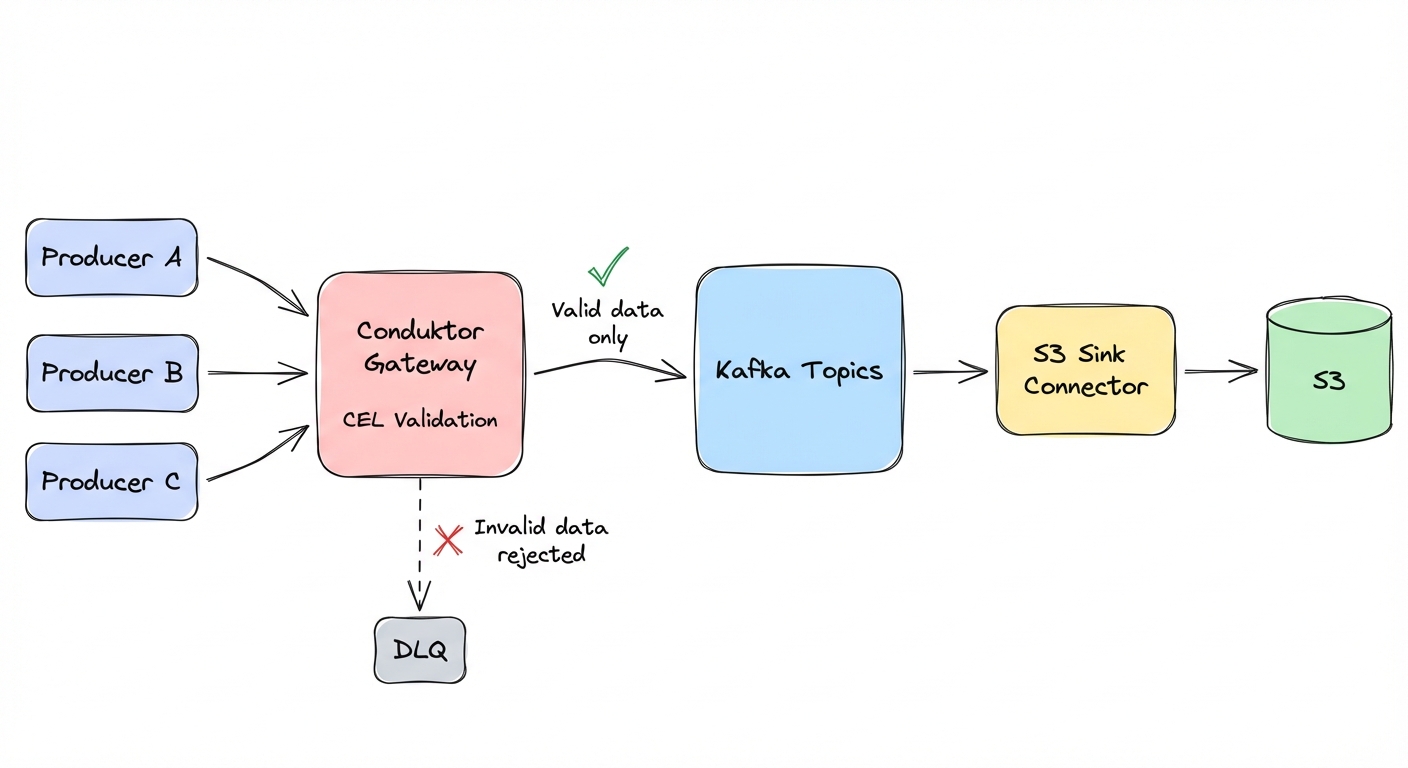
Conduktor Gateway sits between producers and Kafka and validates every message against rules you define. When a producer tries to send invalid data, Gateway rejects it. The producer gets an error, the bad data never enters Kafka, and it never reaches S3.
When Gateway rejects data, producers receive an INVALID_RECORD error. This error is non-retriable -- the Kafka producer client won't automatically retry it. You can also enable a dead-letter queue (dlq: true and dlqTopic in the interceptor config) to capture violating records for investigation.
Basic field validation
Conduktor Gateway lets you define validation rules using Common Expression Language (CEL). CEL expressions have access to value (the message payload), key, headers, topic, partition, and offset.
// Required fields cannot be null
has(value.user_id) && value.user_id != null

// Amount must be non-negative and under limit
value.amount >= 0 && value.amount < 1000000

// Event time must be recent (assumes ISO 8601 string format)
timestamp(value.event_time) > timestamp("2020-01-01T00:00:00Z")

// Email must match format
value.email.matches("^[^@]+@[^@]+\\.[^@]+$")

// Status must be valid enum
value.status in ["pending", "active", "completed"]
Business logic validation
You can also validate field relationships:
// End date must be after start date
has(value.end_date) ?
  timestamp(value.end_date) > timestamp(value.start_date) : true

// Discount must be reasonable
value.discount >= 0 && value.discount <= 100
Data masking for PII
Gateway can mask sensitive fields (SSNs, emails, credit card numbers) using a separate field-level encryption interceptor. A data quality rule can then validate that the masking was applied -- for example, confirming the SSN field matches the masked format before it reaches Kafka:
// Verify SSN is masked (last 4 digits only)
value.ssn.matches("XXX-XX-\\d{4}")
Masking and validation are two separate interceptors. Configure the masking interceptor at a higher priority so it runs first, then the data quality interceptor validates the result. See the Gateway documentation for field-level encryption configuration.
Deploying a data quality policy
CEL rules are deployed as Gateway interceptors via the admin API. Here's a complete example that validates orders before they reach Kafka:
curl -u admin:conduktor -X PUT http://gateway:8888/gateway/v2/interceptor \
  -H "Content-Type: application/json" \
  -d '{
  "apiVersion": "gateway/v2",
  "kind": "Interceptor",
  "metadata": {"name": "orders-quality"},
  "spec": {
    "pluginClass": "io.conduktor.gateway.interceptor.dataquality.DataQualityPlugin",
    "priority": 1,
    "config": {
      "policyName": "orders-quality",
      "topicsRegex": ["^orders$"],
      "block": true,
      "report": true,
      "maxNumberOfViolationReportPerSecond": 10,
      "consoleDeploymentId": "standalone",
      "rules": {
        "amount-valid": {
          "type": "CEL",
          "expression": "value.amount >= 0 && value.amount < 1000000"
        },
        "user-id-required": {
          "type": "CEL",
          "expression": "has(value.user_id) && size(string(value.user_id)) > 0"
        },
        "status-enum": {
          "type": "CEL",
          "expression": "value.order_status in [\"pending\", \"active\", \"completed\"]"
        }
      }
    }
  }
}'
block: true rejects invalid records. report: true writes violation events to an internal Gateway topic for monitoring. consoleDeploymentId is required even without Console -- use "standalone".
To start in observation mode (log violations without blocking), set block: false and mark: true. This adds a conduktor.dataquality.violations header to violating records so downstream consumers can see which rules failed, while still letting messages through. After tuning rules against production traffic, switch to block: true.
Fixing data in S3 takes hours. Rejecting it at the gateway takes milliseconds.
A note on security: Gateway validation is about data quality, not security. Production deployments still need S3 server-side encryption (SSE-KMS for key rotation), least-privilege IAM policies, and CloudTrail audit logging. For regulated industries, add PII masking policies and retention enforcement for GDPR/HIPAA compliance.
Data lake best practices
Clean data entering your lake is step one. You also need to store and retrieve it efficiently. Here are four things that actually matter:
1. Partitioning strategy
Good partitioning:
s3://bucket/topic/year=2025/month=12/day=14/Bad partitioning:
s3://bucket/topic/file-001.parquetWith time-based partitioning, queries can prune partitions. "Give me December 14th data" reads one partition instead of scanning everything. Athena charges $5 per TB scanned, so partition pruning can cut query costs by 10-100x.
2. File size optimization
Target 100-200 MB per Parquet file. Adjust flush.size based on your average record size -- the target is file size in MB, not record count.
- If records are 1 KB:
flush.size=100000-> 100 MB files - If records are 50 KB:
flush.size=2000-> 100 MB files
Small files (<10 MB) drive up S3 request costs and slow Spark startup. We've seen customers paying $10K/month in unnecessary S3 costs because misconfigured flush sizes were creating 1 MB files.
Larger files (>1 GB) cause memory issues and reduce parallelism.
flush.size=10000           # Adjust based on record size
rotate.interval.ms=600000  # Rotate every 10 minutes
3. Compression saves money
Parquet's columnar encoding with Snappy compression typically reduces storage by 80% compared to raw JSON. 10 GB of JSON becomes about 2 GB of compressed Parquet. At S3 Standard pricing ($0.023/GB/month), that's $0.23/month down to $0.05/month per topic. Across hundreds of topics and terabytes of data, compression cuts your storage bill by 80%.
Note: Compression ratios vary by data structure -- highly nested JSON may see 90% reduction, flat numeric data may see 50%.
4. Schema evolution requires planning
Compatible changes: adding optional fields, adding defaults, widening types (int to long).
Breaking changes: removing fields, renaming fields, changing types (string to int).
For breaking changes, create new topics. Don't try to evolve schemas in place. You will corrupt your historical data.
What to do about it
Audit your S3 data. Run Spark jobs with schema validation enabled and count how many corrupt files you already have. The number is probably higher than you think.
spark.read.option("mergeSchema", "false")
  .schema(expected_schema)
  .parquet("s3://bucket/topic/")
Define validation rules. Pick your highest-risk fields. For e-commerce: user_id (required), amount (non-negative), order_status (enum). Write CEL rules and test them in dev.
Deploy Conduktor Gateway. Configure it for one critical topic. Deploy the interceptor in observation mode (block: false, mark: true, report: true) to log violations without rejecting messages. After tuning rules against production traffic, switch to block: true.
Set up monitoring. Alert when rejection rates spike, when S3 Sink connectors fall behind, and watch closely the first week to catch rules that are too strict.
Track costs. Tag S3 storage costs per team using topic tags. Show teams their consumption and give them incentives to optimize compression and file sizes.
A corrupt Parquet file can freeze your analytics for hours. A rejected message at the gateway costs milliseconds.