
ksqlDB for Real-Time Data Processing
Building stream processing applications on Kafka traditionally required writing complex Java or Scala code. ksqlDB provides a SQL interface instead, making real-time data transformation accessible to a wider range of developers. 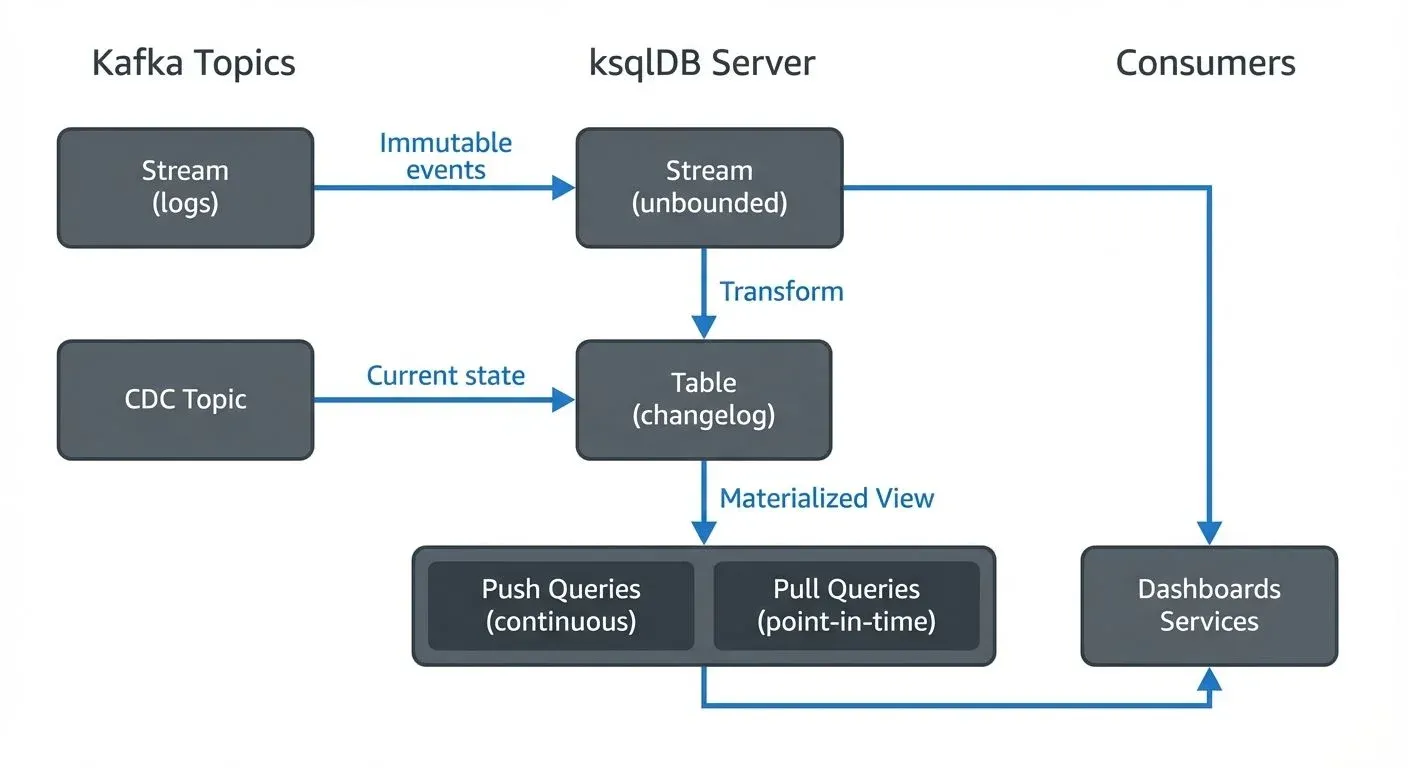
What is ksqlDB?
ksqlDB is an event streaming database built on Apache Kafka and Kafka Streams. It allows developers to build stream processing applications using familiar SQL syntax instead of writing procedural code. Originally released as KSQL in 2017 and rebranded as ksqlDB in 2019, it has evolved into a complete database for stream processing workloads.
As of 2025, ksqlDB 0.29+ includes significant enhancements such as improved pull query performance, enhanced exactly-once semantics, native support for Kafka's KRaft mode (ZooKeeper-free architecture), and better integration with modern schema registries. These updates make ksqlDB a mature, production-ready platform for SQL-based stream processing.
Unlike traditional databases that store data at rest, ksqlDB operates on data in motion. It processes continuous streams of events, allowing you to filter, transform, aggregate, and join data as it flows through Kafka topics. This approach enables real-time analytics, data enrichment, and event-driven architectures without the complexity of custom stream processing applications.
ksqlDB serves dual purposes: it functions as both a stream processing engine and a materialized view layer. Queries can be transient (returning results and terminating) or persistent (continuously processing events and maintaining state). This flexibility makes it suitable for both ad-hoc analysis and production streaming pipelines.
Core Concepts and Architecture
Streams and Tables
ksqlDB introduces two fundamental abstractions: streams and tables. A stream represents an unbounded sequence of immutable events, such as user clicks or sensor readings. Each event is independent and append-only. A table, in contrast, represents the current state derived from a stream, where each key has exactly one value that can be updated over time.
For example, a stream of user login events becomes a table showing the last login time for each user. This distinction between event log (stream) and current state (table) is crucial for modeling real-world data flows.
Continuous Queries and Query Types
ksqlDB supports multiple query types, each serving different use cases:
- Persistent queries run continuously, processing new events as they arrive. When you create a persistent query, ksqlDB automatically maintains it across restarts and failures. The query reads from Kafka topics, applies transformations, and writes results back to Kafka topics, creating a complete streaming data pipeline.
- Push queries (also called continuous queries) stream results to clients as new data arrives. These are ideal for real-time dashboards, monitoring systems, or applications that need to react to changes as they happen. For example, a dashboard displaying live transaction counts would use a push query.
- Pull queries allow point-in-time lookups against materialized views, similar to traditional database queries. In ksqlDB 0.29+, pull queries offer significantly improved performance and support for high-availability setups, making them suitable for serving user-facing applications that need low-latency access to aggregated state.
Materialized views provide queryable state. When you create a table with aggregations, ksqlDB maintains the aggregated results in memory and on disk, allowing you to query the current state at any time using pull queries. This eliminates the need for separate caching layers or batch processing jobs, enabling ksqlDB to serve as both a stream processor and a queryable database.
Key Features and Capabilities
SQL-Based Transformations
ksqlDB supports standard SQL operations including filtering, projecting, joining, and aggregating data. You can write window-based aggregations (tumbling, hopping, session windows) to analyze time-series data. Complex transformations that would require hundreds of lines of Java code can be expressed in a few lines of SQL.
CREATE STREAM filtered_events AS
  SELECT user_id, event_type, TIMESTAMP
  FROM raw_events
  WHERE event_type = 'purchase';
Stream-Table Joins
ksqlDB enables joins between streams and tables, or between multiple streams. This capability is essential for enriching event data with reference information. For instance, you can join a stream of transactions with a table of user profiles to add customer demographics to each transaction in real-time.
For detailed patterns on implementing stream enrichment and various join types, see Stream Joins and Enrichment Patterns.
Scalability and Fault Tolerance
Built on Kafka Streams, ksqlDB inherits distributed processing capabilities. Queries are automatically distributed across multiple servers, and state is partitioned and replicated for fault tolerance. If a server fails, ksqlDB automatically redistributes the workload and restores state from Kafka topics.
Under the hood, ksqlDB leverages the same state store mechanisms as Kafka Streams, using RocksDB for persistent state and changelog topics for recovery. For more details on how state management works in stream processing, see State Stores in Kafka Streams.
ksqlDB in Data Streaming Ecosystems
ksqlDB operates within the broader Apache Kafka ecosystem, working alongside several complementary technologies. It reads and writes Avro, JSON, and Protobuf formats, integrating seamlessly with Schema Registry implementations to enforce data contracts and schema evolution. For details on schema management patterns, see Schema Registry and Schema Management.
ksqlDB vs Kafka Streams vs Apache Flink
Choosing between ksqlDB, Kafka Streams, and Apache Flink depends on your team's expertise, use case complexity, and operational preferences:
ksqlDB is ideal when:
- Your team prefers SQL over code (accessible to analysts and data engineers)
- You need rapid development of streaming transformations and aggregations
- Operational simplicity is a priority (no separate cluster to manage)
- Use cases involve filtering, aggregations, joins, and windowing that SQL can express
- You want to serve queries directly from stream processing (pull queries)
Kafka Streams is better when:
- You need full programmatic control and custom logic
- Your application requires complex stateful processing beyond SQL capabilities
- You want to embed stream processing directly into microservices
- Integration with existing Java/Scala codebases is important
Apache Flink excels when:
- You need advanced features like complex event processing (CEP) or iterative algorithms
- State size is very large (terabytes)
- You're processing multiple data sources beyond Kafka
- Batch and stream unification matters for backfilling or reprocessing
For a detailed comparison of Kafka Streams and Flink, see Kafka Streams vs Apache Flink. For comprehensive coverage of Flink's capabilities, see What is Apache Flink? Stateful Stream Processing.
For organizations running Kafka, ksqlDB provides a natural path to stream processing without introducing additional infrastructure. It leverages existing Kafka topics as both input and output, maintaining a consistent data platform. Governance and management platforms like Conduktor enhance this experience by providing visual interfaces to develop and monitor ksqlDB queries, view query topology, troubleshoot performance issues, and ensure data quality across the streaming infrastructure. See Conduktor's ksqlDB management to create and manage ksqlDB queries, monitor query performance, and inspect materialized views.
Stream processing with ksqlDB complements traditional batch processing. Many organizations implement a lambda architecture where ksqlDB handles real-time processing while batch jobs provide comprehensive historical analysis. Others adopt kappa architecture, using ksqlDB for all processing with different time windows.
Real-World Use Cases and Examples
Real-Time Analytics
A common use case is calculating real-time metrics from event streams. Consider an e-commerce platform tracking page views:
CREATE TABLE page_view_counts AS
  SELECT page_url,
         COUNT(*) AS view_count,
         WINDOWSTART AS window_start,
         WINDOWEND AS window_end
  FROM page_views
  WINDOW TUMBLING (SIZE 1 HOUR)
  GROUP BY page_url
  EMIT CHANGES;
This query continuously aggregates page views into hourly windows, providing near-instant insights into popular pages. The materialized table can be queried using pull queries for real-time dashboards:
-- Pull query: Get current counts for a specific page
SELECT page_url, view_count
FROM page_view_counts
WHERE page_url = '/products/bestseller';
Results are also written to a Kafka topic for downstream consumers. For broader context on real-time analytics patterns, see Real-Time Analytics with Streaming Data.
Data Enrichment and Filtering
Financial institutions use ksqlDB to enrich transaction streams with account information and filter suspicious activities. A simple fraud detection example:
CREATE STREAM suspicious_transactions AS
  SELECT t.transaction_id, t.amount, a.account_type, a.risk_score
  FROM transactions t
  LEFT JOIN accounts a ON t.account_id = a.account_id
  WHERE t.amount > 10000 OR a.risk_score > 75;
This query joins streaming transactions with an accounts table, then filters for high-value or high-risk transactions. Security teams can monitor the output stream in real-time, enabling immediate fraud investigation.
Event-Driven Microservices
ksqlDB enables microservices to react to events without direct service-to-service calls. Services publish events to Kafka topics, and ksqlDB queries transform and route events to appropriate downstream topics. This decouples services while maintaining real-time data flow.
Materialized Views and Query Serving
One of ksqlDB's most powerful features is its ability to serve as both a stream processor and a queryable database through materialized views.
Creating Materialized Views
When you create a table with aggregations in ksqlDB, you're creating a materialized view, a continuously updated representation of query results:
CREATE TABLE user_activity_summary AS
  SELECT user_id,
         COUNT(*) AS event_count,
         MAX(TIMESTAMP) AS last_activity,
         COLLECT_LIST(event_type) AS recent_events
  FROM user_events
  WINDOW TUMBLING (SIZE 5 MINUTES)
  GROUP BY user_id
  EMIT CHANGES;
This table is continuously updated as new events arrive, maintaining real-time aggregated state.
Querying Materialized Views
Push queries stream continuous updates:
-- Stream all changes to the materialized view
SELECT * FROM user_activity_summary EMIT CHANGES;
Pull queries provide point-in-time lookups (ksqlDB 0.29+ significantly improved performance):
-- Get current activity for a specific user
SELECT event_count, last_activity
FROM user_activity_summary
WHERE user_id = 'user_12345';
Pull queries return immediately with the current state, making them suitable for serving user-facing applications, REST APIs, or microservices that need low-latency access to aggregated data.
High Availability for Pull Queries
In production deployments, ksqlDB supports high availability for pull queries through standby replicas. Multiple ksqlDB servers maintain replicas of the same state, allowing queries to be served even if some servers fail. This makes ksqlDB a viable alternative to traditional databases for serving real-time aggregations.
Best Practices and Considerations
When to Use ksqlDB
ksqlDB is ideal when your team prefers SQL over code, when streaming transformations align with SQL capabilities, and when tight Kafka integration is valuable. It works well for filtering, aggregations, simple joins, and real-time metrics. Teams already using Kafka for messaging gain stream processing capabilities without additional infrastructure.
Performance Considerations
Query performance depends on several factors: partition count affects parallelism, state store configuration impacts memory usage, and window sizes influence latency and resource consumption. Monitor query performance using metrics exposed through JMX and integrate with observability platforms like Conduktor to visualize resource utilization, track consumer lag, and identify bottlenecks.
For high-throughput scenarios, ensure adequate partitioning in source topics (aligning with ksqlDB server count), allocate sufficient memory for state stores (RocksDB configuration), and consider scaling horizontally by adding more ksqlDB servers. Testing queries with production-like data volumes before deployment prevents performance surprises.
ksqlDB 0.29+ performance improvements:
- Enhanced pull query performance with better caching and query planning
- Improved state store restoration times for faster recovery
- Better memory management reducing heap pressure during high-throughput operations
- Optimized serialization/deserialization for Avro and Protobuf formats
Limitations and Alternatives
While ksqlDB is powerful, it has limitations compared to lower-level frameworks:
- SQL limitations: Not all stream processing patterns can be expressed in SQL. Complex stateful operations, intricate multi-way joins, and custom processing logic may be better suited to Kafka Streams (programmatic control) or Flink (advanced features like CEP).
- User-defined functions (UDFs): While UDFs extend ksqlDB capabilities, they require Java development and deployment, reducing the SQL-only advantage.
- State size: For very large state (terabytes), Flink's distributed state backend may be more appropriate than ksqlDB's RocksDB stores.
- Processing guarantees: While ksqlDB supports exactly-once semantics within Kafka, complex pipelines with external systems may require more control than SQL provides.
- Version compatibility: Kafka compatibility requires attention during upgrades. As of 2025, ksqlDB 0.29+ is compatible with Kafka 3.4+ and fully supports KRaft mode. Always consult compatibility matrices and test thoroughly in non-production environments. Schema evolution strategies should be planned upfront to avoid breaking changes in production queries.
Summary
ksqlDB provides a SQL interface to Apache Kafka, giving both data engineers and analysts a way to build streaming applications. Streams, tables, and query types (persistent, push, and pull) map naturally to database concepts while operating on data in motion.
Key strengths of ksqlDB:
- SQL accessibility: Build stream processing applications without writing Java/Scala code
- Dual-purpose architecture: Functions as both stream processor and queryable database through materialized views
- Pull query capabilities: Serve real-time aggregations directly from the stream processor (significantly improved in 0.29+)
- Operational simplicity: No separate cluster to manage; deploys as a standard application
- Kafka integration: Leverages existing Kafka infrastructure for durability and scalability
- 2025 maturity: KRaft support, enhanced exactly-once semantics, and production-grade performance
ksqlDB works well for filtering, aggregation, enrichment, and joins. Kafka Streams gives more programmatic control, and Flink handles more complex scenarios, but ksqlDB is a good fit for SQL-first teams that want rapid development and operational simplicity.
Related Concepts
- Kafka Streams vs Apache Flink - Compare ksqlDB's underlying Kafka Streams engine with Apache Flink for architectural decisions
- Stream Joins and Enrichment Patterns - Implementing join patterns and data enrichment in ksqlDB
- Real-Time Analytics with Streaming Data - Building analytics dashboards and metrics using ksqlDB materialized views
Sources and References
- Confluent Documentation. "ksqlDB Documentation." Confluent, https://docs.ksqldb.io/. Official documentation covering ksqlDB architecture, syntax, and operations (updated for 0.29+ features).
- Confluent Blog. "ksqlDB 0.29 Release Notes." Confluent, 2024-2025. Details on pull query improvements, KRaft support, and performance enhancements.
- Narkhede, Neha, et al. "Kafka: The Definitive Guide, 2nd Edition." O'Reilly Media, 2021. Comprehensive coverage of Kafka ecosystem including stream processing concepts.
- Apache Software Foundation. "Kafka Streams Documentation." Apache Kafka, https://kafka.apache.org/documentation/streams/. Foundation technology underlying ksqlDB.
- Kleppmann, Martin. "Designing Data-Intensive Applications." O'Reilly Media, 2017. Theoretical foundations of stream processing and event-driven architectures.
- Confluent Blog. "Introducing ksqlDB." Confluent, 2019, https://www.confluent.io/blog/intro-to-ksqldb-sql-database-streaming/. Original announcement and overview of ksqlDB capabilities.
- Confluent Developer. "ksqlDB Tutorials and Recipes." https://developer.confluent.io/tutorials/. Practical examples and patterns for ksqlDB applications.