
State Stores in Kafka Streams
Stream processing applications often need to remember information across multiple events. Counting page views, calculating running totals, joining streams of data, or tracking user sessions all require maintaining state. Kafka Streams uses state stores to enable these stateful operations while preserving the distributed, fault-tolerant nature of stream processing. For foundational knowledge about Apache Kafka and its ecosystem, see Apache Kafka. 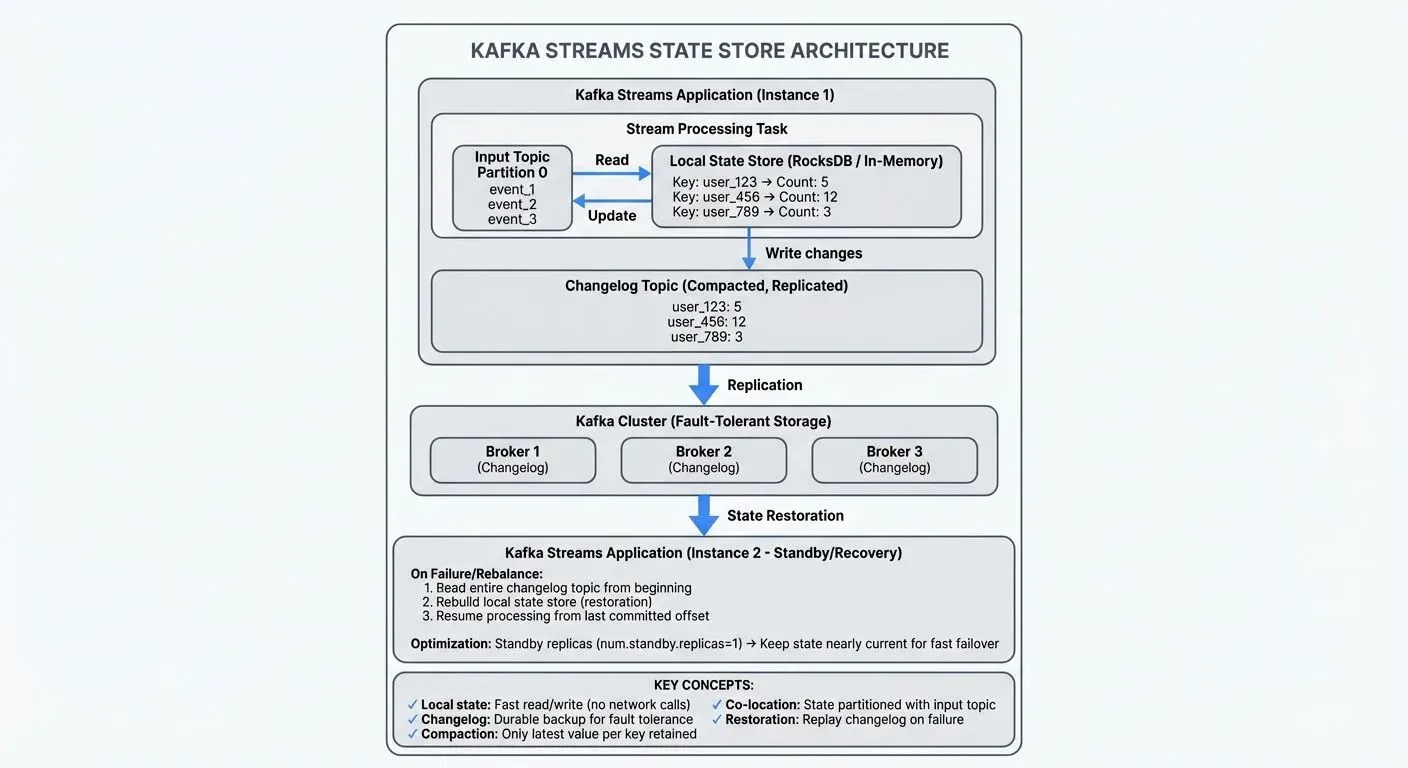
What Are State Stores?
A state store is a local database embedded within a Kafka Streams application that maintains mutable state. When your application processes events, it can read from and write to these stores to keep track of intermediate results, accumulated values, or lookup tables.
State stores solve a fundamental challenge in stream processing: how to perform operations that depend on multiple events without losing data when applications restart or fail. Unlike stateless transformations that process each event independently, stateful operations need to remember previous events.
For example, counting how many times each user has logged in requires remembering the current count for each user. When a new login event arrives, the application reads the current count from the state store, increments it, and writes the updated value back.
Types of State Stores
Kafka Streams provides several types of state stores, each optimized for different use cases.
Persistent vs In-Memory Stores
- Persistent stores use RocksDB, an embedded key-value database, to store data on disk. RocksDB is a high-performance database library that runs within your application process rather than as a separate database server. These stores can handle datasets larger than available memory and survive application restarts. RocksDB stores are the default choice for production applications because they balance performance with durability.
- In-memory stores keep all data in RAM, offering faster access times but limited capacity. They're useful for smaller datasets or when you prioritize speed over durability, though the state is lost when the application stops.
Key-Value vs Window Stores
- Key-value stores maintain a simple mapping of keys to values. They're ideal for aggregations, counters, and lookups. For instance, storing the latest profile information for each user ID.
- Window stores organize data into time-based windows, essential for time-bounded aggregations. A tumbling window might track website traffic per 5-minute interval, while a session window could monitor user activity sessions with varying durations.
- Timestamped key-value stores combine aspects of both, maintaining a versioned history of values for each key based on event timestamps.
- Versioned state stores (introduced in Kafka 3.5 via KIP-889) maintain a complete history of values for each key with associated timestamps, enabling temporal queries. Unlike timestamped stores, versioned stores allow you to retrieve the value of a key as it existed at any specific point in time. This capability is essential for temporal joins, auditing use cases, and scenarios where you need to understand how data changed over time. For example, you could query "What was user_123's account balance at exactly 2:30 PM yesterday?" rather than just seeing the current balance.
How State Stores Work
Understanding the architecture of state stores helps explain how Kafka Streams achieves fault tolerance and scalability.
Changelog Topics
Every state store is backed by a changelog topic in Kafka. Whenever the application updates a state store, it also writes the change to this changelog topic. This creates a durable record of all state modifications.
If an application instance fails, a replacement instance can restore the state store by replaying the changelog topic. This mechanism ensures that state is never lost, even in the event of complete application failure.
Changelog topics are compacted, meaning Kafka retains only the latest value for each key. For example, if user_123's login count changes from 5→10→15→20, the compacted log only stores the final value of 20, discarding the intermediate values. This prevents the changelog from growing indefinitely while still maintaining complete state recovery capability.
Partitioning and Co-location
State stores are partitioned alongside the input topic partitions. Each Kafka Streams task processes one input partition and maintains a corresponding state store partition. This co-location ensures that all data for a given key is processed by the same task, enabling efficient stateful operations.
When you perform a join or aggregation, Kafka Streams automatically handles the data routing to ensure events with the same key reach the correct state store partition.
State Restoration
When a Kafka Streams application starts, it must restore state stores before processing new events. The restoration process reads the changelog topic from the beginning, rebuilding the local state. For example, if your state store contains 1 million keys representing several gigabytes of data, the application must read and process the entire changelog before handling new events. For large state stores, this can take significant time, potentially minutes to hours depending on the state size.
Kafka Streams optimizes restoration using standby replicas, duplicate copies of state stores maintained on other application instances that you configure via the num.standby.replicas setting. These standby replicas continuously update themselves from the changelog topics, staying nearly current. If a task needs to move to a new instance (due to failure or rebalancing), the standby can take over with minimal catch-up, reducing downtime from minutes to seconds.
State Stores in Modern Kafka (3.5+ and 4.0+)
With Kafka 4.0's KRaft architecture (which removes ZooKeeper dependencies), state store management remains largely unchanged at the application level. However, KRaft provides more predictable metadata operations, which improves changelog topic creation and management. State restoration benefits from KRaft's faster metadata propagation, especially noticeable in large-scale deployments with many partitions. For detailed information about KRaft, see Understanding KRaft Mode in Kafka.
Recent Kafka versions have introduced several state store enhancements:
- Kafka 3.5+: Versioned state stores (KIP-889) enable temporal queries, allowing you to retrieve historical values at specific timestamps
- Kafka 3.4+: Improved restoration performance through better changelog management
- Kafka 4.0+: Enhanced monitoring metrics for state store operations and more efficient RocksDB integration
These improvements make state stores more powerful and easier to operate at scale, particularly for complex temporal analytics and audit scenarios.
Common Use Cases
State stores enable a wide range of stateful operations in stream processing.
Aggregations
Aggregations are the most common use case. Calculating sums, averages, counts, or custom aggregations all require state stores to maintain running totals.
KTable<String, Long> userLoginCounts = loginEvents
    .groupByKey()
    .count(Materialized.as("user-login-counts"));
This example creates a state store named "user-login-counts" that maintains the count of login events per user. Each new event updates the stored count.
Stream Joins
Joining two streams requires buffering events from both streams in state stores until matching events arrive. For example, joining a stream of orders with a stream of payments requires temporarily storing unmatched orders and payments. For comprehensive coverage of join patterns and strategies, see Stream Joins and Enrichment Patterns.
Windowed Computations
Time-based analytics rely on window stores. Calculating the number of transactions per 10-minute window requires a state store that organizes data by time interval.
KTable<Windowed<String>, Long> transactionVolume = transactions
    .groupByKey()
    .windowedBy(TimeWindows.ofSizeWithNoGrace(Duration.ofMinutes(10)))
    .count();
This creates a state store that maintains counts for non-overlapping 10-minute windows. The ofSizeWithNoGrace method (introduced in Kafka 2.4+) creates windows without a grace period. Grace periods allow late-arriving events to be included in already-closed windows, useful when event timestamps don't arrive in perfect order. Without a grace period, windows close immediately after their time boundary, optimizing for lower latency at the cost of potentially missing late events. For detailed information on windowing strategies, see Session Windows in Stream Processing.
Stateful Transformations
Custom stateful logic, like deduplication or enrichment, uses state stores to remember previously seen events or lookup reference data.
State Store Configuration and Management
Proper configuration of state stores is essential for performance and reliability.
Performance Tuning
The size of state stores directly impacts application performance. Large stores require more memory for caching and longer restoration times. Key configuration parameters include:
cache.max.bytes.buffering: Controls the size of the record cache, affecting throughput and latency (default: 10MB). Increase for higher throughput, decrease for lower latencycommit.interval.ms: Determines how frequently state is flushed to disk and changelog topics (default: 30000ms). Lower values provide more frequent checkpoints but higher overheadnum.standby.replicas: Number of duplicate state store copies for faster recovery (default: 0). Set to 1 or more for production systems- RocksDB block cache size: Affects how much data RocksDB keeps in memory. Tune via
rocksdb.config.setterfor large state stores
For containerized deployments (Kubernetes, Docker), ensure persistent volumes are properly configured for RocksDB data directories to survive pod restarts. Allocate sufficient disk I/O capacity, as RocksDB performance depends heavily on disk speed.
Compaction and Retention
Changelog topics use log compaction to retain only the latest value for each key. You can configure retention policies to automatically delete old windowed data, preventing unlimited growth.
Monitoring
Monitoring state store metrics is crucial for production applications. Key metrics include state store size, restoration time, and changelog lag. Tools like Conduktor provide comprehensive visibility into state store health through topic management, allowing you to inspect state contents in real-time, monitor restoration progress, debug slow restores, and identify excessive state growth. Configure JMX metrics (such as state-store-size, restore-time, and record-cache-hit-ratio) and integrate with monitoring systems like Prometheus and Grafana for production observability. For broader monitoring strategies, see Consumer Lag Monitoring.
State Stores in Data Streaming Platforms
State stores are fundamental to stateful stream processing across modern data streaming platforms. While Kafka Streams uses RocksDB-backed stores, other frameworks like Apache Flink use similar concepts with different implementations. For more information on Flink's approach to stateful processing, see What is Apache Flink: Stateful Stream Processing.
The changelog-based approach to fault tolerance has become a standard pattern in stream processing. By maintaining state locally for performance while durably logging changes to Kafka topics, applications achieve both low latency and high reliability.
State stores also enable interactive queries, where external applications can query the current state of a streaming application. For example, a REST API could query your Kafka Streams application to retrieve the current login count for a specific user or get real-time analytics without reading from Kafka topics. This bridges the gap between stream processing and traditional databases, allowing you to build applications that serve real-time aggregations or lookups directly from the stream processor.
In production environments, managing state stores requires coordination between your streaming application and the Kafka cluster. Tools like Conduktor help teams monitor state store performance through topic management, debug stateful operations, and ensure that changelog topics are properly configured and compacted.
Summary
State stores are the foundation of stateful processing in Kafka Streams, enabling operations like aggregations, joins, and windowing that depend on remembering previous events. By combining local storage with durable changelog topics, state stores achieve both high performance and fault tolerance.
Understanding the different types of state stores, persistent vs in-memory, key-value vs window vs versioned, helps you choose the right storage mechanism for your use case. Modern Kafka (3.5+) introduced versioned state stores for temporal queries, while Kafka 4.0's KRaft architecture improves metadata operations and state restoration performance. The changelog-based architecture ensures that state survives failures while co-location of partitions keeps operations efficient.
Proper configuration and monitoring of state stores is essential for production applications. Parameters like cache size, commit intervals, standby replicas, and compaction settings directly impact performance and reliability. Tools like Conduktor provide visibility into state store health, while JMX metrics enable integration with monitoring platforms. In containerized environments, ensure proper persistent volume configuration for RocksDB directories.
With the right setup, state stores enable sophisticated stream processing logic, including interactive queries, temporal analytics, and complex joins, while maintaining the scalability and fault tolerance that make Kafka Streams a powerful platform for real-time data processing.
Related Concepts
- Exactly-Once Semantics in Kafka - How state stores integrate with exactly-once processing guarantees
- Kafka Log Compaction Explained - Understanding changelog topic compaction for state store recovery
- Consumer Lag Monitoring - Monitoring state restoration and recovery performance in production
- Kafka Streams state stores (hands-on) - How state is kept locally, backed by changelogs, and why it bites in production
Sources and References
- Apache Kafka Streams Documentation - State Stores - Official documentation on state store types and usage
- Confluent Developer - Stateful Stream Processing - Comprehensive guide to stateful operations in Kafka Streams
- Kafka Streams State Store Implementation - Architecture documentation explaining changelog topics and fault tolerance
- RocksDB Performance Tuning in Kafka Streams - Confluent guide on optimizing RocksDB configuration
- Interactive Queries in Kafka Streams - Documentation on querying state stores from external applications