
Stream Real-Time WebSocket Data to Apache Kafka with Our New Source Connector
Kafka Connect has connectors for databases, files, cloud services, message queues. But if you wanted to pipe a WebSocket stream into Kafka, you had two options: write custom code or pay for a commercial connector. Most teams wrote the custom code. Then they maintained the reconnection logic, the auth handling, the 3 AM debugging when messages stopped flowing.
We got tired of watching teams solve the same problem. So we built an open-source WebSocket source connector for Kafka Connect and are releasing it today.
What it does
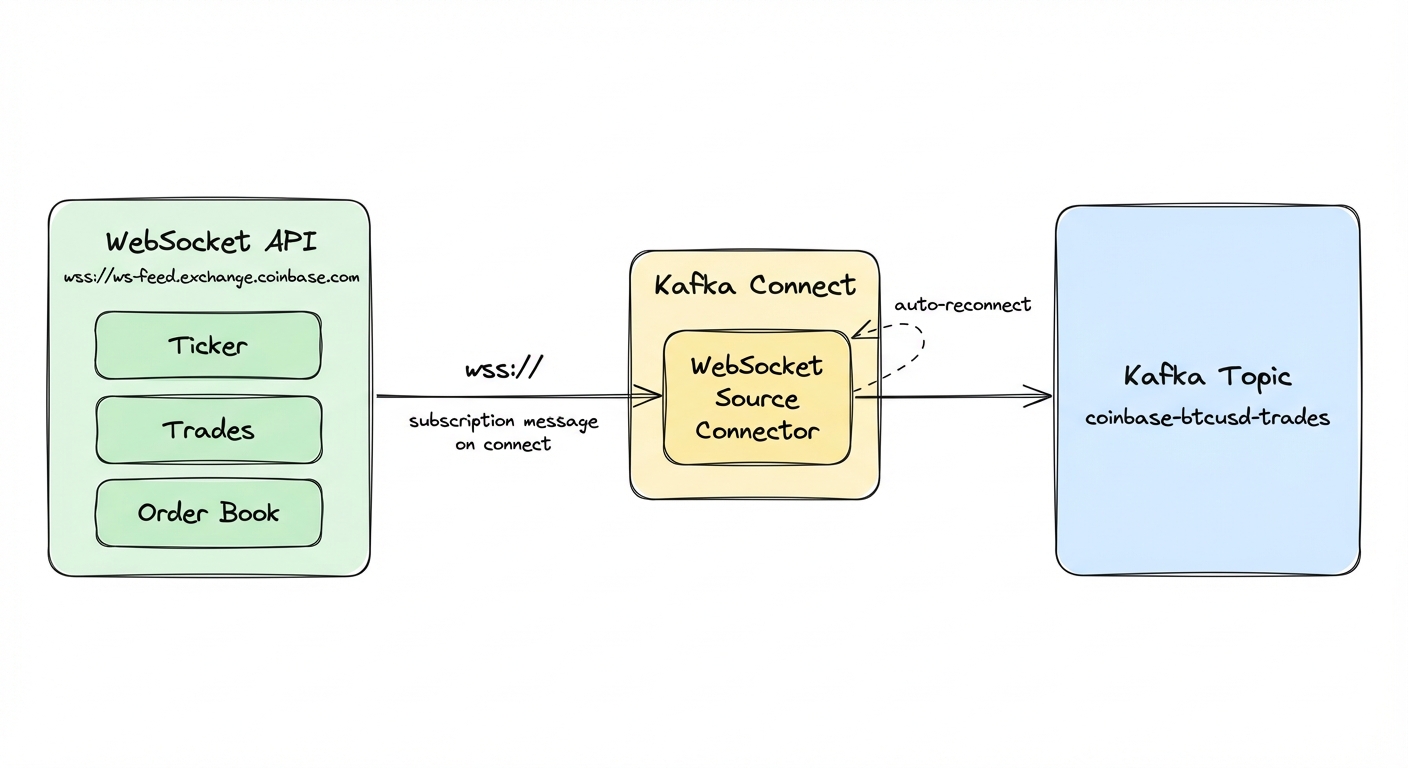
The connector is Apache-licensed. Point it at any WebSocket endpoint, give it a Kafka topic, and it streams messages in. wss://ws-feed.exchange.coinbase.com for Bitcoin trades, your IoT platform's WebSocket API for sensor data, Binance or Discord feeds. Standard Kafka Connect configuration, nothing custom.
What you get:
- Automatic reconnection with configurable intervals
- Bearer token and custom header authentication
- Subscription messages for exchanges like Binance and Coinbase
- Configurable in-memory buffering for bursty traffic
- JMX metrics for connection health and throughput
Quick start: running in 5 minutes
You need Docker and Docker Compose. We'll spin up Kafka, Kafka Connect, and Conduktor Console (a web UI for viewing topics), then deploy the connector to stream live Coinbase trades.
Step 1: Clone and build
git clone https://github.com/conduktor/kafka-connect-websocket.git
cd kafka-connect-websocket
mvn clean package -DskipTests
No local Java? Use Docker instead:
docker run --rm -v "$(pwd)":/app -w /app maven:3.9-eclipse-temurin-17 mvn clean package -DskipTestsStep 2: Start the stack
cd examples
docker compose up -d
This starts:
- Kafka (KRaft mode) on port 9092
- Kafka Connect on port 8083
- Conduktor Console on port 8080 for viewing topics
Wait about 30 seconds for everything to initialize. Check that Kafka Connect is up:
curl http://localhost:8083/You should get back something like:
{"version":"3.9.0","commit":"a60e31147e6b01ee","kafka_cluster_id":"5L6g3nShT-eMCtK--X86sw"}Step 3: Deploy the WebSocket connector
Deploy a connector that subscribes to Coinbase BTC-USD ticker updates:
curl -X POST http://localhost:8083/connectors \
  -H "Content-Type: application/json" \
  -d '{
    "name": "coinbase-btcusd",
    "config": {
      "connector.class": "io.conduktor.connect.websocket.WebSocketSourceConnector",
      "tasks.max": "1",
      "websocket.url": "wss://ws-feed.exchange.coinbase.com",
      "kafka.topic": "coinbase-btcusd-trades",
      "websocket.subscription.message": "{\"type\":\"subscribe\",\"channels\":[{\"name\":\"ticker\",\"product_ids\":[\"BTC-USD\"]}]}"
    }
  }'
The connector opens a WebSocket to Coinbase, sends the subscription message, and starts forwarding ticker updates.
Step 4: See the data
Open Conduktor Console at http://localhost:8080 and navigate to the coinbase-btcusd-trades topic. You should see BTC-USD ticker updates arriving in real time.
Or consume via the command line:
docker exec kafka /opt/kafka/bin/kafka-console-consumer.sh \
  --bootstrap-server localhost:9092 \
  --topic coinbase-btcusd-trades \
  --from-beginning \
  --max-messages 3
The first message is a subscription confirmation from Coinbase. After that, each message is a JSON ticker event:
{"type":"ticker","sequence":124104291706,"product_id":"BTC-USD","price":"70672.78","open_24h":"72422.56","volume_24h":"6951.60","low_24h":"70236.02","high_24h":"72869.07","volume_30d":"302213.79","best_bid":"70672.77","best_bid_size":"0.00002426","best_ask":"70672.78","best_ask_size":"0.79504402","side":"buy","time":"2026-03-14T14:49:14.639873Z","trade_id":980607675,"last_size":"0.00034376"}Live market data, in Kafka, with zero custom code.
To connect your own WebSocket API, copy the connector config, change the URL and topic. For authenticated endpoints, see the configuration section below.
Configuration
The minimum configuration is two fields:
| Parameter | Description | Example |
|---|---|---|
websocket.url | WebSocket endpoint (ws:// or wss://) | wss://stream.example.com/feed |
kafka.topic | Destination Kafka topic | my-websocket-data |
Authentication
For protected APIs, use bearer token authentication:
{
  "name": "authenticated-feed",
  "config": {
    "connector.class": "io.conduktor.connect.websocket.WebSocketSourceConnector",
    "tasks.max": "1",
    "websocket.url": "wss://api.example.com/stream",
    "kafka.topic": "example-stream",
    "websocket.auth.token": "your-bearer-token-here"
  }
}
The connector sends Authorization: Bearer with the connection request.
For custom headers, use websocket.headers:
{
  "websocket.headers": "X-API-Key:abc123,X-Client-ID:myapp"
}
Format is key1:value1,key2:value2 for multiple headers. You can combine both:
{
  "websocket.auth.token": "bearer-token",
  "websocket.headers": "X-Client-ID:myapp,X-Version:2"
}
Subscription messages
Many WebSocket APIs, especially crypto exchanges, require a subscription message after connecting:
{
  "websocket.subscription.message": "{\"type\":\"subscribe\",\"channels\":[\"ticker\"]}"
}
This JSON is sent immediately after the WebSocket connection opens. Binance, Coinbase, Kraken all use this pattern to specify which streams you want.
Message format
The connector preserves WebSocket messages as-is in Kafka record values:
- Text messages become strings (UTF-8)
- Binary messages become byte arrays (preserved exactly)
- Record key is always null (WebSocket has no key concept)
- Headers are empty (WebSocket messages don't carry headers)
You can apply Kafka Connect SMTs to parse JSON, extract fields, or route messages based on content.
Reconnection
| Parameter | Default | Description |
|---|---|---|
websocket.reconnect.enabled | true | Automatically reconnect on disconnect |
websocket.reconnect.interval.ms | 5000 | Wait 5 seconds between reconnection attempts |
Performance tuning
| Parameter | Default | Description |
|---|---|---|
websocket.message.queue.size | 10000 | In-memory buffer for messages |
websocket.connection.timeout.ms | 30000 | Connection timeout (30 seconds) |
When the queue fills, the connector drops incoming messages until space opens. Monitor the MessagesDropped JMX metric. If you see drops, increase websocket.message.queue.size or tune your Kafka producer settings for higher throughput.
Task configuration
Set tasks.max to 1. WebSocket connections are single-threaded by protocol design: one connection, one persistent socket. You cannot parallelize a single WebSocket stream across multiple tasks.
For multiple WebSocket streams, deploy multiple connector instances, one per stream.
Delivery guarantees
The connector provides at-most-once delivery. WebSocket is a fire-and-forget protocol with no replay capability. Messages are lost in two cases: when the internal queue fills (monitor MessagesDropped), and during reconnection windows when the server keeps sending while the connector is disconnected. For use cases requiring completeness, pair with periodic REST API snapshots to detect and fill gaps.
Full configuration reference: configuration documentation.
Use cases
The most obvious fit is crypto and financial markets. Stream price feeds, order books, and trade executions from Coinbase, Binance, Kraken, or Gemini. Coinbase's WebSocket feed covers every trading pair with ticker, order book, and match data. One connector instance per stream, each writing to its own Kafka topic.
IoT platforms with WebSocket feeds work the same way: temperature readings, GPS coordinates, machine status, all into Kafka for stream processing and alerting.
Social and communication platforms push updates over WebSockets. Discord's Gateway API, Bluesky's firehose, Reddit's real-time feeds. Pipe them into Kafka for sentiment analysis, content moderation, or engagement analytics. Game backends, observability platforms, anything that speaks WebSocket works the same way.
Getting started
Three paths depending on what you need.
Docker Compose quickstart (try it out). Run the Docker Compose example from earlier in this article. Full Kafka stack and the connector running in minutes. See the examples directory.
Install from release (production). Download the pre-built JAR from GitHub releases:
wget https://github.com/conduktor/kafka-connect-websocket/releases/download/v1.0.0/kafka-connect-websocket-1.0.0-jar-with-dependencies.jarCopy to your Kafka Connect plugins directory:
mkdir -p $KAFKA_HOME/plugins/kafka-connect-websocket
cp kafka-connect-websocket-1.0.0-jar-with-dependencies.jar $KAFKA_HOME/plugins/kafka-connect-websocket/
Restart Kafka Connect and the plugin becomes available. Deploy connectors via the REST API as shown in the quickstart.
If the connector doesn't appear in the plugin list (
curl http://localhost:8083/connector-plugins), verify the JAR is in the plugins directory and that Kafka Connect has read permissions.
Build from source (contributors). Clone and build:
git clone https://github.com/conduktor/kafka-connect-websocket.git
cd kafka-connect-websocket
mvn clean package
The output JAR with dependencies will be in target/. Requires Java 11+ and Maven 3.6+.
Links
- Documentation: conduktor.github.io/kafka-connect-websocket
- Configuration reference, operations runbook, and FAQ are all on the docs site
- GitHub: github.com/conduktor/kafka-connect-websocket
The project is Apache License 2.0. Bug reports, feature requests, and PRs are welcome. See CONTRIBUTING.md for guidelines.