
Kafka Capacity Planning
Capacity planning is one of the most critical tasks when deploying Apache Kafka in production. Underestimate your needs, and you risk performance degradation or outages. Overestimate, and you waste resources and budget. Getting it right requires understanding your workload characteristics and how Kafka's architecture translates into infrastructure requirements.
This guide walks through the essential aspects of Kafka capacity planning, from calculating throughput to sizing storage and network resources. 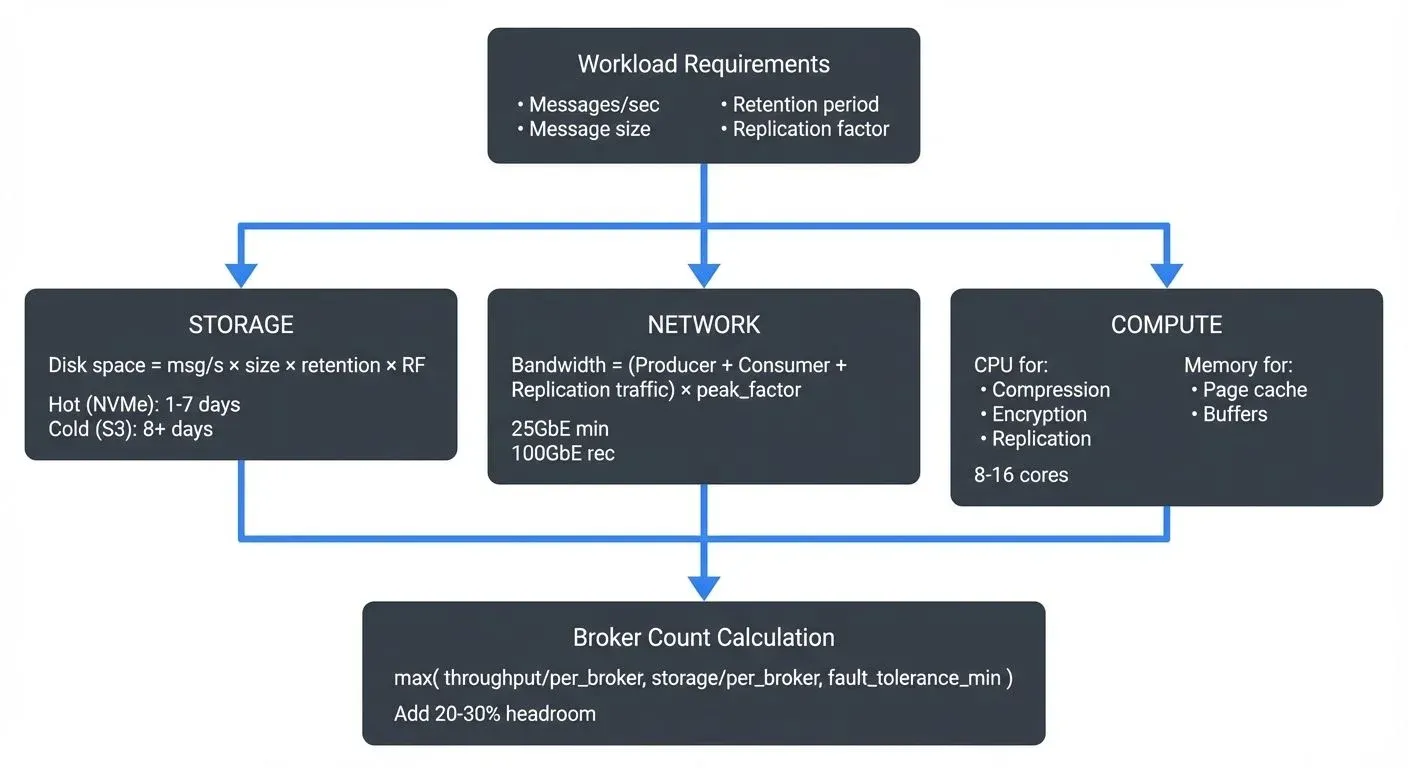
KRaft Mode and Modern Kafka Architecture (2025)
With Kafka 4.0+ running in KRaft mode (without ZooKeeper), capacity planning has evolved significantly. KRaft mode eliminates the need for separate ZooKeeper servers, reducing your infrastructure footprint and operational complexity.
Key capacity benefits of KRaft mode:
- Reduced metadata overhead: KRaft's Raft-based consensus is more efficient than ZooKeeper, reducing CPU and memory requirements for metadata management
- Faster recovery: Metadata replication in KRaft is faster, reducing recovery time after broker failures
- Simplified deployment: No separate ZooKeeper ensemble means fewer servers to provision and manage
- Improved scalability: KRaft can handle clusters with millions of partitions more efficiently than ZooKeeper
For capacity planning, this means you can allocate more resources to data processing rather than coordination overhead. A typical 3-node ZooKeeper ensemble (previously required) can be eliminated, and brokers themselves handle metadata with minimal overhead.
When planning for Kafka 4.0+ deployments, factor in KRaft's efficiency gains, you may need fewer resources than older ZooKeeper-based architectures for the same workload. For detailed information on KRaft architecture, see Understanding KRaft Mode in Kafka.
What is Kafka Capacity Planning?
Kafka capacity planning is the process of estimating the hardware and infrastructure resources needed to support your expected workload. This includes determining the number of brokers, amount of storage, network bandwidth, CPU, and memory required to handle your message throughput, retention policies, and consumer patterns. For foundational understanding of Kafka's core components, see Kafka Topics, Partitions, and Brokers: Core Architecture.
Unlike traditional databases where capacity planning often focuses on transaction volume and query performance, Kafka's distributed log architecture requires considering factors like replication, partition count, message retention, and the continuous nature of streaming data. To understand how replication impacts availability, see Kafka Replication and High Availability.
Proper capacity planning ensures your Kafka cluster can handle peak loads, maintain low latency, and scale as your data streaming needs grow. It also directly impacts cost efficiency, especially in cloud environments where you pay for provisioned resources.
Key Resources to Consider
Kafka capacity planning involves four primary resource types, each serving different aspects of the system:
- Disk Storage is typically the most critical resource. Kafka persists all messages to disk, and your storage needs depend on message throughput, average message size, retention period, and replication factor. Unlike in-memory systems, Kafka's durability guarantees mean you must provision enough disk space for the entire retention window.
- Network Bandwidth becomes crucial when dealing with high-throughput scenarios. Network traffic includes producer writes, consumer reads, inter-broker replication, and potentially cross-datacenter replication. Each of these can saturate network interfaces if not properly sized.
- CPU usage in Kafka is generally moderate but increases significantly when using compression, SSL/TLS encryption, or complex message transformations. Producers and consumers also consume CPU for serialization and network operations.
- Memory is used for page cache (which Kafka relies on heavily for performance), in-flight requests, and internal buffers. While Kafka itself has a relatively small heap footprint, the operating system's page cache is critical for read performance.
Calculating Throughput Requirements
Start by understanding your workload characteristics. You need to know your peak message rate (messages per second), average message size, and desired retention period.
A simple formula for daily storage requirements is:
Daily Storage = Messages/sec × Message Size × 86,400 (seconds/day) × Replication FactorThe constant 86,400 represents the number of seconds in a day (24 hours × 60 minutes × 60 seconds).
For example, if you're processing 1,000 messages per second with an average size of 1 KB and a replication factor of 3:
Daily Storage = 1,000 msg/s × 1,024 bytes × 86,400 sec/day × 3 = 265 GB/dayFor a 7-day retention policy, you would need approximately 1.8 TB of storage capacity per topic. This is a simplified calculation, real-world scenarios require adding overhead for log segment metadata, indexes, and operational headroom (typically 20-30% extra capacity).
Don't forget to account for growth. If your message volume is expected to double in the next year, factor that into your initial provisioning to avoid frequent hardware additions.
Storage Planning and Disk I/O
Disk performance is as important as disk capacity. Kafka's sequential write pattern is disk-friendly, but you still need sufficient I/O throughput to handle your write rate, especially during peak loads or when consumers fall behind.
Modern storage recommendations (2025):
- NVMe SSDs: Use NVMe (PCIe 4.0 or 5.0) for production clusters. NVMe provides 3-7x better throughput than SATA SSDs and sub-millisecond latency. For high-throughput workloads (>100 MB/s per broker), NVMe is essential.
- Local vs Network Storage: In cloud environments, local NVMe instance storage (e.g., AWS i4i instances) typically provides better performance and cost efficiency than network-attached storage for Kafka's workload patterns.
- Storage Tiers: For on-premises deployments, use high-performance NVMe for hot data and consider slower (but larger) SATA SSDs for cold storage tiers.
While Kafka's sequential access patterns worked reasonably well with spinning disks historically, modern production clusters should exclusively use SSDs, and specifically NVMe SSDs, for consistent sub-10ms p99 latencies.
Consider your replication factor carefully. A replication factor of 3 is common for production systems, providing fault tolerance while tripling your storage requirements. Each replica must be written to disk, so your disk I/O capacity must handle the replication overhead.
Log segment size also impacts performance. Kafka rolls log segments based on size or time. Smaller segments mean more files to manage but faster cleanup and compaction. Larger segments reduce file count but can slow maintenance operations.
Tiered Storage and Long-Term Retention
Kafka's tiered storage feature (production-ready in Kafka 3.6+) fundamentally changes capacity planning by separating hot and cold data storage. This feature allows you to offload older log segments to cheaper object storage (S3, Azure Blob, Google Cloud Storage) while keeping recent data on local broker disks.
Capacity impact of tiered storage:
With tiered storage enabled, your local disk capacity needs are dramatically reduced. Instead of provisioning for the entire retention period, you only need enough local storage for the "hotset" period, typically 1-7 days of data.
Example calculation with tiered storage:
Without tiered storage (30-day retention):
Local Storage = 1,000 msg/s × 1 KB × 86,400 × 30 days × RF 3 = 7.8 TBWith tiered storage (7-day local hotset, 30-day total):
Local Storage = 1,000 msg/s × 1 KB × 86,400 × 7 days × RF 3 = 1.8 TB
Remote Storage = 1,000 msg/s × 1 KB × 86,400 × 23 days × RF 1 = 2.0 TB
Notice that remote storage doesn't require replication factor multiplication, the cloud object store handles durability. This can reduce your total storage costs by 60-80% for long retention scenarios.
When to use tiered storage:
- Retention periods beyond 7-14 days
- Compliance requirements for long-term data retention (months or years)
- Cost-sensitive environments where local NVMe storage is expensive
- Workloads where most consumers read recent data, with occasional historical queries
For detailed setup and operational guidance, see Tiered Storage in Kafka.
Network and CPU Considerations
Network bandwidth requirements multiply quickly. Producer traffic is written to disk and replicated to other brokers. If you have a replication factor of 3, each message is written once by the producer but transmitted twice more for replication.
Consumer traffic adds to network usage. Each consumer group reads the full dataset, so multiple consumer groups multiply your read traffic. A common mistake is planning only for producer throughput and being surprised when adding consumer groups saturates network links. For more on consumer behavior and performance considerations, see Kafka Consumer Groups Explained.
Network bandwidth calculation:
For a workload with 1,000 msg/s at 1 KB with replication factor 3 and 2 consumer groups:
Producer inbound: 1,000 × 1 KB = 1 MB/s per broker (divided across brokers)
Replication traffic: 1 MB/s × 2 (to other replicas) = 2 MB/s per broker
Consumer outbound: 1 MB/s × 2 consumer groups = 2 MB/s per broker
Total: ~5 MB/s per broker (plus overhead)
This is for average load, peak traffic can be 3-5x higher, so provision accordingly.
Modern network recommendations (2025):
- 25GbE minimum: Modern production clusters should use 25GbE network interfaces. 10GbE networks are insufficient for high-throughput clusters (>500 MB/s cluster-wide).
- 40GbE/100GbE: For large-scale deployments (>10 brokers, >1 GB/s throughput), use 40GbE or 100GbE to avoid network bottlenecks.
- Separate networks: For high-throughput scenarios, use dedicated network interfaces or VLANs for inter-broker replication traffic to avoid contention with client traffic.
- Cloud networking: In cloud environments, choose network-optimized instance types (AWS: network-optimized instances, GCP: n2-highmem with higher bandwidth).
CPU considerations:
CPU usage spikes when enabling compression. Compressing messages reduces network and storage requirements but increases CPU load on both producers and brokers. Modern compression algorithms like zstd (available in Kafka 2.1+) provide excellent compression ratios with lower CPU overhead than gzip.
SSL/TLS encryption adds CPU overhead, typically 10-30% depending on cipher choice and hardware. Modern CPUs with AES-NI instructions reduce this overhead significantly. When planning capacity, benchmark your specific workload with encryption enabled to understand the real impact.
Modern CPU recommendations (2025):
- Minimum cores: 8-16 cores per broker for production workloads
- Architecture: Use recent CPU architectures (Intel Ice Lake/Sapphire Rapids or AMD EPYC Genoa) for better single-threaded performance and AES-NI support
- Compression: Budget 20-40% extra CPU capacity if using compression
- Encryption: Budget 15-25% extra CPU capacity if using SSL/TLS with modern CPUs (more with older hardware)
Calculating Broker Count and Cluster Size
One of the most common questions in capacity planning is: "How many brokers do I need?" The answer depends on your throughput, storage, and fault tolerance requirements.
Throughput-based sizing:
If you need to handle 2 GB/s of producer throughput with replication factor 3:
Total write throughput = 2 GB/s × 3 (replicas) = 6 GB/s
Per-broker capacity = ~500 MB/s (typical limit for balanced workloads)
Minimum brokers = 6 GB/s ÷ 0.5 GB/s = 12 brokers
Add 20-30% headroom for peaks and maintenance: 15-16 brokers recommended.
Storage-based sizing:
If you need 50 TB total storage with replication factor 3:
Total raw storage = 50 TB × 3 = 150 TB
Per-broker storage = 10 TB (NVMe capacity)
Minimum brokers = 150 TB ÷ 10 TB = 15 brokers
Fault tolerance considerations:
For high availability, you need at least 3 brokers (to survive 1 failure with RF=3). For critical production systems, 5-7 brokers minimum is recommended to handle multiple concurrent failures and maintenance windows.
Use the most constraining factor: Your final broker count should be the maximum of throughput-based, storage-based, and fault tolerance requirements.
Cloud vs On-Premises Sizing
Capacity planning differs significantly between cloud and on-premises deployments.
- Cloud-specific considerations:
- Instance selection:
- AWS: Use i4i instances (local NVMe), r7iz for memory-intensive workloads, or m7i for balanced workloads
- Azure: Use Lsv3-series (NVMe local storage) or memory-optimized Esv5-series
- GCP: Use c3-highmem with local SSDs attached, or n2-highmem for general purpose
Storage options:
- Local NVMe: Best performance and cost for Kafka. Data is ephemeral but replicated by Kafka itself.
- EBS/Persistent Disks: Use io2/gp3 (AWS) or Premium SSD (Azure) only when data persistence beyond instance lifecycle is required. Typically 30-50% more expensive and lower performance than local NVMe.
- Tiered storage: Essential for cloud deployments to reduce costs. Use local NVMe for hot data, object storage (S3/Blob/GCS) for cold data.
Network bandwidth:
- Cloud instances have network limits. An AWS m5.2xlarge has 10 Gbps limit, insufficient for high-throughput brokers.
- Choose network-optimized instances or larger instance types for adequate bandwidth.
Managed services:
- AWS MSK, Azure Event Hubs (Kafka-compatible), GCP Managed Kafka abstract some capacity planning but still require sizing decisions.
- For detailed guidance on AWS, see Amazon MSK: Managed Kafka on AWS.
- On-premises considerations:
- Hardware flexibility:
- Can optimize hardware precisely for Kafka workloads (e.g., high-core-count CPUs, large NVMe arrays)
- Typical server: 2x Intel Xeon or AMD EPYC CPUs (32-64 cores total), 256-512 GB RAM, 8-12x 4TB NVMe SSDs, dual 25GbE or 40GbE NICs
Cost model:
- Higher upfront CapEx but lower OpEx over 3-5 year lifecycle
- Better for predictable, sustained workloads
Scalability:
- Requires procurement lead time (weeks/months) vs instant cloud scaling
- Plan for 18-24 months of growth upfront
When to choose each:
- Cloud: Variable workloads, fast iteration, limited ops team, global distribution needs
- On-premises: Predictable sustained workloads, data sovereignty requirements, existing datacenter infrastructure, cost optimization at scale
For Kubernetes-based deployments (whether cloud or on-premises), see Running Kafka on Kubernetes for container-specific capacity considerations.
Traffic Control Policies for Capacity Management
Capacity planning becomes predictable when you can enforce limits programmatically. Conduktor Traffic Control Policies provide automated enforcement of rate limits, configuration policies, and access controls. Rate limiting prevents individual services from consuming disproportionate resources, configuration policies ensure capacity planning assumptions hold (mandatory retention periods, partition count limits), and access control policies implement capacity-aware governance rules.
The key advantage is programmatic enforcement rather than relying on documentation and team discipline. When you plan for specific throughput limits, policies guarantee they aren't exceeded. This reduces required safety margins and enables tighter resource utilization. For implementation details, see Traffic Control Policies.
Chargeback and Cost Accountability
Understanding where Kafka infrastructure costs originate is essential for capacity planning. Conduktor Chargeback tracks resource consumption by service account (bytes produced/consumed with Conduktor Gateway, a Kafka proxy) or by topic (storage and partition count without Conduktor Gateway), providing visibility into which applications drive your capacity requirements.
Chargeback transforms estimates into precise measurements, instead of guessing needs, you measure actual consumption during peak hours. This enables cost-based governance where teams monitor consumption against budgets, optimization through visibility (identifying high-cost topics for retention adjustment), and objective metrics for cross-team capacity negotiations. For implementation details, see Chargeback.
Monitoring and Scaling in Data Streaming
Effective capacity planning doesn't end at deployment. Continuous monitoring is essential to validate your estimates and detect when you're approaching limits.
Key metrics to track include:
- Broker CPU and memory utilization: Sustained high CPU (>70%) indicates you may need more brokers or to reduce load
- Disk usage and I/O wait: Approaching disk capacity or high I/O wait times signal storage constraints
- Network throughput: Monitor bytes in/out per broker to identify network bottlenecks
- Consumer lag: Growing lag indicates consumers can't keep up, which may require scaling
Platforms like Conduktor provide comprehensive monitoring dashboards that track these metrics across your cluster, making it easier to spot capacity issues before they impact production. Being able to visualize throughput trends, partition distribution, and resource utilization in one place helps teams make informed scaling decisions. Conduktor's Insights Dashboard provides cost control analysis and risk analysis to help identify capacity bottlenecks before they impact production. For comprehensive coverage of monitoring strategies and key metrics, see Kafka Cluster Monitoring and Metrics.
When scaling Kafka, you can scale vertically (larger machines) or horizontally (more brokers). Horizontal scaling is generally preferred as it improves fault tolerance and allows for better load distribution across partitions. For detailed performance optimization strategies, see Kafka Performance Tuning Guide.
Common Pitfalls and Best Practices
Several common mistakes can derail capacity planning:
- Underestimating replication overhead is frequent. Remember that replication multiplies your network and storage needs. A replication factor of 3 doesn't just triple storage, it also triples write network traffic.
- Ignoring partition count can limit scalability. Since partitions are the unit of parallelism in Kafka, having too few partitions means you can't fully use multiple brokers or scale consumer throughput. However, too many partitions increase metadata overhead and recovery time in older ZooKeeper-based clusters. With Kafka 4.0+ and KRaft mode, the partition limit has increased significantly, KRaft can efficiently handle millions of partitions compared to ZooKeeper's practical limit of ~200,000. For guidance on topic and partition design, see Kafka Topic Design Guidelines and Kafka Partitioning Strategies and Best Practices.
- Not planning for peaks is another common issue. Average load might be manageable, but if your system experiences traffic spikes (e.g., end-of-day processing), you need capacity for peak load, not average.
- Best practices include:
- Start with conservative estimates and monitor actual usage
- Provision 20-30% headroom beyond calculated requirements
- Use tiered storage for long-term retention to reduce primary storage costs
- Test capacity under load before production deployment
- Document your capacity assumptions and review them quarterly
Related Concepts
- Tiered Storage in Kafka - Fundamentally changes capacity planning by separating hot and cold storage tiers.
- Kafka Cluster Monitoring and Metrics - Continuous monitoring validates capacity estimates and detects when scaling is needed.
- Kafka Topic Design Guidelines - Partition count and retention policies directly impact storage and throughput capacity requirements.
Summary
Kafka capacity planning requires balancing multiple resources, storage, network, CPU, and memory, based on your throughput, retention, and reliability requirements. Start by calculating your storage needs from message rate, size, retention period, and replication factor. Factor in network bandwidth for both client traffic and replication, and don't overlook CPU requirements for compression and encryption.
Continuous monitoring is essential to validate your planning and detect when scaling is needed. By understanding these fundamentals and avoiding common pitfalls like underestimating replication overhead or ignoring peak loads, you can build a Kafka infrastructure that's both cost-effective and reliable.
Proper capacity planning isn't a one-time task, it's an ongoing process as your data streaming needs evolve. Regular review of your metrics and capacity assumptions ensures your Kafka cluster continues to meet your organization's requirements.
Sources and References
- Apache Kafka Documentation - Operations Guide: https://kafka.apache.org/documentation/#operations
- Confluent - Kafka Capacity Planning: https://docs.confluent.io/platform/current/kafka/deployment.html
- Narkhede, Neha, Gwen Shapira, and Todd Palino. "Kafka: The Definitive Guide" (O'Reilly Media, 2017)
- LinkedIn Engineering Blog - Kafka Capacity Planning at Scale: https://engineering.linkedin.com/kafka
- AWS Big Data Blog - Best Practices for Amazon MSK Sizing: https://aws.amazon.com/blogs/big-data/