
Kafka Consumer Groups: How They Work
A Kafka consumer group is a set of consumers that cooperatively read from a topic by splitting its partitions among themselves. Each partition is consumed by exactly one group member, enabling horizontal scaling without duplicate processing. The group coordinator tracks committed offsets and triggers a rebalance whenever members join or leave, reassigning partitions to maintain coverage.
For foundational understanding of Kafka's architecture including topics, partitions, and brokers, see Kafka Topics, Partitions, and Brokers: Core Architecture.
What Are Consumer Groups?
A consumer group is a collection of consumers that work together to consume messages from one or more Kafka topics. Each consumer in the group is assigned a subset of the topic's partitions, ensuring that no two consumers in the same group read from the same partition simultaneously.
The key benefit is parallel processing. Instead of a single consumer reading all messages sequentially, multiple consumers can process different partitions concurrently. This approach scales horizontally, add more consumers to handle increased throughput. For a broader overview of how consumers and producers work together, see Kafka Producers and Consumers.
Kafka tracks which messages each consumer group has processed by storing offsets in a special internal topic called __consumer_offsets. Think of this as a ledger that records "Consumer Group A has processed messages up to offset 1000 on partition 0." This allows consumers to resume from where they left off after a restart or failure.
The group coordinator runs on a broker: the leader of the __consumer_offsets partition that the group's id hashes to. KRaft mode (Kafka 4.0+ removes ZooKeeper entirely) changes where cluster metadata lives, not where group coordination happens. For more details, see Understanding KRaft Mode in Kafka.
How Consumer Groups Enable Scalability
Partition assignment is at the heart of consumer group scalability. When consumers join a group, Kafka's group coordinator assigns partitions to each consumer using a partition assignment strategy.
// Java consumer group configuration example
Properties props = new Properties();
props.put("bootstrap.servers", "localhost:9092");
props.put("group.id", "analytics-processors");
props.put("key.deserializer", "org.apache.kafka.common.serialization.StringDeserializer");
props.put("value.deserializer", "org.apache.kafka.common.serialization.StringDeserializer");
props.put("enable.auto.commit", "false"); // Manual offset management
props.put("partition.assignment.strategy", "org.apache.kafka.clients.consumer.CooperativeStickyAssignor");

KafkaConsumer<String, String> consumer = new KafkaConsumer<>(props);
consumer.subscribe(Arrays.asList("user-events"));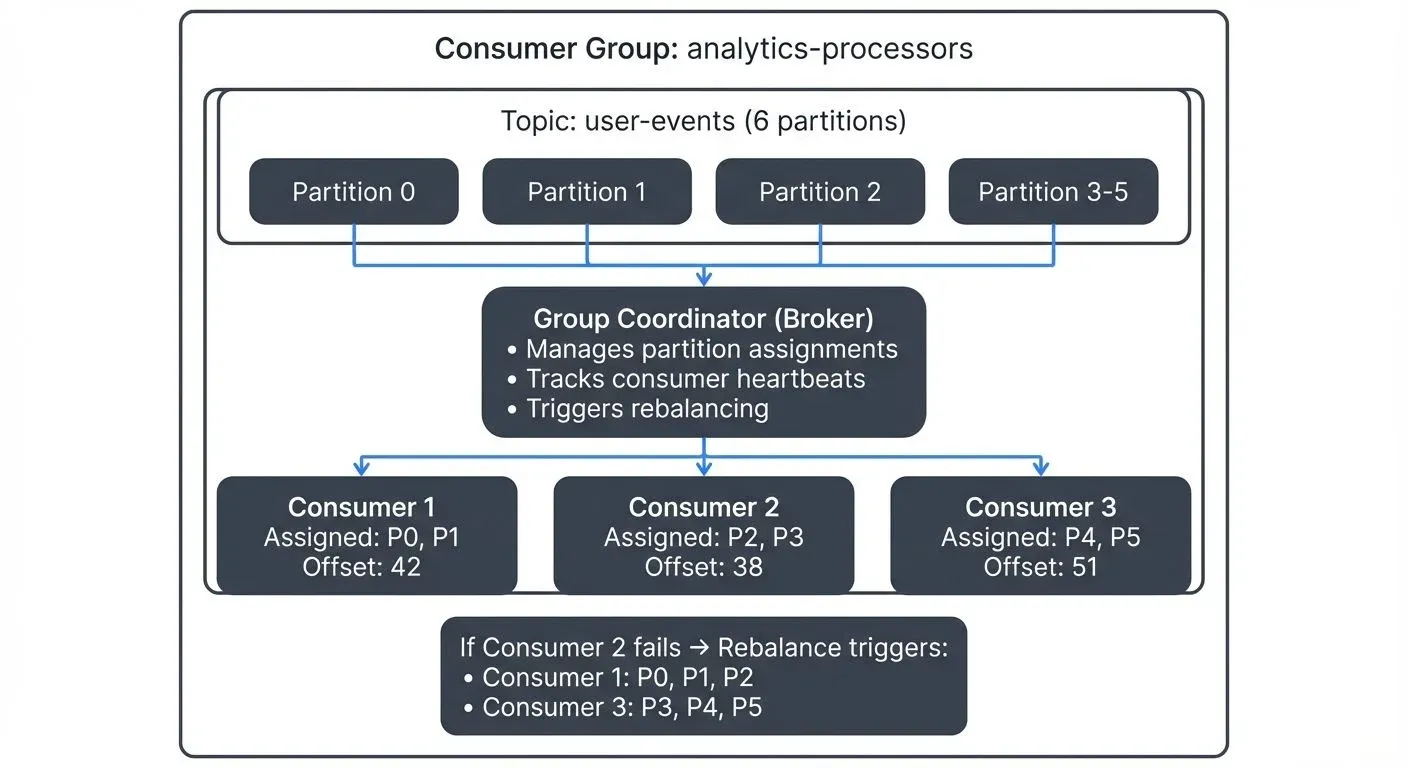
Consider a topic with six partitions and three consumers in the same group. Each consumer might receive two partitions. If you add a fourth consumer, the partitions are redistributed, perhaps three consumers get two partitions each, and one gets none. If you have more consumers than partitions, the extra consumers remain idle.
Common assignment strategies include:
- Cooperative Sticky (Incremental Cooperative Rebalancing): Introduced in Kafka 2.4 (KIP-429). It lets consumers keep processing unaffected partitions during a rebalance. It is not the default on the classic protocol: since Kafka 3.0 the default
partition.assignment.strategylistsRangeAssignorfirst andCooperativeStickyAssignorsecond, so cooperative rebalancing has to be selected explicitly. The KIP-848 consumer protocol makes incremental rebalancing the only mode. - Sticky: Minimizes partition movement during rebalancing but requires all consumers to stop (eager rebalancing)
- Range: Assigns partitions in ranges, which can lead to uneven distribution across multiple topics
- Round-robin: Distributes partitions evenly in a circular fashion across all subscribed topics
Set the assignment strategy using partition.assignment.strategy configuration (the default since Kafka 3.0 is [RangeAssignor, CooperativeStickyAssignor], which resolves to range because a group uses the first strategy every member supports).
On Kafka 4.x clusters and clients, group.protocol=consumer (KIP-848) moves assignment to the broker and makes incremental rebalancing the only mode. On the classic protocol, cooperative sticky gives the best balance of even distribution and minimal disruption; range remains the choice when partition locality across topics matters, for example co-partitioned joins. See Kafka Consumer Rebalancing for the protocols and assignors in detail.
The group coordinator is one of the Kafka brokers that takes responsibility for managing a specific consumer group. Kafka automatically assigns coordinator duties among brokers to distribute the load. This coordinator tracks which consumers are alive (via heartbeats) and triggers rebalancing when needed.
The Rebalancing Process
Rebalancing occurs when the consumer group membership or topic metadata changes. Common triggers include:
- A consumer joins the group
- A consumer leaves (gracefully or due to failure)
- A consumer is considered dead (missed heartbeat deadline)
- Partitions are added to a subscribed topic
During a traditional rebalance, all consumers stop processing, release their partitions, and wait for new assignments. This causes a processing pause that can impact latency-sensitive applications.
Modern rebalancing protocols like cooperative rebalancing (also called incremental cooperative rebalancing) reduce this impact significantly. Instead of stopping all consumers, only the partitions being reassigned are revoked. Consumers not affected by the change continue processing without interruption. Available since Kafka 2.4, it has to be selected explicitly on the classic protocol; the KIP-848 consumer protocol (Kafka 4.0+) makes incremental rebalancing the only mode.
Rebalancing is necessary for fault tolerance and elasticity, but frequent rebalances can hurt performance. Setting appropriate session timeout and heartbeat interval configurations helps balance responsiveness with stability.
session.timeout.ms (default: 45 seconds since Kafka 3.0) governs how long the coordinator waits for heartbeats, which a background thread sends regardless of how long processing takes. Processing time is bounded by max.poll.interval.ms (default: 5 minutes): if a consumer does not call poll() again within this interval, Kafka considers it stuck and triggers a rebalance. Raise max.poll.interval.ms or lower max.poll.records when a batch legitimately takes longer.
Typical production settings:
session.timeout.ms: 45000 (45 seconds)heartbeat.interval.ms: 3000 (3 seconds, typically 1/3 of session timeout)max.poll.interval.ms: 300000 (5 minutes)
Static Membership
In containerized and cloud environments where consumers may restart frequently, static membership (Kafka 2.3+, KIP-345) avoids unnecessary rebalances. By setting a unique group.instance.id for each consumer, Kafka preserves partition assignments across restarts within the session.timeout.ms window.
This is particularly valuable in Kubernetes deployments where pods restart for rolling updates or scaling operations. Static membership reduces rebalancing overhead and improves processing stability. For comprehensive guidance on running Kafka consumers in Kubernetes, see Running Kafka on Kubernetes.
Properties props = new Properties();
props.put("group.id", "analytics-processors");
props.put("group.instance.id", "consumer-1"); // Unique static ID
props.put("session.timeout.ms", "60000"); // 60 seconds for restart window
Consumer Group Patterns
Different applications have different consumption patterns. Understanding common approaches helps you design the right architecture.
Multiple Consumer Groups
The same topic can be consumed by multiple independent consumer groups. Each group maintains its own offsets and processes all messages independently.
For example, imagine a topic containing user activity events. One consumer group might run real-time analytics, calculating metrics as events arrive. A second group might feed an alerting system, detecting anomalies. A third group could replicate data to a data warehouse for historical analysis.
Each group processes the complete event stream at its own pace. This pattern enables building multiple independent applications from the same data source without coupling their implementations.
Single Consumer Per Group
Some use cases require processing all messages in order or maintaining state across the entire topic. Using a single consumer in a group ensures sequential processing but sacrifices parallelism and fault tolerance.
This pattern is rare and typically indicates an architectural concern. Consider whether partitioning your data differently could enable parallel processing while maintaining necessary ordering guarantees within each partition.
Monitoring Consumer Groups
Effective monitoring is critical for operating consumer groups in production. The most important metric is consumer lag, the difference between the latest message offset in a partition and the consumer's committed offset.
For example, if a partition's latest offset is 10,000 but your consumer has only committed offset 9,200, your lag is 800 messages. If that number keeps growing, your consumer is falling behind.
High lag indicates consumers cannot keep up with incoming messages. This might signal:
- Insufficient consumer capacity (need more consumers or instances)
- Slow message processing logic
- Network or broker issues
- Frequent rebalancing disrupting processing
Tracking rebalancing frequency and duration helps identify stability issues. Frequent rebalances suggest configuration problems or unstable consumers.
Tools like Conduktor provide real-time visibility into consumer group health, displaying lag per partition, rebalancing events, and consumer assignment status. Learn more about managing consumer groups in Conduktor to monitor lag, track offsets, and troubleshoot rebalancing issues. For open-source monitoring, Kafka Lag Exporter (the 2025 standard for Prometheus-based monitoring) and Burrow provide solid lag tracking and alerting capabilities.
For detailed coverage of consumer lag monitoring strategies and metrics collection, see Kafka Cluster Monitoring and Metrics.
Conduktor Console Insights: See topic health, costs, and consumer lag in one dashboard. Explore Conduktor Console Insights →
Common Pitfalls and Best Practices
Rebalancing Storms
Misconfigured poll intervals can cause cascading failures. If one poll loop takes longer than max.poll.interval.ms, the consumer is kicked out, triggering a rebalance. When it rejoins, the cycle repeats, a rebalancing storm.
Set max.poll.interval.ms higher than the longest expected poll loop, or reduce max.poll.records so each loop stays short. Keep session.timeout.ms at its default unless network partitions are slow to detect. Consider using static membership (group.instance.id) to reduce rebalance sensitivity during restarts.
Partition Skew
Uneven data distribution across partitions can leave some consumers idle while others are overloaded. Use partition keys that distribute load evenly. For detailed strategies on partition key design and distribution, see Kafka Partitioning Strategies and Best Practices. Monitor per-partition metrics to identify skew.
Offset Management
Kafka provides automatic offset commits, but these can lead to message loss or duplication in failure scenarios. For exactly-once semantics (EOS), configure consumers with isolation.level=read_committed to only read transactionally committed messages. Combine this with idempotent producers (enable.idempotence=true) and transactional producers to achieve end-to-end exactly-once processing. For more details, see Kafka Transactions Deep Dive.
Always commit offsets after successfully processing messages, not before. Processing then committing ensures at-least-once delivery.
Scaling Limits
You cannot have more active consumers than partitions in a consumer group. Plan partition counts based on expected parallelism requirements. Creating topics with too few partitions limits future scaling. For guidance on planning partition counts and topic design, see Kafka Topic Design Guidelines.
Related Concepts
- How to Find the Producers and Consumers of a Kafka Topic - Using consumer group output, ACLs and other sources to map a topic's readers and writers
- Consumer Lag Monitoring - Essential for tracking consumer group performance and detecting processing bottlenecks.
- Kafka Consumer Rebalancing - Assignment strategies, the cooperative and KIP-848 protocols, and how to diagnose rebalance storms.
- Kafka Partitioning Strategies and Best Practices - Partition design directly impacts consumer group scalability and performance.
- Exactly-Once Semantics in Kafka - Combines consumer group offset management with transactional processing for guaranteed delivery semantics.
- Kafka UI: The Complete Guide - Inspecting consumer groups, offsets, and lag from a UI is table stakes for Kafka Visibility.
Summary
Consumer groups are fundamental to Kafka's scalability model. They enable parallel processing through partition assignment, provide fault tolerance through rebalancing, and allow multiple applications to consume the same data independently.
Key takeaways:
- Consumer groups distribute partitions among consumers for parallel processing
- Cooperative sticky rebalancing (available since Kafka 2.4, opt-in on the classic protocol) minimizes disruption during membership changes
- Static membership prevents unnecessary rebalances in containerized environments like Kubernetes
- The KIP-848 consumer protocol (Kafka 4.0+) moves partition assignment to the broker-side group coordinator and removes the group-wide rebalance barrier
- Monitoring lag with tools like Kafka Lag Exporter, Burrow, and Conduktor is essential for production operations
- Proper configuration of
session.timeout.ms,max.poll.interval.ms, andheartbeat.interval.msprevents common issues like rebalancing storms - Exactly-once semantics (EOS) requires careful configuration of consumers with transactional producers
Understanding consumer groups lets you build scalable streaming applications that can grow with your data volumes and processing requirements.
Sources and References
- Apache Kafka Documentation - Consumer Groups: https://kafka.apache.org/documentation/#consumerconfigs
- Narkhede, N., Shapira, G., & Palino, T. (2017). Kafka: The Definitive Guide. O'Reilly Media.
- Confluent Blog - Apache Kafka Rebalance Protocol: https://www.confluent.io/blog/cooperative-rebalancing-in-kafka-streams-consumer-ksqldb/
- KIP-429: Kafka Improvement Proposal for Incremental Cooperative Rebalancing: https://cwiki.apache.org/confluence/display/KAFKA/KIP-429
- Kreps, J. (2013). The Log: What every software engineer should know about real-time data's unifying abstraction: https://engineering.linkedin.com/distributed-systems/log-what-every-software-engineer-should-know-about-real-time-datas-unifying