
Kafka Partitioning: 5 Strategies Compared
Kafka partitioning assigns each producer message to one partition within a topic, determining storage placement, consumer assignment, and ordering guarantees. The strategy chosen controls load distribution and whether related messages land together. The five main strategies — key-based, round-robin, sticky, custom, and co-partitioning — each trade off ordering, throughput, and hot-partition risk.
What is Kafka Partitioning?
For foundational understanding of how partitions fit into Kafka's architecture, see Kafka Topics, Partitions, Brokers: Core Architecture. 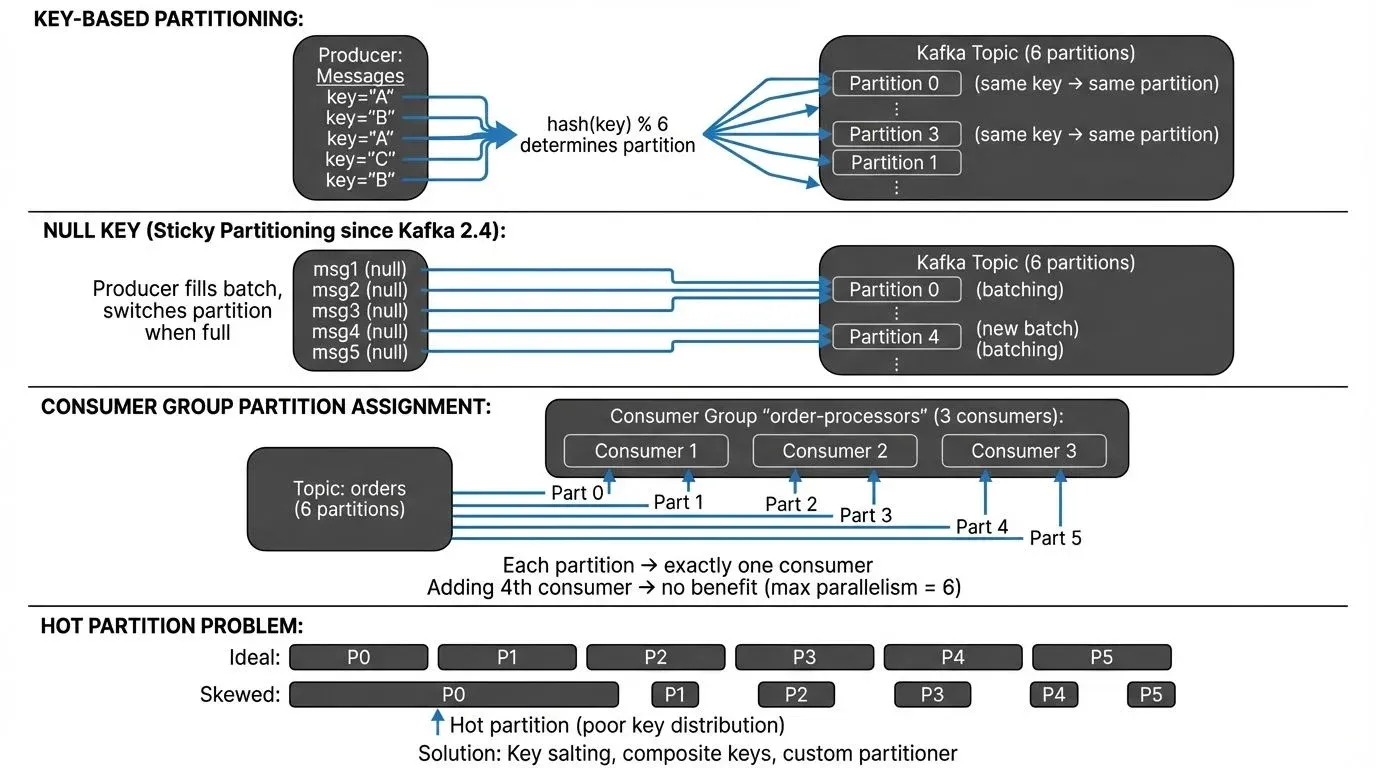
Partitioning Strategies in Kafka
Kafka provides several partitioning strategies that determine how records are assigned to partitions.
Key-Based Partitioning
When a producer sends a message with a key, Kafka uses a hash of the key to determine the partition. The default partitioner uses the murmur2 hash algorithm: murmur2(key) % number_of_partitions. This ensures that all messages with the same key always go to the same partition, preserving ordering for that key.
Important: This hash-to-partition mapping is deterministic but becomes invalid if you add partitions to an existing topic. Messages with the same key may route to different partitions after repartitioning, breaking ordering guarantees.
For example, if you're processing user events and use the user ID as the key, all events for user "12345" will be routed to the same partition. This is crucial for stateful processing where you need to maintain user-specific state or ensure events are processed in order.
Round-Robin Partitioning
When no key is provided (null key), Kafka 2.4+ uses a sticky partitioner by default. Instead of true round-robin, the sticky partitioner batches multiple messages to the same partition before switching, which improves throughput by enabling better batching and compression. Messages are still distributed evenly across partitions over time, but with better performance characteristics. This strategy maximizes throughput and ensures balanced load distribution but provides no ordering guarantees.
Custom Partitioners
Kafka allows you to implement custom partitioners by extending the Partitioner interface. This is useful when you have specific business logic for data distribution. For instance, you might want to route high-priority messages to specific partitions or use composite keys for partitioning decisions.
Here's an example of a custom partitioner that routes high-priority messages to partition 0 and distributes normal messages using standard hashing:
import org.apache.kafka.clients.producer.Partitioner;
import org.apache.kafka.common.Cluster;
import org.apache.kafka.common.utils.Utils;

public class PriorityPartitioner implements Partitioner {

    @Override
    public int partition(String topic, Object key, byte[] keyBytes,
                        Object value, byte[] valueBytes, Cluster cluster) {
        int numPartitions = cluster.partitionCountForTopic(topic);

        // Route high-priority messages to partition 0
        if (value instanceof PriorityMessage &&
            ((PriorityMessage) value).getPriority() == Priority.HIGH) {
            return 0;
        }

        // Use murmur2 hash for normal messages (skip partition 0)
        if (keyBytes == null) {
            return 1 + Utils.toPositive(Utils.murmur2(valueBytes)) % (numPartitions - 1);
        }
        return 1 + Utils.toPositive(Utils.murmur2(keyBytes)) % (numPartitions - 1);
    }

    @Override
    public void close() {}

    @Override
    public void configure(Map<String, ?> configs) {}
}
To use your custom partitioner, configure it in the producer:
Properties props = new Properties();
props.put(ProducerConfig.BOOTSTRAP_SERVERS_CONFIG, "localhost:9092");
props.put(ProducerConfig.PARTITIONER_CLASS_CONFIG, PriorityPartitioner.class.getName());
props.put(ProducerConfig.KEY_SERIALIZER_CLASS_CONFIG, StringSerializer.class.getName());
props.put(ProducerConfig.VALUE_SERIALIZER_CLASS_CONFIG, JsonSerializer.class.getName());

KafkaProducer<String, PriorityMessage> producer = new KafkaProducer<>(props);
For more details on producer configuration and message sending patterns, see Kafka Producers.
Key Design Considerations
Cardinality and Distribution
Cardinality refers to the number of unique values in your partition key. The cardinality of your partition key significantly impacts performance. If you have too few unique keys (low cardinality), you'll end up with hot partitions that receive disproportionate traffic. If you have too many keys with uneven distribution (skewed cardinality), some partitions may be idle while others are overloaded.
Consider an e-commerce system where you partition orders by customer ID. If a small number of customers generate most of the orders (think enterprise clients versus individual consumers), you'll create skewed partitions. A better approach might be to use order ID or a composite key that distributes load more evenly.
Key selection guidelines:
- High, even cardinality: User IDs, transaction IDs, device IDs (if evenly distributed)
- Low cardinality (avoid): Boolean flags, status codes, country codes with uneven distribution
- Skewed cardinality (mitigate): Tenant IDs where some tenants dominate traffic, consider salting or composite keys
Ordering Guarantees
Kafka only guarantees ordering within a partition, not across partitions. If strict global ordering is required, you must use a single partition, which severely limits scalability. More commonly, you need ordering for a specific entity (user, device, transaction), which key-based partitioning handles well.
Consumer Parallelism
The number of partitions determines the maximum parallelism for consumers. A consumer group can have at most one consumer per partition. If you have 10 partitions, adding an 11th consumer to the group won't increase parallelism. Plan your partition count based on your expected consumer scaling needs.
For detailed coverage of consumer group behavior and partition assignment, see Kafka Consumer Groups Explained.
Partition Assignment Strategies
Kafka consumers use partition assignment strategies to determine which partitions each consumer in a group processes. Since Kafka 2.4+, the default strategy is CooperativeStickyAssignor, which enables incremental cooperative rebalancing:
- RangeAssignor (legacy): Assigns contiguous partition ranges per topic, can cause imbalance across topics
- RoundRobinAssignor: Distributes partitions evenly across consumers in round-robin fashion
- StickyAssignor (Kafka 0.11+): Maximizes partition assignment stability during rebalancing, reducing state rebuilding
- CooperativeStickyAssignor (Kafka 2.4+, default 3.0+): Like StickyAssignor but supports cooperative rebalancing, only affected partitions are reassigned, reducing rebalancing impact
Cooperative rebalancing is a major improvement over the older "stop-the-world" approach. During rebalancing, consumers continue processing unaffected partitions, significantly reducing latency spikes and consumer lag during group membership changes.
Common Partitioning Anti-Patterns
Hot Partitions
Hot partitions occur when data distribution is severely unbalanced. This happens with poor key selection (like using a binary flag as a partition key) or when certain keys naturally dominate traffic. Hot partitions create bottlenecks, increase latency, and can cause consumer lag.
Mitigation strategies for hot partitions:
- Key Salting: Append a random suffix to high-volume keys to distribute load
// Instead of: key = _0_
   String salt = String.valueOf(ThreadLocalRandom.current().nextInt(10));
   String saltedKey = String.format("%s-%s", originalKey, salt);
// Produces: _2_- Composite Keys: Combine multiple attributes to improve distribution
// Instead of just tenant_id, combine with time window
String key = String.format("%s:%s", tenantId, timestamp / 3600000); // hourly- Custom Partitioner with Load Awareness: Implement partitioners that track and avoid hot partitions (requires external state/metrics)
- Time-Based Partitioning: For time-series data, include time windows in keys to spread load
- Testing with Conduktor Gateway: Use Conduktor Gateway, a Kafka proxy, to simulate partition traffic patterns and test hot partition scenarios before production deployment. For comprehensive information on Gateway capabilities and deployment, see the Gateway Overview documentation
Choosing Too Few Partitions
Starting with too few partitions limits future scalability. While you can add partitions later, this breaks the hash-based key-to-partition mapping, potentially disrupting ordering guarantees. It's better to slightly over-provision partitions initially.
Choosing Too Many Partitions
Excessive partitions increase memory overhead on brokers, slow down leader elections during failures, and can increase end-to-end latency. Each partition requires file handles and memory for buffering.
Kafka 4.0+ partition scaling guidance:
- Modern Kafka (3.0+) with KRaft mode dramatically improves metadata handling and leader election speed
- With Kafka 4.0+ and proper tuning, clusters can handle significantly more partitions per broker than older versions
- Rule of thumb: Start with under 4,000 partitions per broker for conservative deployments
- Well-tuned Kafka 4.0+ clusters can exceed this with adequate resources (CPU, memory, disk I/O)
- Monitor these limits: file descriptors (
ulimit -n), heap memory for metadata, and controller performance
KRaft mode benefits for partitioning:
- Faster leader elections (milliseconds vs seconds with ZooKeeper)
- Better metadata scalability for large partition counts
- Reduced operational complexity for partition-heavy workloads
For more on KRaft mode's improvements, see Understanding KRaft Mode in Kafka.
Ignoring Key Null Values
Some developers accidentally send null keys, expecting them to maintain some ordering. In reality, null keys trigger sticky partitioner behavior (Kafka 2.4+) or round-robin distribution (older versions), distributing messages across all partitions without ordering guarantees. This can break ordering assumptions in downstream processing.
Best practice: Be explicit about your partitioning strategy. If you need ordering, always provide a key. If you want maximum throughput without ordering, use null keys intentionally, not accidentally.
Best Practices for Production Systems
Partition Count Planning
Calculate your initial partition count based on:
- Target throughput: Modern Kafka (3.0+) can handle 50-100+ MB/s per partition with proper tuning (older estimates of 10-50 MB/s were conservative)
- Expected consumer parallelism: Current and future needs (each consumer can process one partition max)
- Data retention requirements: More partitions mean more segment files and storage overhead
- Rebalancing tolerance: More partitions = more work during consumer group rebalancing
- Formula:
max(throughput_requirement / per_partition_throughput, expected_max_consumers) - Worked example:
- Target throughput: 500 MB/s
- Per-partition throughput: 50 MB/s (conservative for modern Kafka)
- Expected max consumers: 30
- Calculation:
max(500/50, 30) = max(10, 30) = 30 partitions - Start conservatively higher: Recommend 40-50 partitions for this scenario to allow for growth and uneven distribution.
- Note: Partition throughput depends on message size, compression, replication factor, and disk I/O. Test with realistic workloads to determine your cluster's per-partition capacity.
For comprehensive guidance on sizing Kafka clusters and planning partition capacity, see Kafka Capacity Planning.
Choosing Partition Keys
Select partition keys that:
- Have high cardinality with even distribution
- Align with your ordering requirements
- Match your access patterns (queries often filter by this field)
- Remain stable over time (avoid timestamps or ephemeral values)
For a payment processing system, transaction_id is often better than merchant_id if some merchants process far more transactions than others.
Handling Repartitioning
When you must increase partition count, consider:
- New topic migration: Create a new topic with the desired partition count and migrate consumers
- Dual-write patterns: Use MirrorMaker 2 or custom producers to write to both old and new topics during transition, then switch consumers
- Kafka Streams repartitioning: For Kafka Streams applications, use the
repartition()operation to create intermediate topics with proper partition counts - Documentation: Document the partition count change for teams relying on ordering guarantees, keys will map to different partitions after the change
Example with Kafka Streams:
StreamsBuilder builder = new StreamsBuilder();
KStream<String, Order> orders = builder.stream("orders");

// Repartition with custom partition count
KStream<String, Order> repartitioned = orders
    .repartition(Repartitioned.with(Serdes.String(), orderSerde)
        .withNumberOfPartitions(50)
        .withName("orders-repartitioned"));
Avoid decreasing partition counts, Kafka doesn't support this operation. Instead, create a new topic and migrate.
Testing Partition Distribution
Before deploying to production, test your partitioning strategy with realistic data. Check for skew by measuring messages per partition and identifying hot partitions.
Testing approaches:
- Unit tests: Verify custom partitioners assign messages to expected partitions
- Load testing: Use realistic data volumes to identify skew and hot partitions
- Partition monitoring: Use Conduktor to visualize partition distribution and identify imbalances
- Chaos testing: Use Conduktor Gateway to simulate partition failures and test rebalancing behavior
Conduktor provides partition monitoring dashboards showing records per partition, bytes per partition, and consumer lag per partition to help identify imbalances before they impact production workloads.
Conduktor Console: Find slow partitions and optimize throughput from the UI. Explore Conduktor Console →
Monitoring and Troubleshooting
Detecting Partition Skew
Monitor these metrics to detect partition imbalance:
- Records per partition over time: Track via JMX
kafka.log:type=Log,name=Size,topic=,partition= - Bytes per partition: Monitor partition size growth rates
- Consumer lag per partition: Use Kafka Lag Exporter or Conduktor for partition-level lag tracking
- Partition leader distribution across brokers: Ensure leaders are balanced (affects write performance)
- Partition throughput: Messages/sec and bytes/sec per partition
JMX metrics for partition monitoring:
# Partition size
kafka.log:type=Log,name=Size,topic=<topic>,partition=<partition>

# Log end offset (total records)
kafka.log:type=Log,name=LogEndOffset,topic=<topic>,partition=<partition>

# Partition message rate (via rate of LogEndOffset changes)
Using Kafka Lag Exporter:
# Reports partition-level lag as Prometheus metrics
kafka_consumergroup_group_lag{partition="0",topic="orders"} 1523
Using Conduktor: Conduktor provides partition monitoring dashboards with per-partition consumer lag visualization and alerts for lag threshold violations.
Significant variance in these metrics (>20% deviation from mean) indicates skew that may require addressing through key redesign or custom partitioners.
For comprehensive monitoring strategies and metrics collection, see Kafka Cluster Monitoring and Metrics.
Consumer Lag Analysis
Consumer lag often manifests differently across partitions when partitioning is suboptimal. If specific partitions consistently show higher lag, investigate whether those partitions receive disproportionate traffic or contain more complex records to process.
Partition-level lag monitoring:
- Kafka Lag Exporter: Exports partition-level lag to Prometheus for time-series analysis
- Conduktor: Provides real-time partition lag visualization with alerts for lag threshold violations
- Kafka Consumer Groups CLI: Check per-partition lag with
kafka-consumer-groups.sh --describe
# Check per-partition lag
kafka-consumer-groups.sh --bootstrap-server localhost:9092 \
  --describe --group my-consumer-group

# Output shows lag per partition:
# TOPIC     PARTITION  CURRENT-OFFSET  LOG-END-OFFSET  LAG
# orders    0          12500           12500           0
# orders    1          8200            15800           7600  <- Hot partition
# orders    2          12300           12400           100
If partition 1 consistently shows high lag while others don't, this indicates either a hot partition (more data) or uneven processing complexity. Use partition-level monitoring to diagnose whether the issue is partitioning-related or consumer-specific.
Rebalancing Considerations
Partition rebalancing occurs when consumers join or leave a group. Understanding rebalancing behavior is crucial for partition strategy decisions.
Rebalancing metrics to monitor:
- Rebalance frequency: How often rebalances occur (should be rare in stable deployments)
- Rebalance duration: Time to complete rebalancing (milliseconds with cooperative rebalancing, seconds with eager)
- Partitions revoked/assigned: Track which partitions move during rebalancing
Kafka 2.4+ cooperative rebalancing benefits:
- Only affected partitions are reassigned (not all partitions)
- Consumers continue processing unaffected partitions during rebalancing
- Dramatically reduces "stop-the-world" pauses and consumer lag spikes
Common rebalancing issues:
- Frequent rebalancing: Insufficient partitions, aggressive session timeouts, or unstable consumers
- Long rebalancing duration: Too many partitions, large state stores (Kafka Streams), or network issues
- Session timeout misconfigurations:
session.timeout.mstoo low causes false positives
Configuration for stable rebalancing:
# Use cooperative-sticky assignor (Kafka 2.4+)
partition.assignment.strategy=org.apache.kafka.clients.consumer.CooperativeStickyAssignor

# Increase session timeout for stability (default: 45s)
session.timeout.ms=60000

# Reduce max.poll.interval.ms if processing is fast
max.poll.interval.ms=300000
Related Concepts
- Kafka Topic Design Guidelines - Comprehensive guidance on designing topics with appropriate partition counts and replication factors.
- Kafka Consumer Groups Explained - Understanding how partition assignment affects consumer group parallelism and rebalancing.
- Kafka Cluster Monitoring and Metrics - Essential metrics for detecting partition skew and monitoring distribution health.
Summary
Kafka partitioning is a powerful mechanism for achieving scalability and parallelism in distributed streaming systems. The key to success lies in understanding your data characteristics, access patterns, and ordering requirements before choosing a partitioning strategy.
Start by selecting partition keys with high cardinality and even distribution, aligned with your ordering needs. Plan partition counts based on throughput requirements and expected consumer parallelism, erring slightly on the side of more partitions. Avoid common pitfalls like hot partitions, null keys, and extreme partition counts.
Continuously monitor partition distribution and consumer lag to detect imbalances early. When issues arise, use monitoring tools to diagnose whether partitioning adjustments are needed. Remember that partitioning decisions have long-term implications, so invest time in testing and validation before deploying to production.
By following these best practices, you'll build Kafka-based streaming applications that scale efficiently, maintain ordering guarantees where needed, and avoid performance bottlenecks as your system grows.
Sources and References
- Apache Kafka Documentation - Kafka Partitioning - Official documentation covering partition concepts and configuration
- Apache Kafka Documentation - Producer Configurations - Producer settings including partitioner configuration
- Kafka: The Definitive Guide by Neha Narkhede, Gwen Shapira, and Todd Palino (O'Reilly, 2017) - Comprehensive coverage of partitioning strategies and production considerations
- Designing Data-Intensive Applications by Martin Kleppmann (O'Reilly, 2017) - Distributed systems patterns including partitioning strategies
- Conduktor - Kafka Partition Management - Commercial platform for partition monitoring, analytics, and testing with Conduktor Gateway
- Kafka Lag Exporter - GitHub Repository - Open-source tool for partition-level lag monitoring