
Kafka Security Best Practices
As Kafka deployments grow in scale and criticality, securing them becomes essential. A security breach can expose sensitive business data, break compliance requirements, and disrupt critical operations.
This guide covers security best practices for Apache Kafka: authentication, authorization, encryption, and operational security. 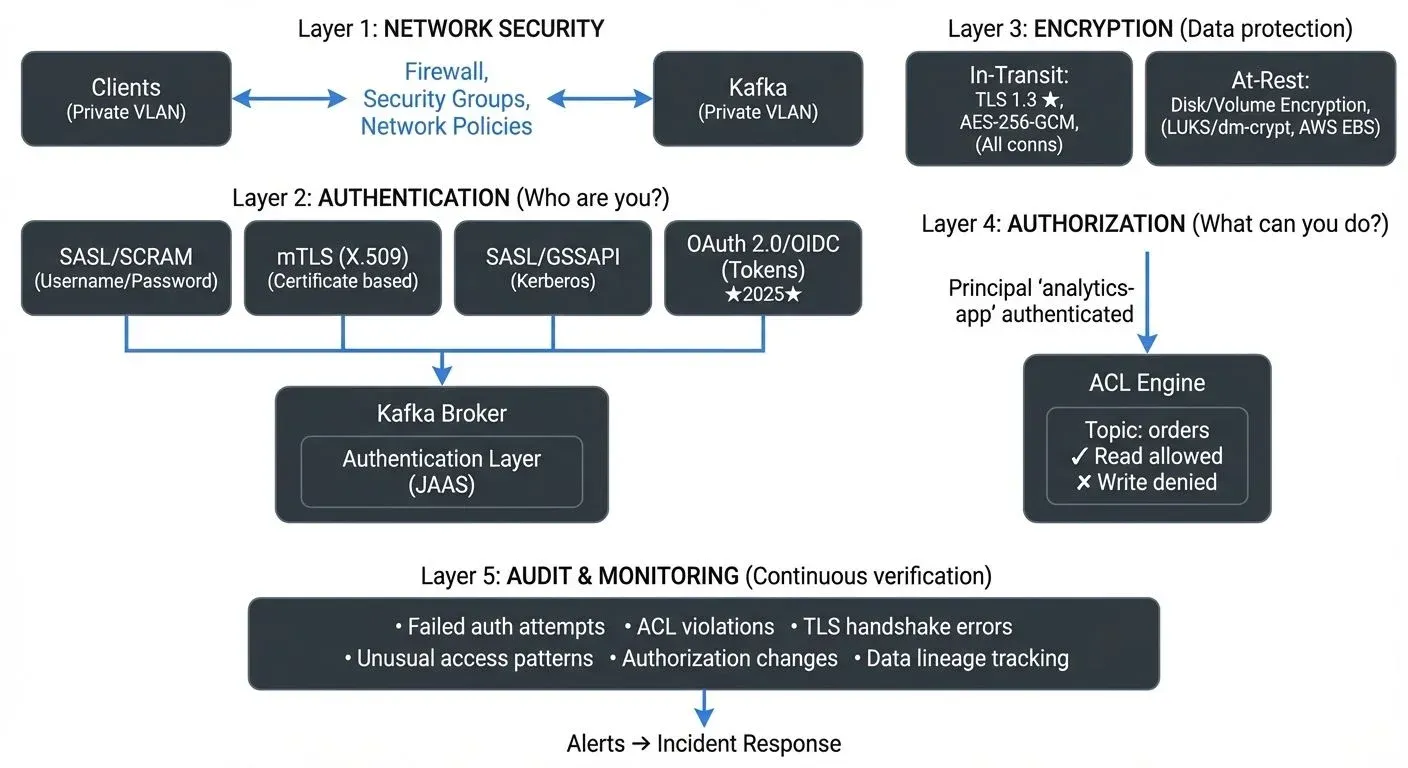
Why Kafka Security Matters in Data Streaming
Data streaming platforms like Kafka process and store vast amounts of information in real time. Unlike traditional databases with well-established security patterns, streaming platforms present unique challenges. Data flows continuously between producers, brokers, and consumers, often across network boundaries and organizational teams.
Without proper security controls, any application with network access to your Kafka cluster can publish or consume any data. This unrestricted access creates significant risks, including unauthorized data access, data tampering, compliance violations, and service disruption through malicious or accidental actions.
Modern streaming architectures often involve multiple teams, microservices, and external partners sharing the same Kafka infrastructure. This amplifies security concerns and makes strong access controls essential.
Authentication: Verifying Client Identity
Authentication ensures that only verified clients can connect to your Kafka cluster. Kafka supports several authentication mechanisms, each with different security profiles and operational complexity. For in-depth coverage of authentication mechanisms and implementation patterns, see Kafka Authentication: SASL, SSL, OAuth.
SASL (Simple Authentication and Security Layer)
SASL provides a framework for authentication with multiple mechanisms:
SASL/SCRAM (Salted Challenge Response Authentication Mechanism) offers username/password authentication with credentials stored in KRaft (Kafka 3.3+) or ZooKeeper (legacy). Modern Kafka deployments using KRaft mode benefit from simplified credential management without ZooKeeper dependencies. This mechanism provides strong security without requiring external infrastructure:
# Broker configuration
sasl.enabled.mechanisms=SCRAM-SHA-512
sasl.mechanism.inter.broker.protocol=SCRAM-SHA-512- SASL/PLAIN transmits credentials in plaintext (albeit over encrypted connections) and should only be used with TLS encryption. While simpler to implement, SCRAM is generally preferred for production environments.
- SASL/GSSAPI (Kerberos) integrates with enterprise identity systems and provides strong authentication with single sign-on capabilities. However, it requires Kerberos infrastructure and additional operational complexity.
Mutual TLS (mTLS)
Mutual TLS authentication uses client certificates for authentication. Both the broker and client present certificates, providing strong two-way authentication. This approach eliminates password management but requires certificate infrastructure and distribution mechanisms.
mTLS works well for service-to-service communication where certificate lifecycle management can be automated, though it can be more challenging for human users and dynamic client environments. For detailed implementation guidance, see mTLS for Kafka.
OAuth 2.0 and OIDC (Modern Cloud-Native Authentication)
OAuth 2.0 with OpenID Connect (OIDC) has become the standard authentication mechanism for cloud-native Kafka deployments in 2025. This approach integrates Kafka with enterprise identity providers like Okta, Auth0, Azure AD, or Keycloak, enabling centralized identity management, token-based authentication, and fine-grained access control.
SASL/OAUTHBEARER is Kafka's OAuth 2.0 implementation that supports both unsecured JWT tokens (development only) and secured tokens from external identity providers:
# Broker configuration for OAuth 2.0
sasl.enabled.mechanisms=OAUTHBEARER
sasl.mechanism.inter.broker.protocol=OAUTHBEARER
listener.name.sasl_ssl.oauthbearer.sasl.jaas.config=org.apache.kafka.common.security.oauthbearer.OAuthBearerLoginModule required;
listener.name.sasl_ssl.oauthbearer.sasl.login.callback.handler.class=io.strimzi.kafka.oauth.client.JaasClientOauthLoginCallbackHandler
listener.name.sasl_ssl.oauthbearer.sasl.server.callback.handler.class=io.strimzi.kafka.oauth.server.JaasServerOauthValidatorCallbackHandler
Benefits of OAuth 2.0/OIDC:
- Centralized identity management: Leverage existing enterprise identity infrastructure
- Token-based authentication: Short-lived tokens reduce credential exposure
- Integration with SSO: Users authenticate once across multiple systems
- Dynamic authorization: Token claims can drive authorization decisions
- Audit trails: Identity providers maintain comprehensive authentication logs
OAuth 2.0 is particularly valuable in multi-tenant environments, microservices architectures, and organizations with established identity management systems. However, it requires additional infrastructure (identity provider) and more complex configuration than SCRAM or mTLS.
Authorization: Controlling Access with ACLs
Authentication identifies who is connecting, but authorization determines what they can do. Kafka uses Access Control Lists (ACLs) to enforce fine-grained permissions on topics, consumer groups, and cluster operations. For comprehensive coverage of authorization patterns and implementation strategies, see Kafka ACLs and Authorization Patterns.
ACLs specify which principals (users or services) can perform which operations on which resources. For example:
# Allow user 'analytics-app' to read from 'customer-events' topic
kafka-acls --add --allow-principal User:analytics-app \
  --operation Read --topic customer-events
ACL Best Practices
- Principle of least privilege: Grant only the minimum permissions required for each application or user. A consumer application typically needs only Read permission on specific topics and Write permission on its consumer group.
- Resource-specific permissions: Avoid wildcard ACLs in production. Instead of granting access to all topics (
*), explicitly list permitted topics. This prevents accidental access to sensitive data. - Team-based access control: In multi-team environments, prefix topic names with team identifiers (e.g.,
marketing.events,engineering.logs) and grant ACLs accordingly. This creates clear ownership boundaries. For strategies on managing shared Kafka infrastructure across teams, see Multi-Tenancy in Kafka Environments. - Regular audits: Review ACLs periodically to remove unused permissions and identify over-privileged accounts.
Managing ACLs through command-line tools can become cumbersome as your cluster grows. Governance platforms provide visual ACL management interfaces that make it easier to understand and maintain permission structures across hundreds of topics and users. For broader access control patterns including RBAC and ABAC, see Access Control for Streaming.
Encryption: Protecting Data in Transit and at Rest
Encryption prevents unauthorized access to data as it moves through your infrastructure and while stored on disk. For detailed encryption implementation guidance, see Encryption at Rest and in Transit for Kafka.
Encryption in Transit (TLS 1.3)
TLS encryption protects data as it travels between clients and brokers and between brokers. Without encryption, network traffic can be intercepted and read by anyone with network access.
TLS 1.3 is the modern standard (2025) and should be enforced for all production deployments. TLS 1.3 provides improved security by removing vulnerable cipher suites and enhancing performance through reduced handshake latency:
# Broker configuration with TLS 1.3
listeners=PLAINTEXT://localhost:9092,SSL://localhost:9093
ssl.keystore.location=/var/private/ssl/kafka.server.keystore.jks
ssl.keystore.password=your-keystore-password
ssl.key.password=your-key-password

# Enforce TLS 1.3 (recommended for 2025)
ssl.protocol=TLSv1.3
ssl.enabled.protocols=TLSv1.3

# Strong cipher suites for TLS 1.3
ssl.cipher.suites=TLS_AES_256_GCM_SHA384,TLS_AES_128_GCM_SHA256,TLS_CHACHA20_POLY1305_SHA256
TLS 1.2 compatibility: If you must support legacy clients, allow TLS 1.2 as a fallback but plan migration to TLS 1.3:
ssl.protocol=TLSv1.3
ssl.enabled.protocols=TLSv1.3,TLSv1.2- Performance considerations: TLS 1.3 encryption has minimal overhead on modern hardware. With AES-NI hardware acceleration available in modern CPUs, the throughput impact is typically less than 5%, making encryption cost-effective for all deployments. TLS 1.3's optimized handshake also reduces connection establishment latency by 33% compared to TLS 1.2.
- Certificate management: Implement automated certificate rotation using tools like cert-manager (Kubernetes) or HashiCorp Vault to prevent certificate expiration incidents. Certificates should be rotated every 90 days or less.
Encryption at Rest
Kafka stores messages in log files on broker disks. Encryption at rest protects this data if physical disks are compromised or improperly decommissioned.
While Kafka itself doesn't provide built-in encryption at rest, you can implement it through:
- Filesystem-level encryption: Tools like dm-crypt on Linux or LUKS encrypt entire partitions where Kafka stores data.
- Cloud provider encryption: AWS EBS volumes, Azure Disk Encryption, and GCP persistent disk encryption provide transparent encryption.
- Application-level encryption: Encrypt message payloads before producing them to Kafka, though this prevents brokers from compressing data effectively.
Network Security and Isolation
Beyond authentication and encryption, network-level security provides additional protection layers.
- Network segmentation: Deploy Kafka brokers in private subnets without direct internet access. Use bastion hosts or VPN connections for administrative access.
- Firewall rules: Configure firewalls to allow only necessary traffic. Broker-to-broker communication should be restricted to broker IP addresses, and client access should be limited to specific application networks.
- Security groups: In cloud environments, use security groups or network policies to enforce network-level access control. For example, only allow traffic to Kafka brokers from specific application tiers.
- Inter-cluster replication: When replicating data between clusters across different network zones or cloud regions, always use encrypted connections and authentication even within private networks.
Zero Trust Architecture for Kafka
Zero Trust security requires continuous verification of every access request regardless of origin, rather than trusting any network location by default.
- Core Zero Trust principles for Kafka:
- Never trust, always verify: Authenticate and authorize every client connection, even from internal networks. Don't assume that traffic from your private network is safe, implement authentication and encryption everywhere.
- Least privilege access: Grant the minimum permissions required for each client to perform its function. A consumer reading from
user-eventsshould not have access topayment-transactions. - Assume breach: Design your security architecture assuming attackers may already be inside your network. Use encryption in transit for all connections, including broker-to-broker communication within the same data center.
- Verify explicitly: Use strong authentication mechanisms (OAuth 2.0, mTLS, SCRAM-SHA-512) rather than relying on network location or IP addresses for access control.
- Monitor continuously: Track all access patterns, authentication attempts, and authorization decisions to detect anomalies that may indicate compromise or misconfiguration.
- Microsegmentation: Isolate different workloads and tenants using network policies, ACLs, and separate clusters when necessary. Critical financial data should not share infrastructure with lower-sensitivity workloads.
For comprehensive guidance on implementing Zero Trust principles across your streaming infrastructure, see Zero Trust for Streaming.
Monitoring and Auditing Security Events
Security requires ongoing monitoring, not just initial configuration.
- Audit logs: Enable Kafka's audit logging to track authentication attempts, authorization decisions, and administrative operations. These logs are crucial for security investigations and compliance reporting. For comprehensive audit logging strategies, see Audit Logging for Streaming Platforms.
- Security metrics monitoring (2025 tooling): Track security-related metrics using modern observability platforms:
- Authentication failures: Monitor failed login attempts and authentication errors
- ACL violations: Track unauthorized access attempts to topics or consumer groups
- TLS handshake failures: Detect certificate issues or version mismatches
- Unusual access patterns: Identify anomalous consumer or producer behavior
Modern platforms like Conduktor provide centralized security management interfaces with visual RBAC editors, permission auditing, and audit logging. These tools make it easier to understand your security posture across hundreds of topics, thousands of ACLs, and multiple Kafka clusters.
- Alerting: Configure alerts for security events like repeated authentication failures, connections from unexpected IP addresses, or attempts to access unauthorized topics. Integration with incident response platforms (PagerDuty, Opsgenie) ensures rapid response to security incidents.
- Security testing: Use Conduktor Gateway, a Kafka proxy, to test security controls through chaos engineering scenarios, simulate authentication failures, certificate expiration, or unauthorized access attempts to verify your security monitoring and alerting work correctly before incidents occur in production.
Conduktor Gateway Protect: Enforce encryption, RBAC, and compliance in Kafka — no app code changes. Explore Conduktor Gateway Protect →
Security in Data Streaming Architectures
Securing Kafka extends beyond the cluster itself to the broader streaming ecosystem. Apache Flink applications, Kafka Connect connectors, and ksqlDB servers all require proper authentication credentials and authorization to access Kafka topics.
- Credential management: Use secret management systems like HashiCorp Vault, AWS Secrets Manager, or Kubernetes secrets to store and distribute Kafka credentials rather than hardcoding them in configuration files.
- Schema Registry security: If using Schema Registry or other schema systems, secure these components separately as they control data formats and evolution. For schema management security considerations, see Schema Registry and Schema Management.
- Connect and ksqlDB: These components often have elevated privileges to create topics and manage consumer groups. Secure their administrative APIs and limit their Kafka permissions appropriately.
- Policy enforcement: Implement automated policy enforcement for security standards, data classification, and compliance requirements. For comprehensive policy enforcement strategies, see Policy Enforcement in Streaming.
Virtual Clusters for Multi-Tenant Security
Managing security across multiple teams sharing a Kafka cluster traditionally requires complex network segmentation or intricate ACL hierarchies. Conduktor Virtual Clusters provide logical isolation within a single physical cluster, where each tenant operates in their own namespace completely isolated from other tenants' topics and configurations. This scopes all security controls, authentication, authorization, and encryption policies, to individual virtual clusters rather than managing them globally.
Virtual Clusters allow different security postures across workloads. A virtual cluster handling payment data can enforce strict mTLS and restrictive ACLs, while a development virtual cluster maintains lighter controls. Compromised credentials affect only one virtual cluster, limiting blast radius. For organizations implementing Zero Trust, Virtual Clusters provide microsegmentation at the Kafka layer. For implementation details, see the Virtual Clusters documentation.
Summary
Securing Apache Kafka requires authentication, authorization, encryption, network isolation, and continuous monitoring. Start with these practices:
- Enable authentication using OAuth 2.0/OIDC, SASL/SCRAM-SHA-512, or mTLS to verify all client identities
- Implement ACLs following the principle of least privilege with regular audits
- Encrypt all traffic with TLS 1.3 to protect data in transit
- Adopt Zero Trust principles with continuous verification and microsegmentation
- Isolate networks to limit exposure and attack surfaces
- Monitor security events continuously with modern observability platforms
- Secure the ecosystem including Schema Registry, Connect, and streaming applications
- Automate security testing using chaos engineering to validate controls
Security is not optional for production Kafka deployments. The implementation complexity is worth it given the risks of data breaches, compliance failures, and service disruptions.
Related Concepts
- Multi-Tenancy in Kafka Environments - Strategies for securing shared Kafka infrastructure across multiple teams with isolation and access control patterns.
- Data Classification and Tagging Strategies - How to classify and tag sensitive data to enforce appropriate security controls.
- Audit Logging for Streaming Platforms - Comprehensive strategies for tracking security events and maintaining compliance audit trails.
Sources and References
- Apache Kafka Security Documentation - Official security configuration guide covering authentication, authorization, and encryption: https://kafka.apache.org/documentation/#security
- Conduktor Security Documentation - Platform for managing Kafka security, ACLs, and governance with visual interfaces and testing tools: https://www.conduktor.io/
- OWASP API Security Project - General API security principles applicable to Kafka's protocol: https://owasp.org/www-project-api-security/
- Kafka: The Definitive Guide (O'Reilly, 2024) - Chapter on securing Kafka deployments, written by Kafka committers and practitioners
- NIST Cybersecurity Framework - Framework for improving critical infrastructure cybersecurity, applicable to data infrastructure: https://www.nist.gov/cyberframework
- OAuth 2.0 for Apache Kafka - Strimzi OAuth library documentation and best practices: https://github.com/strimzi/strimzi-kafka-oauth
- Zero Trust Architecture (NIST SP 800-207) - NIST standards for implementing Zero Trust security principles: https://csrc.nist.gov/publications/detail/sp/800-207/final