
Quotas and Rate Limiting in Kafka
Apache Kafka clusters serve multiple applications simultaneously, each with varying workloads and resource demands. Without proper controls, a single misbehaving or resource-intensive client can degrade performance for all users. Quotas and rate limiting provide the mechanisms to prevent this scenario, ensuring fair resource allocation and stable cluster operation. 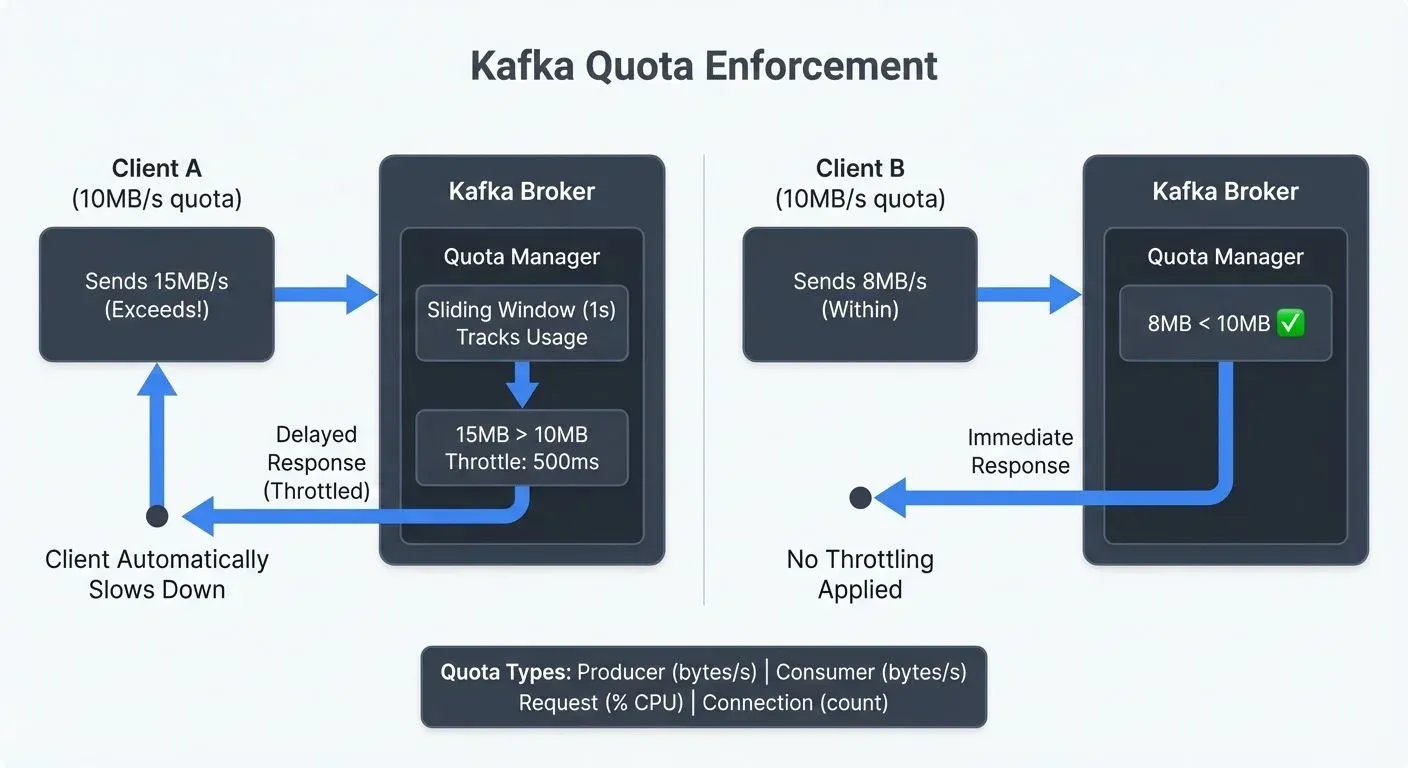
Understanding how Kafka implements quotas is essential for anyone operating production clusters, especially in multi-tenant environments where predictable performance is critical. For foundational understanding of Kafka architecture, see Apache Kafka.
What Are Quotas in Kafka?
Quotas in Kafka are resource controls that limit the amount of bandwidth or request capacity a client can consume. Rather than allowing clients to use unlimited broker resources, quotas enforce upper bounds on data transfer rates and request processing.
When a client exceeds its quota, Kafka doesn't reject the request outright. Instead, it throttles the client by delaying responses, effectively slowing down the client to bring it within its allocated limits. This approach maintains data integrity while preventing resource monopolization.
Quotas serve several critical purposes in Kafka deployments:
- Resource protection: Prevent individual clients from overwhelming broker CPU, memory, or network capacity
- Fair sharing: Ensure all clients receive predictable service levels in shared clusters
- Cost control: Limit resource consumption to manage infrastructure costs
- Stability: Maintain consistent latency and throughput even under heavy load
Types of Kafka Quotas
Kafka supports three primary quota types, each targeting different aspects of client behavior.
Producer Quotas
Producer quotas limit the rate at which clients can publish data to Kafka. These are specified as bytes per second and control the total throughput a producer can achieve across all topics.
For example, setting a producer quota of 10 MB/sec means a client cannot exceed this rate when writing to the cluster. If the producer attempts to send data faster, Kafka will throttle it by delaying produce responses.
Consumer Quotas
Consumer quotas limit the rate at which clients can fetch data from Kafka. Like producer quotas, these are expressed as bytes per second and control the total bandwidth a consumer can use when reading from topics.
A consumer quota of 15 MB/sec ensures that a single consumer application cannot saturate broker network interfaces or monopolize disk I/O when reading historical data.
Request Quotas
Request quotas limit the percentage of request handler thread time a client can consume on a broker. Rather than measuring bytes, this quota type focuses on broker CPU and processing capacity.
For instance, a request quota of 50% means a client cannot use more than half of the broker's request processing capacity. This prevents computationally expensive requests from blocking other clients.
Examples of computationally expensive requests include:
- Large metadata requests: Asking for information about thousands of partitions simultaneously
- Complex offset lookups: Searching for specific timestamps across many partitions
- High-frequency administrative operations: Repeatedly querying cluster configuration or partition leadership
By limiting request processing time rather than just bytes transferred, request quotas protect brokers from clients that make many small but CPU-intensive requests.
How Rate Limiting Works in Kafka
Kafka's rate limiting mechanism is designed to be non-destructive. When a client exceeds its quota, Kafka calculates the delay needed to bring the client back within limits and holds the response for that duration.
The broker tracks each client's resource usage in a sliding window - a moving time window that continuously measures consumption over recent intervals, typically 1 second. Unlike a fixed window that resets at specific times (like every minute), a sliding window provides smoother enforcement by considering usage over the most recent period at any moment.
When usage exceeds the quota, the broker computes the throttle time based on how much the client has overshot its limit.
For example, if a producer has a 10 MB/sec quota but sends 15 MB in one second, the broker delays the produce response by approximately 500 milliseconds. This throttling causes the producer to slow down naturally without losing data.
The client receives the throttled response along with a metric indicating how long it was delayed. Well-designed clients can use this information to self-regulate their sending or fetching rates proactively.
This approach has several advantages over hard rejection:
- Data is never lost due to quota violations
- Clients automatically adjust to stay within limits
- The cluster remains stable even when clients misbehave
- Operators have time to diagnose and address quota violations
Configuring Quotas in Kafka
Kafka provides flexible quota configuration options, supporting both static broker configuration and dynamic runtime updates.
Static Configuration (Legacy)
Note: Static quota configuration in server.properties has been deprecated since Kafka 2.0. While these properties still work in some deployments, dynamic configuration is the recommended approach for all modern Kafka clusters.
For reference, legacy static quotas looked like:
# Legacy - not recommended for Kafka 2.0+
quota.producer.default=10485760
quota.consumer.default=15728640
Static configuration required broker restarts and lacked the flexibility needed for production environments. Modern Kafka deployments should exclusively use dynamic configuration.
Dynamic Configuration (Recommended)
Operators set quotas dynamically using the kafka-configs command-line tool. This is the standard approach in modern Kafka deployments (2.0+) and allows quota changes without broker restarts, making it ideal for production environments.
To set a producer quota for a specific client:
kafka-configs --bootstrap-server localhost:9092 \
  --alter \
  --add-config 'producer_byte_rate=10485760' \
  --entity-type clients \
  --entity-name my-producer-app
To set a consumer quota for a specific user:
kafka-configs --bootstrap-server localhost:9092 \
  --alter \
  --add-config 'consumer_byte_rate=15728640' \
  --entity-type users \
  --entity-name data-pipeline-user
Quotas can be scoped to:
- Client ID: Applies to all connections using a specific client identifier
- User: Applies to all connections authenticated as a specific user (requires authentication)
- User and Client ID: Most specific, applies to a user-client combination
This hierarchical approach allows fine-grained control. For instance, you might set generous quotas for trusted internal applications while restricting third-party integrations.
Modern Quota Features in Kafka 4.0+
Kafka 4.0 and later versions introduce several quota enhancements that improve resource management and operational control, particularly for KRaft-mode clusters.
Connection Quotas
Connection quotas limit the maximum number of concurrent connections a client can establish to the cluster. This prevents connection exhaustion attacks and helps manage broker memory consumption.
To set a connection quota limiting a client to 100 concurrent connections:
kafka-configs --bootstrap-server localhost:9092 \
  --alter \
  --add-config 'connection_creation_rate=100' \
  --entity-type clients \
  --entity-name high-volume-app
Connection quotas are particularly valuable in multi-tenant environments where connection storms from misconfigured clients can impact cluster availability.
IP-Based Quotas
IP-based quotas provide an additional security layer by limiting resource consumption based on source IP addresses, even before client authentication. This helps defend against DDoS attacks and resource exhaustion from unknown actors.
Setting IP-based rate limits:
kafka-configs --bootstrap-server localhost:9092 \
  --alter \
  --add-config 'producer_byte_rate=5242880,consumer_byte_rate=5242880' \
  --entity-type ips \
  --entity-name 192.168.1.100
IP-based quotas complement user and client-id quotas, creating defense in depth for resource protection.
KRaft-Native Quota Management
With Kafka 4.0's KRaft mode becoming the standard (ZooKeeper support has been removed), quota configuration is now stored directly in the metadata log. This provides:
- Faster propagation: Quota changes propagate immediately across all brokers through the metadata log
- Better consistency: No risk of ZooKeeper-Kafka state divergence
- Simplified operations: Single source of truth for all cluster configuration
For clusters running on KRaft, quota changes take effect within milliseconds rather than seconds, improving operational responsiveness. For detailed information on KRaft architecture and migration, see Understanding KRaft Mode in Kafka.
Client Metrics and Observability (KIP-714)
Modern Kafka clients (3.7+) support client-side metrics plugins that push telemetry data directly to brokers. This enables more sophisticated quota monitoring and enforcement:
- Predictive throttling: Clients can self-regulate before hitting hard limits
- Better visibility: Operators see client-side metrics alongside broker-side enforcement
- Proactive alerting: Identify quota violations before they impact users
Client metrics plugins integrate with tools like Conduktor to provide comprehensive quota dashboards showing both client intent and broker enforcement.
Quotas in Multi-Tenant Kafka Environments
Multi-tenant Kafka deployments particularly benefit from quotas. When multiple teams or customers share a cluster, quotas ensure fair resource distribution and prevent noisy neighbor problems (situations where one tenant's resource usage negatively impacts others).
Consider a SaaS platform running Kafka for multiple customer applications. One customer might run a large batch job that reads historical data at maximum speed. Without quotas, this batch job could saturate broker network interfaces, causing latency spikes for other customers running real-time streaming applications. For comprehensive coverage of multi-tenant patterns and best practices, see Multi-Tenancy in Kafka Environments.
By implementing consumer quotas, the platform operator can limit the batch job to a reasonable throughput, perhaps 20 MB/sec, while ensuring real-time applications maintain low-latency access to their data streams.
Quotas also enable tiered service models. A platform might offer:
- Free tier: 1 MB/sec producer and consumer quotas
- Standard tier: 10 MB/sec quotas
- Enterprise tier: 100 MB/sec or custom quotas
This approach aligns resource consumption with pricing while maintaining cluster stability.
Virtual Clusters for Quota Isolation
Managing quotas in multi-tenant environments requires careful coordination of client IDs and quota hierarchies. Conduktor Virtual Clusters simplify this by scoping quota enforcement to individual virtual clusters, each operates as an independent quota domain with its own rate limits, completely isolated from other virtual clusters. A team's quota violations in one virtual cluster cannot impact applications in other virtual clusters, providing strong isolation against noisy neighbor scenarios.
This architecture enables differentiated resource allocation where platform teams assign throughput ceilings to each virtual cluster (e.g., 100 MB/sec for data engineering, 50 MB/sec for analytics). Teams manage their own internal quotas without cross-tenant coordination. Virtual Clusters also simplify tiered service models, customers upgrade by migrating to higher-capacity virtual clusters rather than modifying quota rules. For implementation details, see the Virtual Clusters documentation.
Monitoring and Managing Quotas
Effective quota management requires visibility into quota usage and violations. Modern Kafka deployments use a combination of broker-side metrics, client-side telemetry, and dedicated monitoring tools.
Broker-Side Metrics
Kafka exposes quota enforcement metrics through JMX:
kafka.server:type=Request,name=ThrottleTime: Duration clients spend throttled (milliseconds)kafka.server:type=ClientQuotas,name=QuotaViolations: Count of quota violations by clientkafka.network:type=RequestMetrics,name=RequestQueueTimeMs: Request queuing delays indicating saturation
For KRaft-mode clusters (Kafka 4.0+), additional metrics track quota configuration propagation and metadata log performance.
Client-Side Metrics (Kafka 3.7+)
Modern Kafka clients support client metrics plugins (KIP-714), providing visibility into client behavior before broker enforcement:
- Client-side throttle awareness: Applications can detect impending quota violations
- Intent vs. enforcement: Compare what clients want to do versus what brokers allow
- Proactive tuning: Adjust client behavior based on observed patterns
Client metrics integrate with Conduktor and other observability platforms, creating a complete picture of quota health.
Quota Management Tools
Tools like Conduktor provide visual interfaces for quota management, making it easier to configure quotas, monitor violations, and alert on quota-related issues. Rather than managing quotas through command-line tools and interpreting raw JMX metrics, Conduktor offers:
- Quota dashboards: Real-time visualization of quota usage across all clients
- Violation alerts: Automated notifications when clients consistently exceed limits
- Historical analysis: Track quota patterns over time to inform capacity planning
- Multi-cluster views: Manage quotas consistently across development, staging, and production environments
For hands-on guidance on implementing quotas and rate limiting with Conduktor, see the Traffic Control Policies documentation.
Establishing quota violation alerts ensures operators can respond to issues proactively. If a critical application consistently hits quota limits, this might indicate the need for infrastructure scaling or quota increases rather than simply throttling the client. For strategies on tracking consumer performance and identifying quota-related lag issues, see Consumer Lag Monitoring.
Conduktor Gateway: Isolate teams, enforce quotas, multi-tenant Kafka without rebuilds. Explore Conduktor Gateway →
Quotas and Data Streaming Pipelines
Quotas play a vital role in maintaining stable data streaming pipelines. Stream processing frameworks like Kafka Streams and Apache Flink rely on predictable Kafka performance to maintain their processing guarantees.
When quotas are properly configured, streaming applications experience consistent latency and throughput. This stability enables accurate watermarking (temporal markers for event-time processing), reduces backpressure in processing pipelines, and helps maintain exactly-once semantics.
Conversely, without quotas, a sudden spike in producer traffic can cause broker saturation, leading to increased latency for all consumers. This latency spike propagates through stream processing applications, potentially causing processing delays, state store lag, and missed SLAs. For detailed coverage of managing flow control in streaming systems, see Backpressure Handling in Streaming Systems.
For organizations building real-time analytics or event-driven architectures, quotas are a fundamental requirement for production reliability.
Troubleshooting Quota Violations
When clients hit quota limits, understanding the root cause and implementing appropriate fixes ensures optimal performance without compromising cluster stability.
Identifying Quota Issues
Signs that a client is experiencing quota throttling:
- Increased latency: Producer send or consumer fetch operations take longer than expected
- Throttle metrics: Client reports non-zero throttle time in metrics
- Throughput plateaus: Application cannot increase throughput despite available capacity
- Broker logs: Entries indicating quota enforcement for specific clients
Common Causes and Solutions
1. Legitimate Load Growth
If a trusted application consistently hits quota limits due to genuine business growth:
- Increase quotas: Adjust limits to match new requirements using
kafka-configs - Scale infrastructure: Add brokers or increase broker capacity
- Review tiering: Move application to higher service tier if using quota-based pricing
2. Inefficient Client Behavior
Poorly designed clients may trigger quotas unnecessarily:
- Batching issues: Producers sending tiny batches frequently instead of larger batches less often
- Polling patterns: Consumers fetching data too aggressively with very short poll intervals
- Metadata requests: Applications repeatedly fetching cluster metadata
Solutions include optimizing batch sizes, adjusting fetch configurations, and caching metadata appropriately.
3. Noisy Neighbor Scenarios
In multi-tenant environments, one application's spike impacts others:
- Implement connection quotas: Prevent connection storms
- Use IP-based quotas: Add defense layer before authentication
- Review quota hierarchy: Ensure user+client combinations have appropriate limits
4. Testing and Development Traffic
Test environments accidentally pointing to production:
- Separate clusters: Use dedicated clusters for testing when possible
- Lower default quotas: Set conservative defaults for unknown clients
- Network isolation: Enforce network boundaries between environments
Validating Quota Configuration
Test quota behavior proactively using tools like Conduktor Gateway (a Kafka proxy) for chaos engineering scenarios:
- Simulate quota violations: Generate controlled load exceeding limits
- Measure throttle behavior: Verify brokers throttle correctly without dropping data
- Test client resilience: Ensure applications handle throttling gracefully
For comprehensive testing strategies, see Chaos Engineering for Streaming Systems.
Best Practices for Quota Management
- Start conservative: Set initial quotas lower than expected peak load, then increase based on monitoring
- Monitor continuously: Track quota metrics and violations across all clients
- Document limits: Maintain clear documentation of quota policies and tiers
- Automate alerts: Configure proactive alerts before clients hit hard limits
- Review regularly: Periodically audit quota configurations as workloads evolve
Summary
Quotas and rate limiting in Kafka provide essential controls for managing cluster resources and ensuring stable, predictable performance. By limiting producer throughput, consumer fetch rates, request processing capacity, and connections, quotas prevent individual clients from monopolizing broker resources.
Kafka's throttling-based approach maintains data integrity while enforcing limits, and the flexible configuration system supports both default cluster-wide quotas and fine-grained client-specific controls. This makes quotas particularly valuable in multi-tenant environments where fair resource sharing is critical.
Modern Kafka deployments (4.0+) benefit from enhanced quota features including KRaft-native configuration management, connection quotas, IP-based rate limiting, and client metrics plugins (KIP-714) for comprehensive observability. These improvements provide faster configuration propagation, better defense in depth, and proactive quota violation detection.
Effective quota management requires ongoing monitoring of quota metrics and violations, with tools available to simplify configuration and alerting. For data streaming pipelines, properly configured quotas are fundamental to achieving consistent performance and meeting processing SLAs.
Whether operating a shared Kafka cluster or managing dedicated infrastructure, understanding and implementing quotas should be a standard part of any Kafka deployment strategy. For additional performance optimization techniques, see Kafka Performance Tuning Guide.
Related Concepts
- Multi-Tenancy in Kafka Environments - Quota strategies for isolating workloads and ensuring fair resource allocation across teams and applications.
- Kafka Security Best Practices - Combine quotas with authentication and authorization for comprehensive resource protection.
- Kafka Capacity Planning - Use quota configurations to inform capacity planning and prevent cluster saturation.
Sources and References
- Apache Kafka Documentation - Quotas: https://kafka.apache.org/documentation/#design_quotas
- KIP-13: Quotas: https://cwiki.apache.org/confluence/display/KAFKA/KIP-13+-+Quotas
- Confluent Documentation - Kafka Quotas: https://docs.confluent.io/platform/current/kafka/design.html#quotas
- Narkhede, Neha, et al. "Kafka: The Definitive Guide." O'Reilly Media, 2017.
- KIP-219: Improve quota communication: https://cwiki.apache.org/confluence/display/KAFKA/KIP-219+-+Improve+quota+communication