
Using Kafka Headers Effectively
Kafka headers let you attach metadata to messages without altering the message payload itself. Introduced in Kafka 0.11 via KIP-82, headers remain a core feature through Kafka 4.x and beyond, providing a clean separation between message content and contextual information and enabling useful patterns in distributed systems. 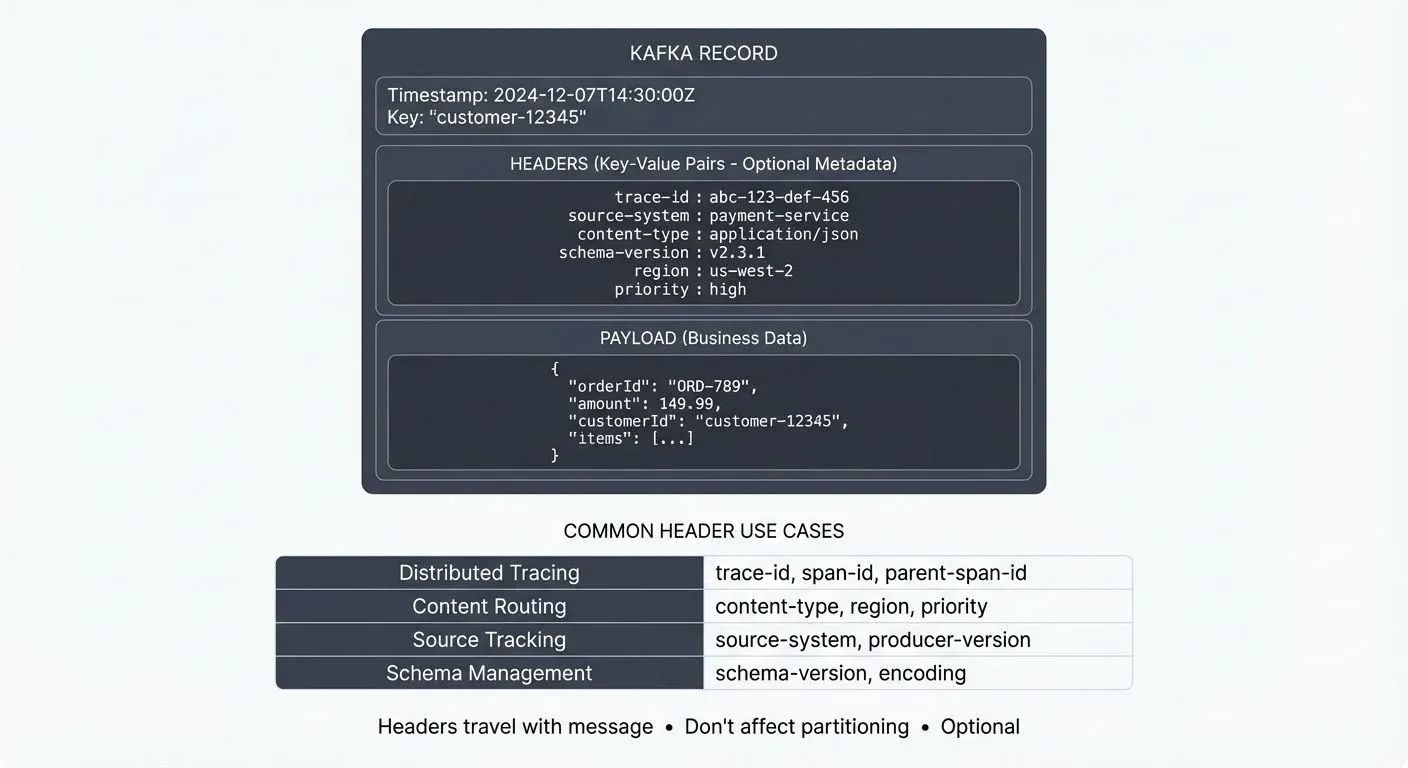
This article covers what Kafka headers are, common use cases, best practices, and how to use them effectively in modern streaming architectures.
What Are Kafka Headers?
Kafka headers are key-value pairs attached to each Kafka record. Unlike the message key and value, headers are optional metadata that travel with the message through the Kafka cluster.
Each header consists of:
- Key: A string identifier (e.g., "trace-id", "source-system")
- Value: A byte array containing the header data (byte arrays provide flexibility - you can store strings, numbers, JSON, or any serialized data format)
Headers are stored alongside the record in Kafka's log segments, but they don't affect partitioning or log compaction (Kafka's process of keeping only the latest version of each key). Only the message key influences partition assignment.
A single Kafka record can have zero or more headers, making them flexible for various metadata needs.
Common Use Cases for Headers
Distributed Tracing
One of the most valuable applications of headers is propagating trace context across services. When a message flows through multiple microservices, correlation IDs and trace IDs can be passed as headers.
For example, using OpenTelemetry or similar frameworks, you might include:
trace-id: Unique identifier for the entire request flowspan-id: Identifier for a specific operation segmentparent-span-id: Links this operation to its caller
This enables end-to-end observability without polluting the business payload. For detailed coverage of distributed tracing patterns in Kafka applications, see Distributed Tracing for Kafka Applications.
Content Routing and Filtering
Headers can carry routing metadata that downstream consumers use to filter or route messages. For instance:
content-type: Specifies message format (JSON, Avro, Protobuf)schema-version: Indicates which schema version was usedregion: Geographic origin of the messagepriority: Message urgency level
Consumers can use header-based filtering to process only relevant messages, reducing unnecessary deserialization and processing overhead. For more on schema management strategies, see Schema Registry and Schema Management.
Source and Lineage Tracking
Headers provide a lightweight way to track message provenance:
source-system: The originating application or serviceproducer-version: Version of the producing applicationtimestamp-utc: Custom timestamp beyond Kafka's built-in timestamp
This metadata helps with debugging, auditing, and understanding data lineage in complex pipelines. For comprehensive lineage tracking approaches, see Data Lineage Tracking: Data from Source to Consumption.
Working with Headers Programmatically
Producing Messages with Headers
In Java, adding headers is straightforward using the Producer API:
ProducerRecord<String, String> record = new ProducerRecord<>(
    "my-topic",
    "message-key",
    "message-value"
);

// Add headers
record.headers()
    .add("trace-id", "abc-123-def".getBytes(StandardCharsets.UTF_8))
    .add("source-system", "payment-service".getBytes(StandardCharsets.UTF_8));

producer.send(record);
In Python with confluent-kafka:
from confluent_kafka import Producer

producer.produce(
    'my-topic',
    key='message-key',
    value='message-value',
    headers=[
        ('trace-id', b'abc-123-def'),
        ('source-system', b'payment-service')
    ]
)
Consuming and Reading Headers
Consumers can access headers from received records:
ConsumerRecords<String, String> records = consumer.poll(Duration.ofMillis(100));
for (ConsumerRecord<String, String> record : records) {
    for (Header header : record.headers()) {
        String key = header.key();
        String value = new String(header.value(), StandardCharsets.UTF_8);
        System.out.printf("Header: %s = %s%n", key, value);
    }
}
This allows consumers to make decisions based on header content before or instead of deserializing the full message payload.
Headers in Stream Processing
Kafka Streams
Kafka Streams preserves headers throughout transformations by default. When processing streams, you can access and modify headers using the Processor API. In Kafka Streams 3.x+, you can use the process() method with a Processor or FixedKeyProcessor:
stream
    .process(() -> new FixedKeyProcessor<String, String, String>() {
        private FixedKeyProcessorContext<String, String> context;

        @Override
        public void init(FixedKeyProcessorContext<String, String> context) {
            this.context = context;
        }

        @Override
        public void process(FixedKeyRecord<String, String> record) {
            // Read existing headers
            Headers headers = record.headers();

            // Add new header
            headers.add("processed-by", "enrichment-service".getBytes(StandardCharsets.UTF_8));

            // Forward with modified headers
            context.forward(record.withValue(enrichedValue));
        }
    });
However, operations like map() that create new records require explicit header handling if you want to preserve them. For more on Kafka Streams capabilities, see Introduction to Kafka Streams.
Apache Flink
Flink's Kafka connectors also support headers. In Flink, header access happens during deserialization. When using the KafkaSource (Flink 2.x), headers are available in the deserialization schema:
// Flink 2.x approach with KafkaSource
KafkaSource<Event> source = KafkaSource.<Event>builder()
    .setBootstrapServers("localhost:9092")
    .setTopics("my-topic")
    .setDeserializer(new KafkaRecordDeserializationSchema<Event>() {
        @Override
        public void deserialize(ConsumerRecord<byte[], byte[]> record,
                              Collector<Event> out) throws IOException {
            // Access headers safely
            Header traceHeader = record.headers().lastHeader("trace-id");
            String traceId = traceHeader != null ?
                new String(traceHeader.value(), StandardCharsets.UTF_8) : null;

            // Parse value and include header data
            Event event = parseValue(record.value());
            event.setTraceId(traceId);
            out.collect(event);
        }

        @Override
        public TypeInformation<Event> getProducedType() {
            return TypeInformation.of(Event.class);
        }
    })
    .build();
This enables header-aware processing in Flink applications. For more on Flink's capabilities, see What is Apache Flink: Stateful Stream Processing.
Best Practices
Keep Headers Small
Headers are stored with every message and consume network bandwidth and storage. Keep individual header values under 1KB when possible. While Kafka doesn't enforce a hard limit on header size, excessively large headers can impact broker and client performance. For large metadata, consider storing it externally and using headers for references (e.g., storing metadata in a database and including the ID in a header).
Use Consistent Naming Conventions
Establish clear header naming patterns across your organization:
- Use lowercase with hyphens:
trace-id,content-type - Prefix organizational headers:
myorg-department,myorg-priority - Document standard headers in a schema registry or wiki
Don't Duplicate Payload Data
Headers should contain metadata about the message, not duplicate business data. If information is part of the core business event, it belongs in the payload.
Consider Schema Evolution
Unlike message values with schema registries, headers don't have built-in schema management (like message payloads do via Schema Registry). Document expected header formats and handle missing or malformed headers gracefully in consumer code. Establish clear documentation for your header standards in a central location.
Use Headers for Filtering, Not Business Logic
Headers are excellent for routing and filtering decisions, but core business logic should rely on the message payload. Headers can be easier to spoof or modify than properly secured payloads.
Security Considerations
Headers are stored and transmitted alongside message data, so they're subject to the same security controls:
- Encryption: Headers are encrypted when using TLS/SSL for in-transit encryption
- Sensitive Data: Avoid storing sensitive information (like passwords or API keys) in headers
- Authorization: Headers don't have separate ACLs - if a client can read a message, they can read its headers
- Validation: Always validate header content in consumer applications, as headers can be set by any producer
For comprehensive security approaches, see Encryption at Rest and in Transit for Kafka.
When NOT to Use Headers
While headers are powerful, they're not appropriate for every use case:
- Business-critical data: Core event data belongs in the payload, not headers
- Large data: Headers should be small (< 1KB); store large metadata externally
- Data requiring schema validation: Headers lack schema management - use payload for structured data
- Partitioning keys: Use the message key, not headers, to control partition assignment
- Sensitive information: Don't put credentials, PII, or secrets in headers without proper encryption
Observability and Debugging
Headers are invaluable for debugging and monitoring Kafka applications. When troubleshooting message flows, headers provide critical context without requiring payload deserialization.
GUI and Management Tools
Tools like Conduktor make header inspection straightforward. You can view and manage topics to:
- View all headers on messages in the UI
- Filter messages based on header values
- Search for specific trace IDs or correlation IDs
- Validate that expected headers are present
This visibility significantly reduces debugging time in distributed systems where messages traverse multiple services and topics.
Command-Line Tools
For command-line inspection, kcat (formerly kafkacat) is an essential tool for viewing headers:
# Consume messages and display headers
kcat -b localhost:9092 -t my-topic -C -f 'Headers: %h\nPayload: %s\n\n'

# Filter messages by header value
kcat -b localhost:9092 -t my-topic -C -f '%h %s\n' | grep "trace-id"
kcat provides quick access to header information without writing consumer code, making it ideal for troubleshooting and validation.
Production Monitoring
For production monitoring, consider including headers in your metrics and logging:
- Track header presence rates
- Alert on missing critical headers (like trace IDs)
- Include header values in structured logs for correlation
For broader observability practices, see What is Data Observability: The Five Pillars.
Summary
Kafka headers provide a clean, efficient mechanism for attaching metadata to messages without modifying payloads. They enable critical patterns like distributed tracing, content routing, and message lineage tracking.
Key takeaways:
- Headers are optional key-value pairs that travel with Kafka records, fully supported in Kafka 4.x
- Use them for tracing, routing metadata, and provenance information - not business-critical data
- Keep headers small (< 1KB) and establish consistent naming conventions
- Modern stream processing frameworks (Kafka Streams 3.x+, Flink 2.x) fully support header manipulation
- Tools like Conduktor and kcat make header inspection straightforward for debugging
- Headers are encrypted with TLS but should not contain sensitive data
- Always validate header content and handle missing headers gracefully
When used thoughtfully, headers improve observability, enable flexible routing patterns, and maintain clean separation between business data and operational metadata in your streaming architectures.
Related Concepts
- Message Serialization in Kafka - Understand how headers complement message serialization by carrying metadata like schema versions and content types.
- Kafka Topics, Partitions, and Brokers: Core Architecture - Learn how headers travel with messages through Kafka's partition and broker architecture.
- Data Lineage Tracking: Data from Source to Consumption - Discover how headers enable tracking data provenance and lineage across distributed systems.
Sources and References
- KIP-82: Add Record Headers - Apache Kafka Improvement Proposal
- Confluent Documentation: Kafka Headers
- Apache Kafka Documentation: Producer API
- OpenTelemetry Context Propagation
- Kafka Streams Documentation: Headers
Written by Stéphane Derosiaux · Last updated April 29, 2026