
Introduction to Kafka Streams
Stream processing has become essential for modern data architectures. Organizations need to react to events in real-time, whether detecting fraud, personalizing user experiences, or monitoring system health. Kafka Streams provides a lightweight yet powerful solution for building these real-time applications.
This article introduces Kafka Streams, explaining its core concepts, architecture, and practical applications. You'll learn how it fits into the broader stream processing landscape and how to get started building your own streaming applications.
What is Kafka Streams?
Kafka Streams is a client library for building stream processing applications on top of Apache Kafka. Unlike heavyweight frameworks that require separate clusters, Kafka Streams runs as part of your application. It's simply a Java library you add to your project.
For foundational understanding of Apache Kafka's architecture, topics, and partitions, see Apache Kafka.
As of Kafka 3.6+ and Kafka 4.0, Kafka Streams has matured significantly with features like versioned state stores, improved exactly-once semantics, and full compatibility with KRaft mode (Kafka's ZooKeeper-free architecture). These advancements make it production-ready for the most demanding real-time applications. For details on KRaft mode, see Understanding KRaft Mode in Kafka.
The key advantage is simplicity. You write standard Java applications that read from and write to Kafka topics. No separate processing cluster is needed. Your application instances can be deployed, scaled, and managed like any other microservice.
Kafka Streams provides high-level abstractions for common stream processing patterns:
- Filtering and transforming events
- Joining multiple streams
- Aggregating data over time windows
- Maintaining stateful computations
- Handling late-arriving data
These capabilities enable you to build sophisticated real-time applications without dealing with low-level complexities of distributed stream processing.
Core Architecture and Components
Understanding Kafka Streams architecture helps you design better applications and troubleshoot issues effectively.
Stream Processing Topology
A Kafka Streams application defines a processing topology - a graph of stream processors connected by streams. The topology describes how data flows through your application: 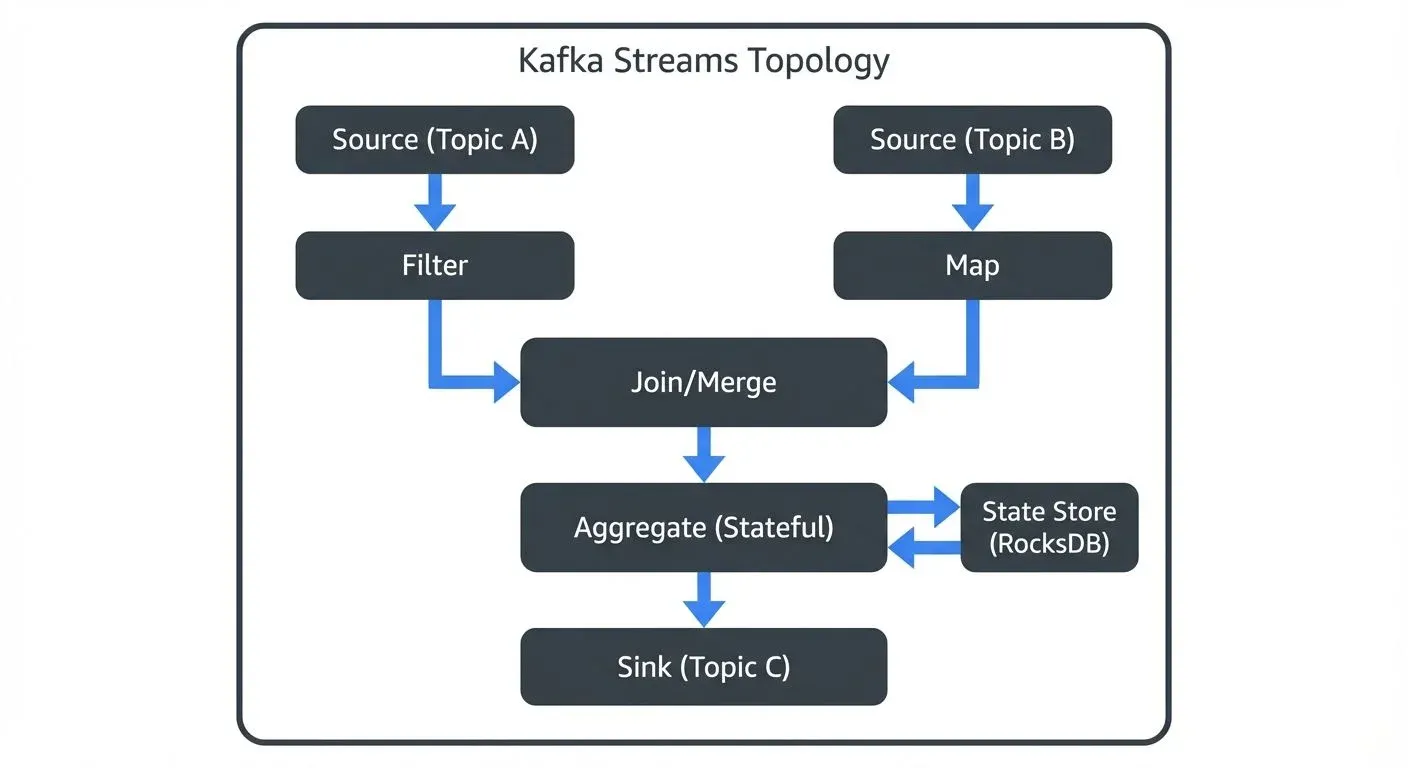
- Source Processor: Reads records from Kafka topics
- Stream Processors: Transform, filter, or aggregate data
- Sink Processor: Writes results back to Kafka topics
Each processor performs a specific operation. Data flows from sources through processors to sinks, with intermediate results stored in Kafka topics.
State Stores
Many stream processing operations require state. For example, counting events or joining streams needs to remember previous data. Kafka Streams provides state stores - fault-tolerant, local databases embedded in your application.
State stores are backed by Kafka topics called changelog topics. Every state change is written to Kafka, ensuring durability. If an application instance fails, another instance can rebuild the state from the changelog.
Modern State Store Features (Kafka 3.5+):
Kafka Streams 3.5+ introduced versioned state stores, which maintain historical versions of each key's value with timestamps. This enables:
- Time-travel queries to retrieve values as they existed at specific points in time
- More accurate stream-stream joins with better handling of out-of-order data
- Improved consistency for temporal queries
// Example: Creating a versioned state store
StoreBuilder<VersionedKeyValueStore<String, Long>> storeBuilder =
    Stores.versionedKeyValueStoreBuilder(
        Stores.persistentVersionedKeyValueStore("user-profiles-versioned", Duration.ofHours(24)),
        Serdes.String(),
        Serdes.Long()
    );
Exactly-Once Processing Guarantees
Kafka Streams supports exactly-once semantics (EOS), ensuring each record is processed exactly once even during failures. This is critical for applications like financial transactions or inventory management where duplicate processing causes serious problems.
Enable exactly-once processing with the processing.guarantee configuration:
Properties props = new Properties();
props.put(StreamsConfig.APPLICATION_ID_CONFIG, "word-count-app");
props.put(StreamsConfig.BOOTSTRAP_SERVERS_CONFIG, "localhost:9092");
props.put(StreamsConfig.PROCESSING_GUARANTEE_CONFIG, StreamsConfig.EXACTLY_ONCE_V2);
Kafka 3.0+ introduced exactly-once semantics v2 (EXACTLY_ONCE_V2), which significantly improves performance by reducing coordination overhead between brokers. Always use v2 for new applications.
For in-depth coverage of state store internals, RocksDB configuration, and optimization strategies, see State Stores in Kafka Streams.
Parallel Processing
Kafka Streams automatically parallelizes processing based on Kafka's partition model. Each partition can be processed independently. If your input topic has 10 partitions, you can run 10 application instances, each processing one partition.
This design provides elastic scalability. Add more application instances to handle increased load. Remove instances when load decreases. Kafka's consumer group protocol handles partition assignment automatically.
For detailed coverage of how Kafka Streams uses consumer groups for coordination, see Kafka Consumer Groups Explained. For partitioning strategies that maximize parallel processing, see Kafka Partitioning Strategies and Best Practices.
Stream Processing Fundamentals
Kafka Streams introduces several abstractions representing different types of data streams.
KStream: Event Streams
A KStream represents an unbounded stream of events. Each record is a new fact. For example, user clicks, sensor readings, or transaction events are naturally modeled as KStreams.
KStreams are append-only. A new record with the same key doesn't replace previous records - it's simply another event in the stream.
// Create a KStream from a Kafka topic
KStream<String, String> clicks = builder.stream("user-clicks");

// Filter clicks from mobile devices
KStream<String, String> mobileClicks = clicks.filter(
    (key, value) -> value.contains("mobile")
);

// Transform the stream
KStream<String, String> processed = mobileClicks.mapValues(
    value -> value.toUpperCase()
);

// Write results to an output topic
processed.to("mobile-clicks-processed");
KTable: Changelog Streams
A KTable represents a changelog stream - a sequence of updates to a table. Each record with a given key updates the current value for that key. Think of it as a database table continuously updated by a stream of changes.
KTables are useful for representing current state. For example, user profiles, product inventory, or account balances are naturally modeled as KTables.
// Create a KTable from a compacted Kafka topic
KTable<String, Long> userProfiles = builder.table("user-profiles");

// A new record with key _1_ replaces the previous value
// Materialize the table for interactive queries
KTable<String, Long> materializedProfiles = userProfiles.mapValues(
    profile -> profile,
    Materialized.<String, Long, KeyValueStore<Bytes, byte[]>>as("user-profiles-store")
);

// Convert KTable to KStream to send updates downstream
KStream<String, Long> profileUpdates = userProfiles.toStream();
KStream vs KTable Decision Guide:
- Use KStream when each event matters independently (transactions, clicks, sensor readings)
- Use KTable when you care about current state (user settings, inventory levels, account balances)
- A KTable is essentially a KStream with log compaction - only the latest value per key is retained
For details on how log compaction works and its role in KTables, see Kafka Log Compaction Explained. To understand the transactional guarantees underlying exactly-once processing, see Kafka Transactions Deep Dive.
Stateless vs Stateful Operations
Stateless operations process each record independently:
map: Transform each recordfilter: Select records matching a conditionflatMap: Transform one record into zero or more records
Stateful operations require remembering previous data:
aggregate: Combine records with the same keyjoin: Combine records from multiple streamswindowing: Group records into time-based windows
Stateful operations use state stores and are more complex but enable powerful stream processing patterns.
For detailed coverage of windowing strategies including tumbling, sliding, and session windows, see Session Windows in Stream Processing. For join patterns and stream enrichment techniques, see Stream Joins and Enrichment Patterns. To understand how Kafka Streams handles out-of-order data and event time processing, see Watermarks and Triggers in Stream Processing.
Building Your First Kafka Streams Application
Here is a simple word count application - the "Hello World" of stream processing. This example demonstrates core Kafka Streams concepts.
Project Setup
First, add Kafka Streams to your project. For Maven:
<dependency>
    <groupId>org.apache.kafka</groupId>
    <artifactId>kafka-streams</artifactId>
    <version>3.6.0</version>
</dependency>
For Gradle:
implementation 'org.apache.kafka:kafka-streams:3.6.0'The Word Count Application
Our application reads text from an input topic, counts word occurrences, and writes results to an output topic. 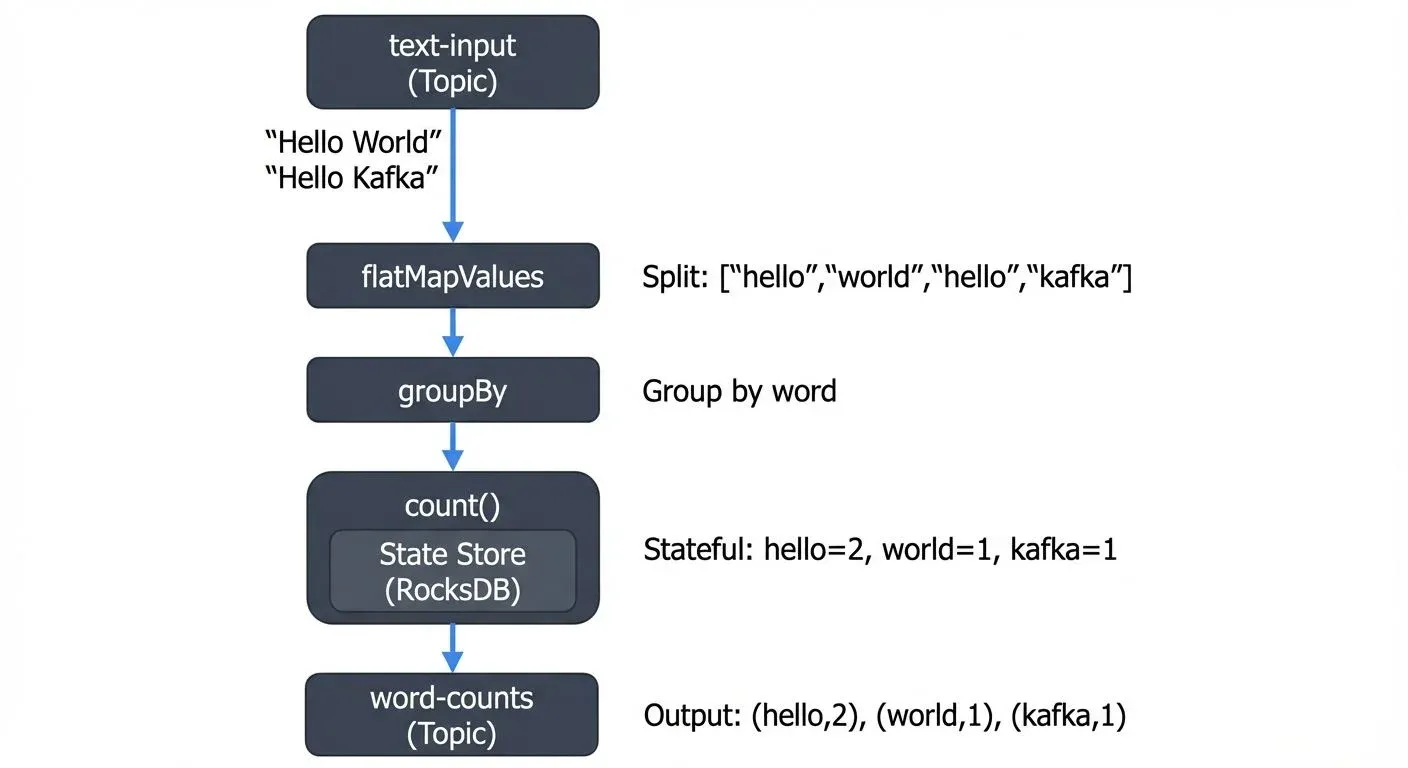
This simple application demonstrates several concepts:
- Stateless transformation:
flatMapValuessplits lines into words - Grouping:
groupByorganizes words with the same key - Stateful aggregation:
countmaintains running totals in a state store - Output: Results are written to another Kafka topic
Complete Code Example
Here's the complete, runnable word count application:
import org.apache.kafka.common.serialization.Serdes;
import org.apache.kafka.streams.KafkaStreams;
import org.apache.kafka.streams.StreamsBuilder;
import org.apache.kafka.streams.StreamsConfig;
import org.apache.kafka.streams.kstream.KStream;
import org.apache.kafka.streams.kstream.KTable;
import org.apache.kafka.streams.kstream.Materialized;
import org.apache.kafka.streams.kstream.Produced;

import java.util.Arrays;
import java.util.Properties;

public class WordCountApplication {

    public static void main(String[] args) {
        // Configure the Streams application
        Properties props = new Properties();
        props.put(StreamsConfig.APPLICATION_ID_CONFIG, "word-count-app");
        props.put(StreamsConfig.BOOTSTRAP_SERVERS_CONFIG, "localhost:9092");
        props.put(StreamsConfig.DEFAULT_KEY_SERDE_CLASS_CONFIG, Serdes.String().getClass());
        props.put(StreamsConfig.DEFAULT_VALUE_SERDE_CLASS_CONFIG, Serdes.String().getClass());

        // Build the topology
        StreamsBuilder builder = new StreamsBuilder();

        // Read from input topic
        KStream<String, String> textLines = builder.stream("text-input");

        // Process the stream
        KTable<String, Long> wordCounts = textLines
            // Split each line into words
            .flatMapValues(line -> Arrays.asList(line.toLowerCase().split("\\W+")))
            // Group by word
            .groupBy((key, word) -> word)
            // Count occurrences
            .count(Materialized.as("word-counts-store"));

        // Write results to output topic
        wordCounts.toStream()
            .to("word-counts", Produced.with(Serdes.String(), Serdes.Long()));

        // Start the application
        KafkaStreams streams = new KafkaStreams(builder.build(), props);

        // Add shutdown hook for graceful shutdown
        Runtime.getRuntime().addShutdownHook(new Thread(streams::close));

        streams.start();
    }
}
Key Configuration Parameters:
APPLICATION_ID_CONFIG: Unique identifier for this application. Also serves as the consumer group ID and prefix for internal topicsBOOTSTRAP_SERVERS_CONFIG: Kafka cluster connection stringDEFAULT_KEY_SERDE_CLASS_CONFIG/DEFAULT_VALUE_SERDE_CLASS_CONFIG: Serialization/deserialization classes for keys and values
Running the Application
The application runs as a standard Java process. Deploy it like any microservice - in containers, on VMs, or in Kubernetes. To scale, simply launch more instances. Kafka Streams automatically distributes partitions across instances.
Before running:
- Create input and output topics:
kafka-topics --create --topic text-input --bootstrap-server localhost:9092 --partitions 3
kafka-topics --create --topic word-counts --bootstrap-server localhost:9092 --partitions 3- Run the application:
java -jar word-count-app.jar- Test with sample data:
echo "hello world" | kafka-console-producer --topic text-input --bootstrap-server localhost:9092
echo "hello kafka" | kafka-console-producer --topic text-input --bootstrap-server localhost:9092- View results:
kafka-console-consumer --topic word-counts --bootstrap-server localhost:9092 \
  --from-beginning --property print.key=true --property key.separator=" : "
Real-World Use Cases
Kafka Streams powers diverse real-time applications across industries.
Fraud Detection
Financial services use Kafka Streams to detect fraudulent transactions in real-time. The application aggregates recent transactions per user, calculates risk scores, and flags suspicious patterns immediately. 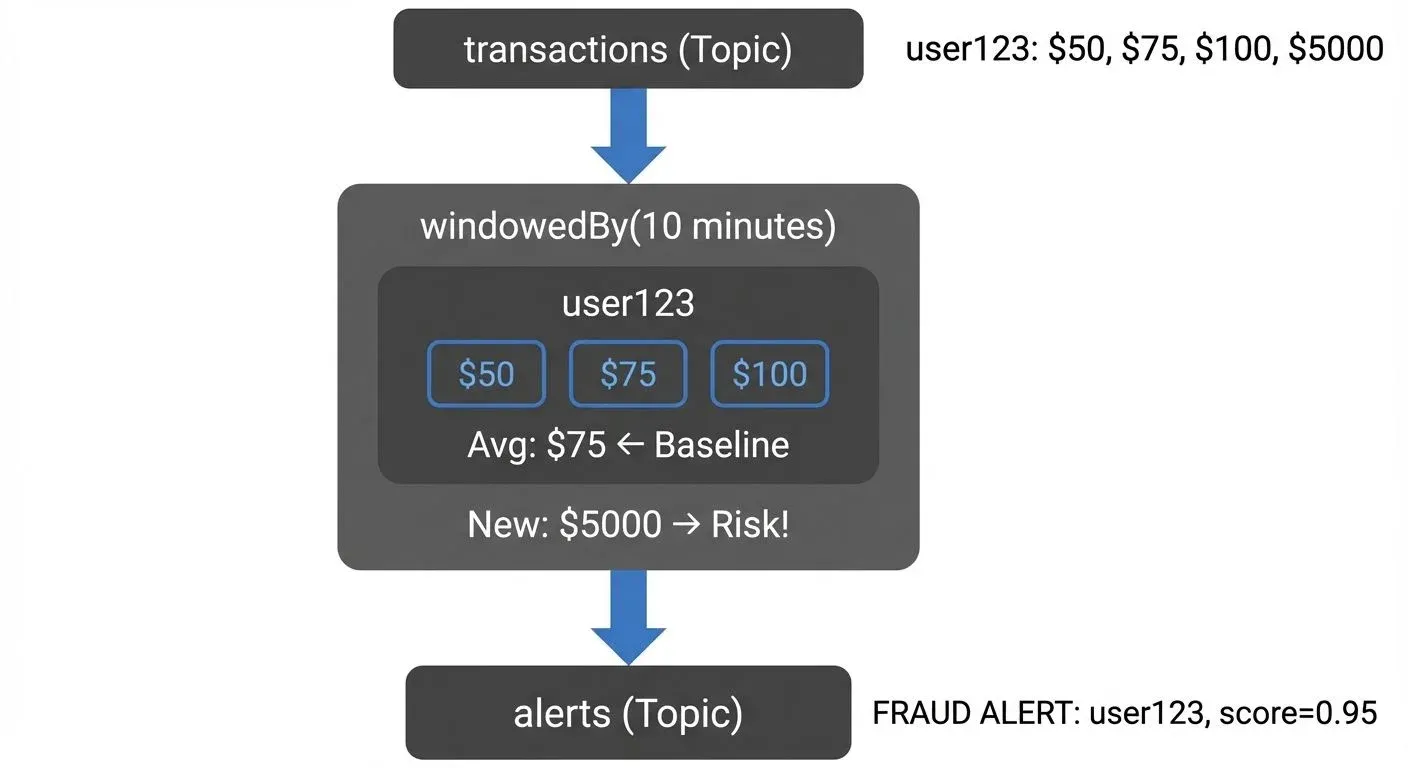
This pattern enables immediate action - blocking transactions, alerting users, or triggering manual review.
Metrics and Monitoring
Applications generate continuous metrics - request rates, error counts, latency percentiles. Kafka Streams aggregates these metrics in real-time, providing up-to-the-second dashboards without expensive batch processing.
Event-Driven Microservices
Modern architectures use events to communicate between services. Kafka Streams processes these events, maintaining materialized views, enforcing business rules, and orchestrating complex workflows.
For example, an e-commerce system might use Kafka Streams to:
- Update inventory after orders
- Calculate customer lifetime value
- Generate personalized recommendations
- Detect and prevent overselling
Each of these runs as an independent Kafka Streams application, reading from and writing to Kafka topics.
Monitoring and Troubleshooting
Production Kafka Streams applications require careful monitoring and operational tooling.
Key Metrics to Monitor
Kafka Streams exposes metrics through JMX:
- Lag: How far behind the application is from the latest data
- Throughput: Records processed per second
- State store size: Memory and disk usage
- Rebalances: Partition assignment changes
High lag indicates the application can't keep up with incoming data. Frequent rebalances suggest instability. Monitoring these metrics is essential for maintaining healthy stream processing.
For comprehensive monitoring strategies and alerting best practices, see Kafka Cluster Monitoring and Metrics.
Debugging Stream Processing
Stream processing applications are inherently complex. Data flows through multiple stages, state is distributed, and timing matters. Debugging requires specialized tools.
Platforms like Conduktor provide visibility into the Kafka topics your Streams application reads from and writes to through topic management, helping you understand consumer lag and throughput at each stage. When issues arise, these tools significantly reduce debugging time.
Testing Strategies
Kafka Streams includes the TopologyTestDriver for unit testing without running Kafka. This enables fast, reliable testing as part of your CI/CD pipeline.
Example unit test using TopologyTestDriver:
import org.apache.kafka.common.serialization.Serdes;
import org.apache.kafka.streams.StreamsBuilder;
import org.apache.kafka.streams.StreamsConfig;
import org.apache.kafka.streams.TestInputTopic;
import org.apache.kafka.streams.TestOutputTopic;
import org.apache.kafka.streams.TopologyTestDriver;
import org.junit.jupiter.api.AfterEach;
import org.junit.jupiter.api.BeforeEach;
import org.junit.jupiter.api.Test;

import java.util.Properties;

import static org.junit.jupiter.api.Assertions.assertEquals;

public class WordCountApplicationTest {

    private TopologyTestDriver testDriver;
    private TestInputTopic<String, String> inputTopic;
    private TestOutputTopic<String, Long> outputTopic;

    @BeforeEach
    public void setup() {
        Properties props = new Properties();
        props.put(StreamsConfig.APPLICATION_ID_CONFIG, "test");
        props.put(StreamsConfig.BOOTSTRAP_SERVERS_CONFIG, "dummy:1234");

        StreamsBuilder builder = new StreamsBuilder();
        // Build your topology here (same as production code)

        testDriver = new TopologyTestDriver(builder.build(), props);
        inputTopic = testDriver.createInputTopic("text-input",
            Serdes.String().serializer(), Serdes.String().serializer());
        outputTopic = testDriver.createOutputTopic("word-counts",
            Serdes.String().deserializer(), Serdes.Long().deserializer());
    }

    @AfterEach
    public void tearDown() {
        testDriver.close();
    }

    @Test
    public void testWordCount() {
        // Send test data
        inputTopic.pipeInput("hello world");
        inputTopic.pipeInput("hello kafka");

        // Verify results
        assertEquals("hello", outputTopic.readKeyValue().key);
        assertEquals(1L, outputTopic.readKeyValue().value);
        assertEquals("world", outputTopic.readKeyValue().key);
        assertEquals(1L, outputTopic.readKeyValue().value);
        assertEquals("hello", outputTopic.readKeyValue().key);
        assertEquals(2L, outputTopic.readKeyValue().value);
        assertEquals("kafka", outputTopic.readKeyValue().key);
        assertEquals(1L, outputTopic.readKeyValue().value);
    }
}
Benefits of TopologyTestDriver:
- No Kafka cluster required: Tests run in milliseconds, not seconds
- Deterministic: Control input timing and ordering precisely
- State inspection: Access state stores directly for assertions
- CI/CD friendly: Fast enough for every commit
For comprehensive testing strategies including integration testing and chaos engineering approaches, see Testing Strategies for Streaming Applications.
Summary
Kafka Streams provides a powerful yet accessible approach to stream processing. As a lightweight library rather than a separate framework, it integrates naturally into modern application architectures.
Key takeaways:
- Simplicity: No separate cluster required - just a Java library
- Modern features (Kafka 3.6+/4.0): Versioned state stores, improved exactly-once semantics v2, full KRaft compatibility
- Scalability: Automatic parallelization based on Kafka partitions
- Fault tolerance: State backed by Kafka changelog topics with automatic recovery
- Rich abstractions: KStream and KTable model different stream semantics
- Production-ready: Built-in metrics, TopologyTestDriver for testing, and operational tools
- Exactly-once processing: EXACTLY_ONCE_V2 ensures no duplicate processing even during failures
Whether you're building fraud detection, real-time analytics, or event-driven microservices, Kafka Streams provides the building blocks for reliable stream processing. Start with simple transformations and gradually adopt more advanced patterns as your needs grow.
The stream processing landscape includes alternatives like Apache Flink and ksqlDB, each with different trade-offs. Kafka Streams excels when you want library-based processing, tight Kafka integration, and operational simplicity. For a detailed comparison, see Kafka Streams vs Apache Flink. For SQL-based stream processing, see ksqlDB for Real-Time Data Processing.
For real-world implementation examples, see Real-Time Fraud Detection with Streaming which demonstrates advanced Kafka Streams patterns for production systems.
Related Concepts
- Exactly-Once Semantics in Kafka - Deep dive into Kafka's exactly-once processing guarantees and EXACTLY_ONCE_V2
- Kafka Transactions Deep Dive - Understand the transactional guarantees underlying exactly-once processing in Kafka Streams
- Consumer Lag Monitoring - Essential metrics and strategies for monitoring Kafka Streams application lag
- Learn Kafka Streams (hands-on course) - Production-grounded walkthrough of the DSL, state, joins, and running it in production
Sources and References
- Apache Kafka Documentation - Streams API - Official documentation covering architecture, API reference, and developer guide
- Confluent Kafka Streams Tutorial - Comprehensive tutorials and best practices from Confluent, the company founded by Kafka's creators
- "Kafka: The Definitive Guide" by Neha Narkhede, Gwen Shapira, and Todd Palino (O'Reilly Media, 2021) - In-depth book covering Kafka fundamentals and stream processing patterns
- Apache Kafka Streams GitHub Repository - Source code and examples demonstrating Kafka Streams capabilities
- "Designing Event-Driven Systems" by Ben Stopford (O'Reilly Media, 2018) - Explores event-driven architectures and stream processing design patterns