
Kafka Security: Beyond TLS
Securing Apache Kafka means covering four pillars: encryption, authentication, authorization, and auditing. TLS handles one slice of one pillar. This guide walks through each one, the tradeoffs between approaches, and the configurations that actually work in production.
- Kafka security is four pillars: encryption, authentication, authorization, auditing. TLS alone is one slice of one pillar.
- Encryption covers the wire (TLS), the payload (field-level, for PII), and disk (at rest). Each blocks a different attacker.
- Authentication is how brokers prove who's connecting. mTLS for services, SASL or OAuth for humans, SSO for the rest. Stop using shared service accounts.
- Authorization is what callers can do. Native ACLs work at small scale. RBAC scales past 10 teams. Plan the migration before you need it.
- Auditing is what you can prove after the fact. Ship broker logs to a SIEM or you can't reconstruct an incident.
- 68% of breaches involve the human element, not zero-days. Most Kafka security work is closing the defaults the cluster ships with.
Kafka security comes down to four questions. Can an outsider read the data? Who is connecting to the broker? What are they allowed to do? What did they actually do?
Those map to four pillars: encryption, authentication, authorization, auditing. Get any one wrong and the defaults Kafka ships with become your security posture. For the architectural walkthrough of each pillar with code, real authorizer log lines, and our recommendations, see the Apache Kafka Security Playbook.
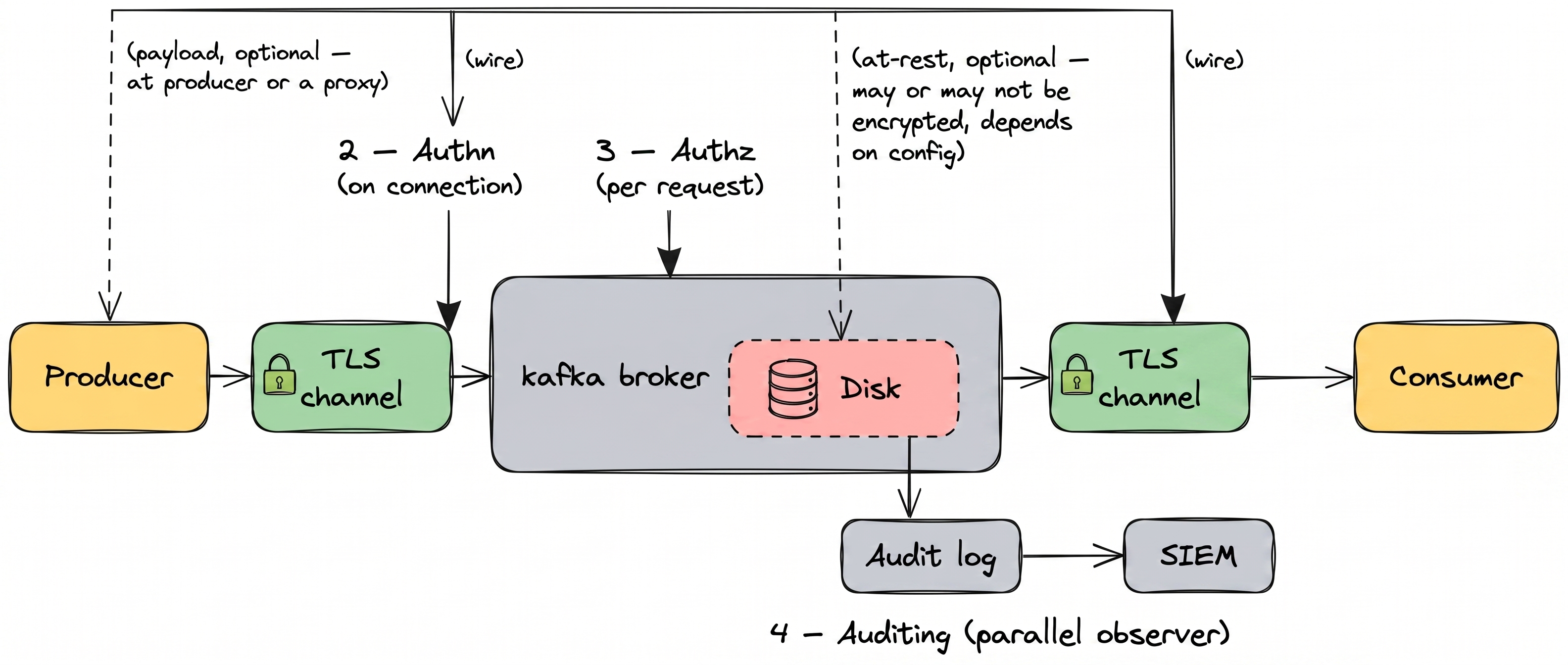
1. Encryption
Protect data in transit, at rest, and at the field level. TLS alone is not enough.
2. Authentication
Verify every client connecting to a broker. mTLS, SASL, and SSO.
3. Authorization
Control which users and services can read, write, or admin each resource.
4. Auditing
Capture every action with user, timestamp, and payload context.
Native Kafka covers parts of each pillar. It leaves real gaps in others. The rest of this page walks through them one by one, with the tradeoffs and the practices that hold up at scale.
Pillar 01 — Kafka Encryption
Can an outsider read the data?
Without encryption, anyone on the network or with disk access can read your Kafka messages. You end up needing encryption in three places: in traffic between clients and brokers, in whatever Kafka writes to disk, and inside the payload itself for anything sensitive.
Each layer stops a different kind of attacker, and none of them substitutes for the others.
Data in transit: TLS and mTLS
Kafka supports TLS out of the box. Clients negotiate a TLS session with the broker, exchange certificates, and encrypt traffic over the wire. Once TLS is enforced on a listener, unencrypted connections get rejected.
Mutual TLS (mTLS) extends this. Instead of only the server presenting a certificate, the client presents one too. The broker validates the client certificate against a trusted CA. You get encrypted traffic and authentication in a single handshake.
A minimal broker config that enforces TLS 1.3 and requires client certificates:
# broker.properties
listeners=SSL://:9093
listener.security.protocol.map=SSL:SSL
ssl.keystore.location=/var/kafka/kafka.server.keystore.jks
ssl.keystore.password=<redacted>
ssl.truststore.location=/var/kafka/kafka.server.truststore.jks
ssl.truststore.password=<redacted>
ssl.client.auth=required
ssl.enabled.protocols=TLSv1.2,TLSv1.3
ssl.protocol=TLSv1.3
Set ssl.client.auth=required to reject any client that can't present a valid certificate. Drop the PLAINTEXT listener entirely; there's no production reason to keep one.
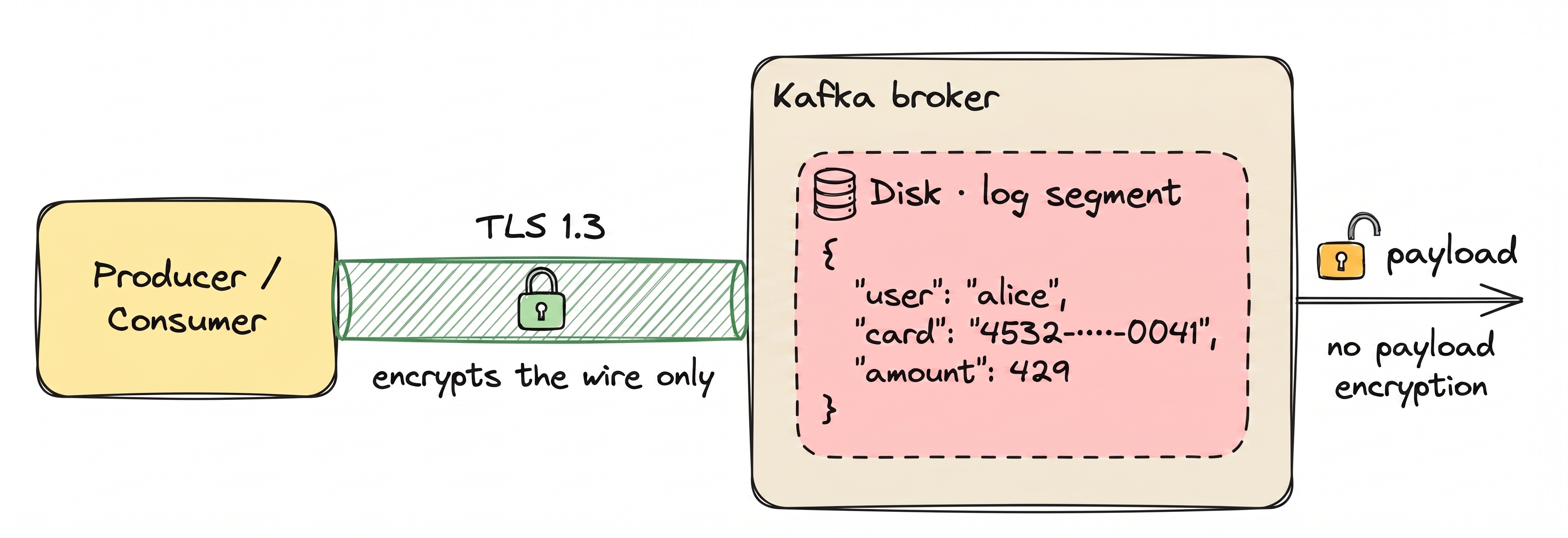
Treating TLS as the whole of Kafka security. It isn't. TLS protects the connection. Once a message reaches the broker, it's decrypted and stored on disk in plaintext.
Any process with broker access can read it: admins, monitoring agents, a compromised service.
Data at rest: disk-level encryption
Kafka doesn't encrypt the messages it stores on disk. That's on the OS or your cloud provider. Common options:
- Linux Unified Key Setup (LUKS) for self-managed brokers
- Amazon EBS encryption for AWS
- Azure Disk Encryption for Azure
- Google Cloud persistent disk encryption for GCP
Disk-level encryption protects against stolen disks and misconfigured backups. It does nothing about a process that already has broker access; that process sees plaintext.
Field-level and message-level encryption
For sensitive data like credentials, payment details, or health records, disk-level encryption isn't enough. The payload itself needs to be encrypted before it reaches the broker. This is called application-level encryption and comes in two forms.
Message-level encryption encrypts the entire payload. The broker sees only ciphertext. It cannot route or filter based on content. Maximum confidentiality, but Kafka loses some capabilities.
Field-level encryption encrypts only sensitive fields, such as PII or payment data. Routing and filtering on non-sensitive fields still work. The broker never sees the protected values in plaintext.
| Layer | TLS only | Disk-level | Field-level | Message-level |
|---|---|---|---|---|
| On the wire | Encrypted | Plaintext unless TLS is also enabled | Encrypted with TLS | Encrypted with TLS |
| On broker disk | Plaintext | Encrypted by the OS or cloud | Ciphertext only | Ciphertext only |
| Readable by broker admins | Yes | Yes, through a Kafka client | No | No |
| Routing and filtering | Preserved | Preserved | Works on non-encrypted fields | Lost — the full payload is opaque |
| Typical use | Baseline | Stored-data compliance | PII, PCI, HIPAA | End-to-end confidentiality |
| Overhead | Low | Low | Moderate | Higher |
Go deeper: full Kafka encryption guide → · how Conduktor Gateway handles encryption across apps →
Pillar 02 — Kafka Authentication
Who is connecting to the broker?
Authentication verifies the identity of every client connecting to Kafka. Without it, anyone on the network can produce or consume messages. There are three common approaches.
Mutual TLS
Client and broker exchange certs signed by a trusted CA. Common for service-to-service traffic.
SASL
Pluggable mechanisms: PLAIN, SCRAM, GSSAPI (Kerberos), OAUTHBEARER. Choose per threat model.
SSO (OIDC / LDAP)
Front the cluster with a proxy that terminates SSO and maps to a Kafka principal.
68% of breaches involve the human element: errors, stolen credentials, social engineering. Not exotic exploits. (Verizon 2024 DBIR)
Mutual TLS (mTLS)
Client and broker each present a certificate signed by a trusted CA. Once validated, the TLS session carries an authenticated identity. Common in service-to-service scenarios where certificate issuance is already part of the infrastructure.
SASL (Simple Authentication and Security Layer)
A plug-in framework. Kafka supports four SASL mechanisms:
- SASL/PLAIN — username and password. Simple. Credentials travel with every connection, so use only with TLS.
- SASL/SCRAM — challenge-response with hashed passwords. Credentials never travel in plaintext.
- SASL/GSSAPI (Kerberos) — ticket-based auth against a KDC. Common in large enterprises with existing Kerberos.
- SASL/OAUTHBEARER — token-based auth for OAuth2 and OpenID Connect providers.
SSO: OIDC and LDAP
SSO isn't native to Kafka, but it's what operators end up needing. Humans don't manage their own certificates. They log into Okta, Azure AD, or Google Workspace. A proxy or control plane in front of Kafka terminates the OIDC or LDAP handshake and maps the identity to a Kafka principal.
A minimal SASL/SCRAM configuration:
# broker.properties
listener.security.protocol.map=SASL_SSL:SASL_SSL
sasl.enabled.mechanisms=SCRAM-SHA-512

# client.properties
security.protocol=SASL_SSL
sasl.mechanism=SCRAM-SHA-512
sasl.jaas.config=\
  org.apache.kafka.common.security.scram.ScramLoginModule required \
  username="alice" password="alice-secret";
Kafka validates the SCRAM handshake against credentials stored in KRaft (or ZooKeeper on older clusters) and binds the connection to a principal like User:alice.
Go deeper: SSO for humans in Conduktor Console → · service auth translation at the wire in Gateway →
Pillar 03 — Kafka Authorization
What are they allowed to do?
Authentication tells you who is connecting. Authorization decides what they're allowed to do. Kafka has two main approaches: native ACLs, and role-based access control layered on top.
Access Control Lists (ACLs)
ACLs are off by default. Turn them on in broker.properties before anything else, otherwise every authenticated principal can do everything:
# broker.properties (KRaft)
authorizer.class.name=org.apache.kafka.metadata.authorizer.StandardAuthorizer
super.users=User:admin
allow.everyone.if.no.acl.found=false
On ZooKeeper-backed clusters, swap the authorizer for kafka.security.authorizer.AclAuthorizer. The other two lines are the same.
With allow.everyone.if.no.acl.found=false, the broker denies any request that isn't explicitly permitted. Safer default than the alternative.
ACLs are then managed through the kafka-acls.sh CLI. Each ACL is an allow rule mapping a principal to a resource and operation:
bin/kafka-acls.sh --bootstrap-server localhost:9092 \
  --add --allow-principal User:alice \
  --operation Read --topic customer-events
ACLs are fine-grained but have practical limits at scale:
- No groups. Add a new team member, add ACLs one at a time.
- No role inheritance. Every principal's permissions are managed directly.
- No audit of changes. Who added this ACL last Tuesday? Hard to answer.
- No centralized visibility. Listing permissions across clusters means running the CLI per cluster.
For dozens of users and topics, ACLs work. For hundreds or thousands across multiple clusters, they become unmanageable.
Role-Based Access Control (RBAC)
RBAC adds a layer of indirection between users and permissions. Permissions attach to roles. Users join groups. Groups get roles. Change the role once, and everyone in the group picks up the new permissions.

This makes onboarding and offboarding one step. A new data scientist joining data-science-team inherits every permission that team has. A leaver removed from the group loses access immediately.
| ACLs | RBAC | |
|---|---|---|
| Unit of control | Per-resource, per-operation | Per-role, applied across resources |
| Groups | Not supported | First-class |
| Role inheritance | Not supported | Nested roles and hierarchies |
| Centralized visibility | CLI per cluster | Unified UI or API |
| Change audit | Limited, no native history | Full history of role and assignment changes |
| Scale | Small deployments | Hundreds of users and topics |
| Standards alignment | Kafka-specific | NIST RBAC |
Go deeper: Kafka ACL guide → · Kafka RBAC guide → · group-based RBAC in Conduktor Console →
Pillar 04 — Kafka Auditing & Monitoring
What did they actually do?
When an auditor asks "who consumed customer PII on March 3 at 2 PM?", the answer should take minutes, not weeks. Auditing captures every action with enough context to reconstruct what happened.
What Kafka logs natively
Kafka uses Log4j to emit authorization and authentication events. With the right configuration, you get records of:
- Successful and failed authentication attempts
- Authorization decisions (allow or deny)
- Admin API calls (topic creation, ACL changes, config updates)
# log4j.properties
log4j.logger.kafka.authorizer.logger=INFO, authorizerAppender
log4j.logger.kafka.request.logger=INFO, requestAppender
What you don't get natively: consumer-side activity (who actually read which message from which partition), full payload context, and cross-cluster correlation. Turning raw broker logs into a proper audit trail is a separate build.
SIEM integration
Kafka's Log4j output ships to any standard SIEM or log aggregator:
- Splunk — via universal forwarders or HEC
- ELK / OpenSearch — Filebeat or Logstash
- Datadog — Datadog Agent with the Kafka integration
- Sumo Logic, New Relic — via their Log4j appenders
Once in the SIEM, detection rules do the actual security work: repeated auth failures, unusual IP patterns, privilege escalation, admin API spikes.
Compliance reporting
Auditors don't want raw logs. They want evidence: "show me every access to PCI data in Q3." That means:
- Retention policies aligned with regulations (GDPR: case-by-case; PCI-DSS: at least one year; HIPAA: six years)
- Tamper-evidence — signed or write-once audit logs
- Searchable reports filtered by user, resource, time range, or action type
- Export formats your auditors will accept, usually CSV, JSON, or PDF
Native Kafka produces the raw events. Turning them into audit-ready evidence is work most teams end up doing themselves.
Go deeper: audit trails and SIEM integration in Console → · wire-level auth logging in Gateway →

All four pillars working together is what holds up in production. Lean on any one alone and there's a gap.
Enforce TLS on every broker
No unencrypted listeners in production. Disable PLAINTEXT on all ports. Set a minimum TLS version of 1.2.
Use mTLS or SASL/SCRAM
Avoid SASL/PLAIN outside local testing. For human users, front the cluster with SSO through a proxy.
Rotate certificates automatically
Track expiry dates. Automate renewal and broker reloads. Expired certs cause outages.
Prefer RBAC over raw ACLs at scale
Keep ACLs as the enforcement layer. Manage access through roles and groups. Audit role changes.
Enforce least privilege
Producers get write-only on their own topics. Consumers get read-only. Admins are a small, named group with MFA.
Encrypt PII at the field level
Disk encryption and TLS do not protect against privileged broker access. Encrypt sensitive fields with a KMS-managed key.
Centralize audit logs in a SIEM
Raw Log4j output on brokers is not an audit trail. Ship to Splunk, ELK, or Datadog with alerting rules.
Monitor authentication failures
Repeated failed logins are often brute-force attempts. Alert on rate thresholds.
Isolate environments
Separate clusters or virtual clusters for dev, staging, and prod. Do not share credentials across environments.
Run quarterly security reviews
Review ACLs and RBAC assignments, check certificate expiry, verify SIEM ingestion, run a tabletop exercise.
Conduktor splits the work across two products. Console handles people and policy: SSO, RBAC, ACL management, user audit trails. Gateway handles data in motion: field-level encryption, tokenization, application-level audit. You can run one or both, which is why Gateway works in front of Confluent Cloud or AWS MSK without bringing Console along.
Encryption — Gateway
Gateway encrypts at the wire, in the payload, and in headers with eight algorithms including AES-GCM and ChaCha20-Poly1305. Schema-aware for Avro, JSON, and Protobuf. Crypto-shredding supports per-record keys for GDPR right-to-erasure. Any KMS: AWS, Azure, GCP, HashiCorp Vault, Fortanix.
Authentication — Console + Gateway
Console terminates SSO (OIDC, LDAP) for humans. Gateway enforces mTLS, SASL/SCRAM, and OAUTHBEARER for workloads, validating OIDC claims at the proxy. One identity layer across every connection.
Authorization — Console + Gateway
Console handles group-based RBAC and native ACL management. Gateway enforces virtual ACLs per tenant at the wire, with rate limiting and per-tenant isolation.
Auditing — Console + Gateway
Console logs user and admin actions. Gateway logs application-level activity across produce, fetch, and admin APIs. 70+ event types, with SIEM export to Splunk, ELK, and Datadog.
Security for regulated industries
The same four pillars, mapped to the frameworks auditors actually ask about.
Right to erasure
Field-level encryption plus crypto shredding. Destroy the key, individual records become permanently unreadable. No topic deletion, no reprocessing.
Resilience for regulated workloads
Audit trails, access controls, and incident response for financial services. Bitvavo runs DORA-compliant Kafka with Conduktor in production.
PHI protection in streams
Encrypt PHI at the field level before it reaches Kafka brokers. Healthcare teams use Conduktor to protect patient data in streaming pipelines.
Audit-ready evidence
Full audit logs of data access and admin actions. Evidence export for compliance reviews without manual log aggregation.
Cardholder data, unchanged clients
Tokenization and field-level encryption for cardholder data. Meet PCI requirements without rebuilding every producer and consumer.
Documented controls, end-to-end
Encryption, authentication, authorization, and audit trails in a single control plane. Fewer custom builds to justify to your auditor.
Read more customer stories
Is Kafka secure by default?
No. Out of the box, Kafka accepts plaintext connections with no authentication. TLS, SASL, and ACLs are all opt-in. Most Kafka breaches come from misconfigured clusters, not exploited vulnerabilities.
What is the difference between Kafka SSL and TLS?
SSL is the older protocol. TLS is its successor. Modern Kafka uses TLS exclusively, though older docs and config parameters still say "SSL." When you see security.protocol=SSL, it is actually TLS under the hood.
How do I secure Kafka topics?
Start with TLS on every listener so traffic is encrypted. Add SASL or mTLS so the broker knows who's connecting. Then restrict access with ACLs, or with RBAC once you're past a handful of users. If you handle PII or payment data, encrypt those fields on top.
What is the difference between authentication and authorization?
Authentication verifies who you are. Authorization decides what you can do. You need both. Authenticating without authorizing means anyone who logs in can do anything.
How does RBAC differ from Kafka ACLs?
ACLs are per-resource allow rules with no concept of groups or role inheritance. RBAC organizes permissions around roles you assign to users or groups. A new team member inherits the group's permissions automatically; a leaver loses them immediately.
Do I need both TLS and field-level encryption?
For sensitive data, yes. TLS protects the wire. Field-level encryption protects the payload. Without field-level encryption, anyone with broker or disk access can read plaintext even when TLS is enforced.
How do I audit Kafka access?
Enable Kafka's Log4j audit loggers, ship the output to a SIEM (Splunk, ELK, Datadog), and set up detection rules for failed auth attempts, privilege escalation, and unusual access patterns.
Does Conduktor replace Kafka's native security?
No. It extends it. TLS, ACLs, and SASL still work. Conduktor adds field-level encryption, RBAC, SSO, data masking, and richer audit logging on top.
What are the main Kafka security vulnerabilities?
The usual suspects aren't CVEs in the broker; they're misconfigurations. Plaintext listeners left on. SASL/PLAIN without TLS. Shared service-account credentials. ACLs that nobody audits or revokes when someone leaves. Disk encryption but no field-level encryption, so any process with broker access reads plaintext PII. Almost every published Kafka incident traces back to one of these, not to a novel exploit.
What's the overhead of field-level encryption?
Measurable but usually small. For most workloads, field-level encryption adds single-digit milliseconds per message when implemented at a proxy, because only the protected fields go through the crypto path and the rest flows through untouched. Heavier schemes (full-payload encryption with chain-of-custody signing) cost more but still sit well under native Kafka's throughput ceiling for most deployments. Benchmark your own payload sizes before committing.
How do I migrate from ACLs to RBAC without downtime?
Run both in parallel during the transition. Model your existing ACLs as roles in the RBAC system, assign those roles to the right groups or users, and verify the effective permissions match. Once verified, flip applications over to the RBAC-managed identities one at a time. ACLs remain the enforcement layer at the broker throughout, so nothing breaks if you pause the migration mid-way.
Does Kafka support OAuth2?
Yes, through SASL/OAUTHBEARER. Kafka validates a bearer token from your OIDC provider (Okta, Azure AD, Keycloak, Google) and binds the connection to a principal. In practice, most teams front Kafka with a proxy that terminates OAuth at the edge so brokers don't need to be exposed to the identity provider directly.
Ready to Secure Your Kafka Deployment?
Production Kafka security takes more than TLS. In 30 minutes with our team, we'll walk through your current posture across the four pillars and show you what Conduktor would change. No edits in your producers or consumers.