
librdkafka vs Java Client: 10 Kafka Surprises
Python confluent-kafka and Java share config names but not behavior. 10 librdkafka differences tested on a KRaft cluster, with source code and real output.

I spent years reading Kafka docs, configuring producers and consumers in Java, and building mental models around how the client works. Then I started writing Python with confluent-kafka. Completely different behavior.
librdkafka is a C reimplementation of the Kafka protocol. It powers every non-JVM Kafka client: Python, Go, C#, Node.js, Rust. It shares config names with the Java Kafka client, but the defaults and edge-case behaviors are different.
We ran every test below on a 3-node KRaft cluster, Python (confluent-kafka) and Java side by side.
1. Messages don't land on the same partition
Two differences here. For null-key messages, both clients use sticky partitioning, but the trigger for switching is different. Java is size-based: it stays on one partition until batch.size bytes (default 16 KB) accumulate, then switches. librdkafka is time-based: it stays on one partition for sticky.partitioning.linger.ms (defaults to 2 × linger.ms, so 10ms), then re-rolls. Under burst load, Java spreads across partitions as batches fill. librdkafka puts everything on one partition because the burst fits in 10ms.
For keyed messages, the hash function itself is different. Java uses murmur2. librdkafka defaults to CRC32 (consistent_random). The same key lands on a different partition:
Key "user-123" with 12 partitions:
  consistent_random (CRC32, librdkafka default): partition 6
  murmur2_random (Java-compatible):              partition 8
Set partitioner=murmur2_random in librdkafka to match Java. Without this, key-based ordering and co-partitioning break on migration.
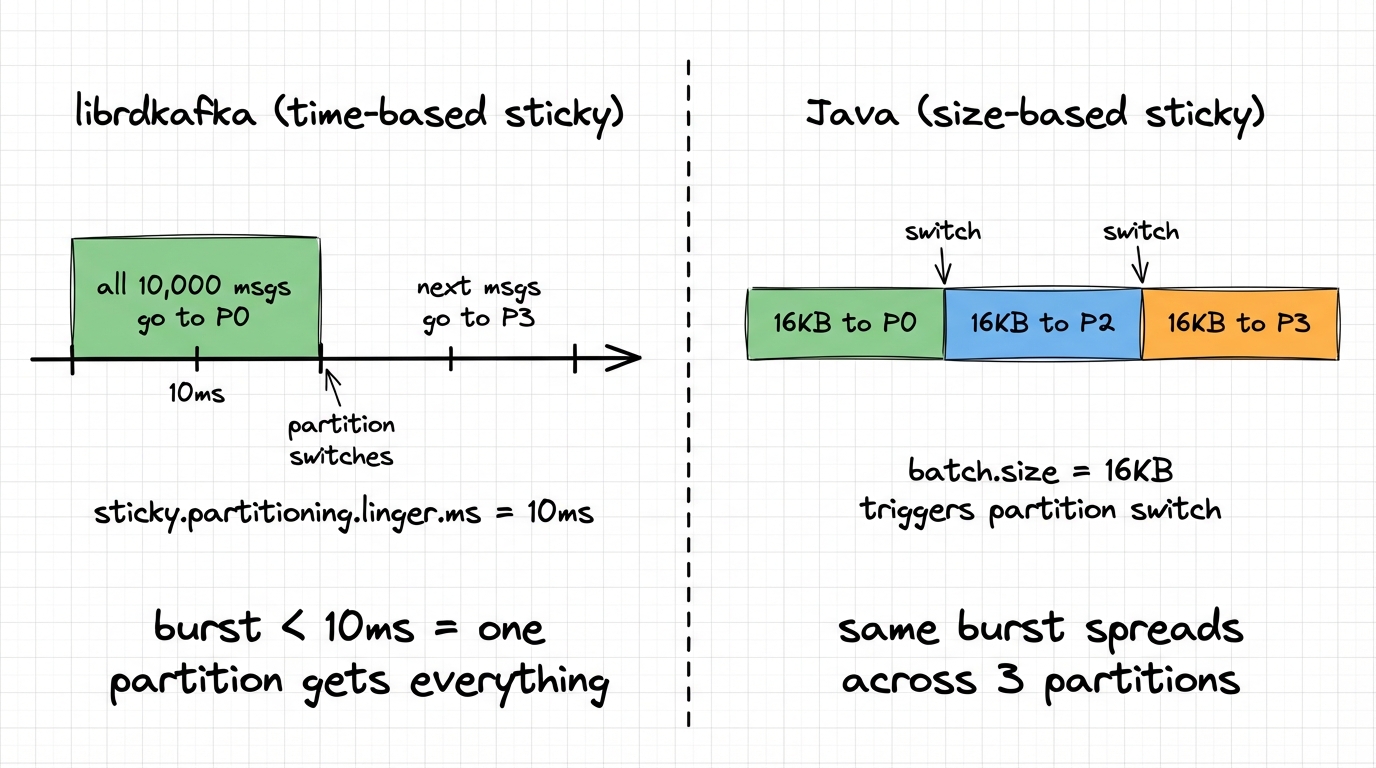
We produced 10,000 null-key messages to a 6-partition topic from both clients:
Python (librdkafka, default sticky.partitioning.linger.ms=10):
  partition 0: 10000 (100%)  ← ALL messages on one partition

Java (sticky partitioner, batch.size=16384):
  partition 0:  3856 (38%)
  partition 2:  2048 (20%)
  partition 3:  4096 (40%)
Under burst, librdkafka puts everything on one partition. Java spreads across three. If you were relying on even distribution for parallelism, that's a problem you'll only see under load. Setting sticky.partitioning.linger.ms=0 in librdkafka gives even distribution (~17% per partition) but at the cost of smaller batches.
If you migrate from Java to Python, set
partitioner=murmur2_randomto match Java's key hashing (the defaultconsistent_randomuses CRC32, which routes the same key to a different partition). For null-key distribution, reducesticky.partitioning.linger.msif you need even spread under burst.
2. Idempotence is off by default
This one caught me off guard. Since Kafka 3.0, the Java client ships with enable.idempotence=true. This pulls in acks=all, caps max.in.flight.requests.per.connection to 5, and enables broker-side deduplication. You get ordering and exactly-once semantics without asking.
librdkafka doesn't do this. It defaults to enable.idempotence=false. Your Python producer, out of the box, has no ordering guarantees during retries and no deduplication. If a ProduceRequest times out and the broker actually wrote it, the retry creates a duplicate. Nobody tells you.
The cascade of defaults makes it worse:
| Config | Java (3.0+) | librdkafka |
|---|---|---|
enable.idempotence | true | false |
acks | all | all |
max.in.flight.requests.per.connection | 5 | 1,000,000 |
retries | MAX_INT | MAX_INT |
max.in.flight.requests.per.connection config (max unacknowledged requests per broker connection). Java defaults it to 5. librdkafka defaults it to 1,000,000. With retries and no idempotence, message reordering isn't just possible: it's the expected behavior under load. When you enable idempotence in librdkafka, it auto-adjusts: caps max.in.flight.requests.per.connection to 5, forces acks=all, and sets queuing.strategy=fifo. But you have to opt in. Every Python confluent-kafka producer runs without idempotence by default.
Set
enable.idempotence=trueexplicitly in your librdkafka producers. Java defaults don't carry over. If you can't change client code, Conduktor Gateway can enforce idempotence at the proxy layer.
3. Batch size: 16 KB vs 1 MB
Java's default batch.size is 16,384 bytes (16 KB). librdkafka's is 1,000,000 bytes (1 MB), plus an additional batch.num.messages=10000 threshold.
Both clients also use linger.ms=5 by default (Java changed from 0 to 5 in Kafka 4.0). The wait time is the same, but librdkafka can pack much more data into a single batch before sending it.
Under high throughput, librdkafka packs more data per ProduceRequest (fewer round-trips, better compression). Under low throughput, both clients behave similarly because the linger.ms timer expires before either batch fills.
The client-side buffer model also differs. Java uses a single buffer.memory=32MB pool. librdkafka uses dual limits: queue.buffering.max.messages=100000 AND queue.buffering.max.kbytes=1048576 (1 GB). Either limit can trigger backpressure.
| Config | Java | librdkafka |
|---|---|---|
batch.size | 16 KB | 1 MB |
batch.num.messages | (no equivalent) | 10,000 |
| Client-side buffer | buffer.memory = 32 MB | queue.buffering.max.kbytes = 1 GB |
kafka-dump-log.sh: batch.size=1MB (librdkafka default): 2 record batches
batch.size=16KB (Java default): 68 record batchesSame data, 34x fewer round-trips with the librdkafka default. With compression, the larger batches also compress better.
If you need low-latency producing in librdkafka, reduce
batch.sizeandbatch.num.messages. If you need high throughput in Java, increasebatch.size. Don't assume one client's defaults work for the other's use case.
4. Your consumer is buffering more than you think
This one can crash your container. librdkafka pre-fetches aggressively into internal queues filled by a background thread. The defaults:
queued.min.messages  = 100000
queued.max.messages.kbytes = 65536  // 64 MB
The fetcher checks these thresholds per partition. With many partitions, each one independently accumulates messages up to these limits.
Java's consumer works differently. No per-partition queue. A single shared buffer holds completed fetch responses, capped at fetch.max.bytes=52428800 (50 MB) per request. Fetching is reactive: new fetches fire after poll() returns data, not continuously in the background.
| Aspect | Java | librdkafka |
|---|---|---|
| Buffer model | Single shared buffer | Per-partition queues |
| Max per partition | max.partition.fetch.bytes=1MB | queued.max.messages.kbytes=64MB |
| 100 partitions theoretical max | ~50 MB | ~6.4 GB |
| Fetch trigger | After poll() returns | Background thread, continuous |
| Backpressure | Poll frequency | Queue full → 100ms backoff |
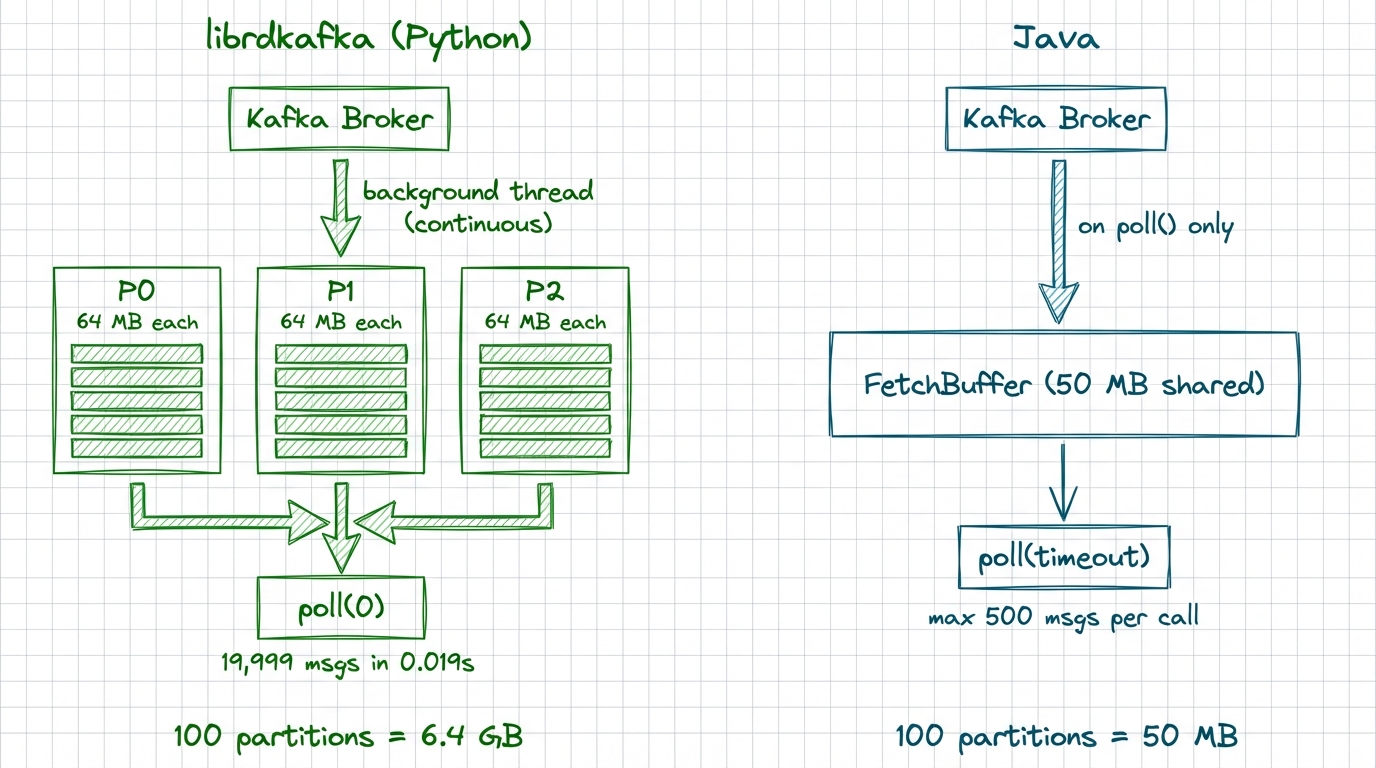
We produced 20,000 messages (1 KB each) across 10 partitions. After a single poll(), we called poll(0) in a non-blocking loop to see how many messages were already sitting in memory:
Default (queued.min.messages=100000):  19,999 messages pre-fetched
Tuned  (queued.min.messages=10):        2,969 messages pre-fetched
With defaults, librdkafka had buffered the entire topic before the application asked for a single message.
Tune
queued.min.messagesandqueued.max.messages.kbytesbased on your partition count and container memory. A consumer with 200 partitions at default settings will OOM a 4 GB pod.queued.min.messages=1000andqueued.max.messages.kbytes=1024is a reasonable starting point.
5. Rebalance: stop-the-world by default
Java's consumer ships with [RangeAssignor, CooperativeStickyAssignor] as default assignors: ready for cooperative incremental rebalancing out of the box. Only partitions that actually change ownership are revoked.
librdkafka defaults to range,roundrobin, both of which use the eager protocol: every partition is revoked from every consumer before reassignment. That's a full stop-the-world pause.
When the eager protocol is detected, librdkafka revokes all partitions at once before reassignment.
In a consumer group with 10 consumers and 100 partitions, adding one consumer triggers a rebalance where all 10 consumers drop all 100 partitions, then get them reassigned. During that window, nothing is consumed.
With cooperative rebalancing, only the ~10 partitions being moved to the new consumer are revoked. The other 90 keep flowing.
We tested with one consumer owning all 6 partitions, then a second consumer joining the group:
EAGER (librdkafka default):
  Consumer A owned [0, 1, 2, 3, 4, 5]
  Consumer B joins → A loses ALL 6 partitions
  A gets [3, 4, 5] back, B gets [0, 1, 2]
  During the rebalance: zero consumption

COOPERATIVE:
  Consumer A owned [0, 1, 2, 3, 4, 5]
  Consumer B joins → A loses only [0, 1, 2]
  A keeps consuming [3, 4, 5] the entire time
  B gets [0, 1, 2]
With eager, the existing consumer drops everything and waits. With cooperative, only the partitions that actually move are revoked.
Set
partition.assignment.strategy=cooperative-stickyin your librdkafka consumers. This requires a rolling restart (you can't mix eager and cooperative consumers in the same group), but the reduction in rebalance downtime is dramatic.
6. Auto-commit runs in a background thread
Both clients default to enable.auto.commit=true with auto.commit.interval.ms=5000. Different implementation, different crash semantics.
In Java, auto-commit fires inside poll(). The consumer checks a timer, and if 5 seconds have elapsed, it commits. If your processing blocks for 30 seconds between poll() calls, no commit happens until the next poll(). Your uncommitted messages are safe.
In librdkafka, auto-commit fires from a background timer thread, independent of poll(). Even if your application thread is blocked processing messages, offsets get committed.
This sounds like a feature. It's a trap. librdkafka commits offsets for messages your application received but hasn't processed. If your app crashes mid-processing, those offsets are already committed. The next consumer starts after them.
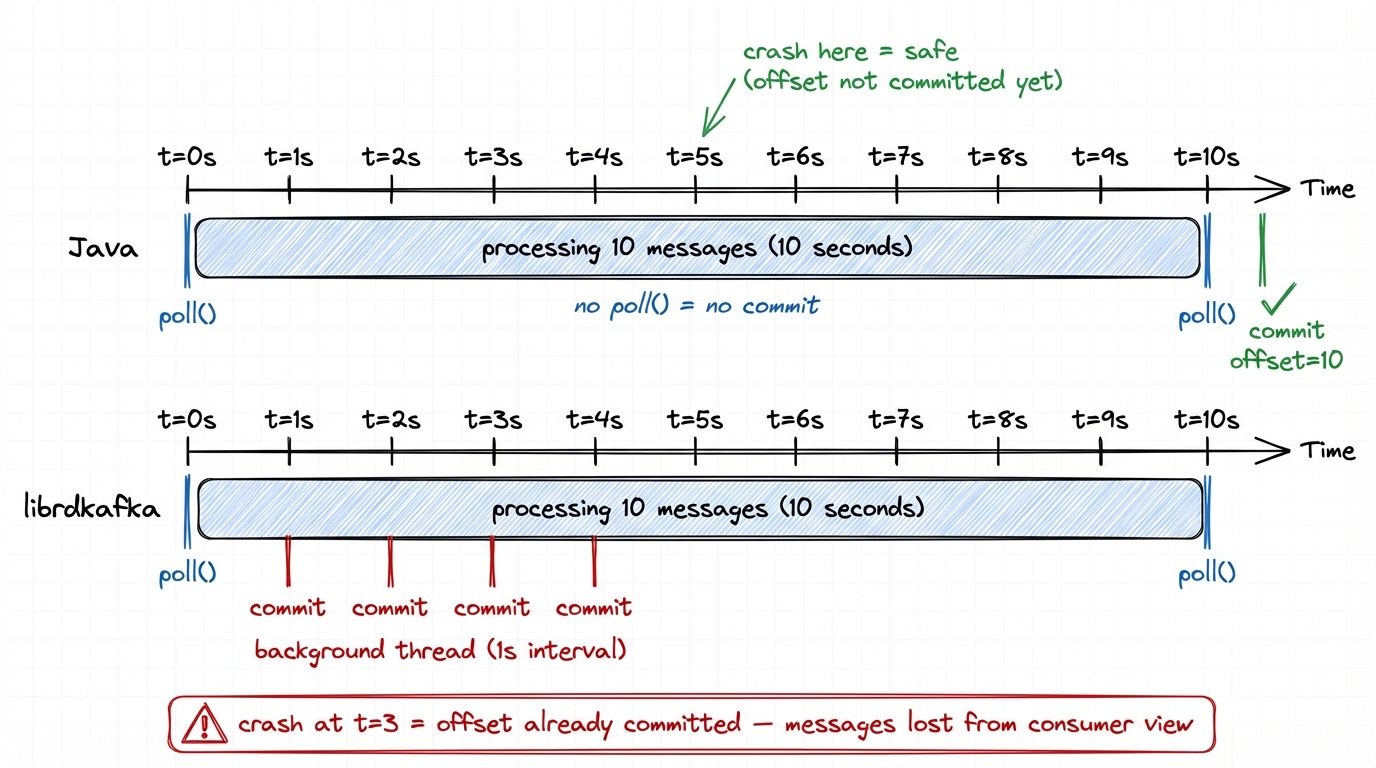
librdkafka also has a concept Java doesn't: enable.auto.offset.store (default true). This auto-stores offsets immediately when messages are dequeued from the internal queue. The background timer then commits these stored offsets. You can set enable.auto.offset.store=false and manually call store_offsets() after processing, then let auto-commit handle the rest.
We tested this: consume 10 messages, then sleep 5 seconds before processing them. With defaults, offset 10 was already committed before the sleep ended. If the app crashes at that point, the next consumer skips those 10 messages. Setting enable.auto.offset.store=false prevents this: nothing is committed until your code explicitly calls store_offsets().
In librdkafka, set
enable.auto.offset.store=falseand callstore_offsets()after processing each batch. This gives you Java-like semantics (only commit what you've processed) while still using auto-commit for the actual broker write.
7. Buffer full: block vs error
Java's send() blocks the calling thread for up to max.block.ms (default 60 seconds) when the buffer is full. librdkafka's produce() raises a BufferError immediately and moves on. If your Python code doesn't catch it, the message is silently dropped.
Python (queue.buffering.max.messages=10):
  Message 9:  BufferError — instant
  41 messages dropped

Java (buffer.memory=32KB, max.block.ms=3000, dead broker):
  Every send() blocked for ~3 seconds
Neither is better: it depends on whether you prefer backpressure or fast failure. The problem is when you expect one and get the other.
Wrap
produce()in error handling. OnQUEUE_FULL, callpoll(0)to drain delivery callbacks and free buffer space, then retry. Sizequeue.buffering.max.messagesandqueue.buffering.max.kbytesbased on your throughput.
8. Delivery callbacks need poll()
In Java, producer.send(record, callback) fires the callback automatically from the sender thread.
In librdkafka, delivery report callbacks only fire when you call producer.poll() or producer.flush(). If you don't poll regularly, callbacks are delayed and errors surface late.
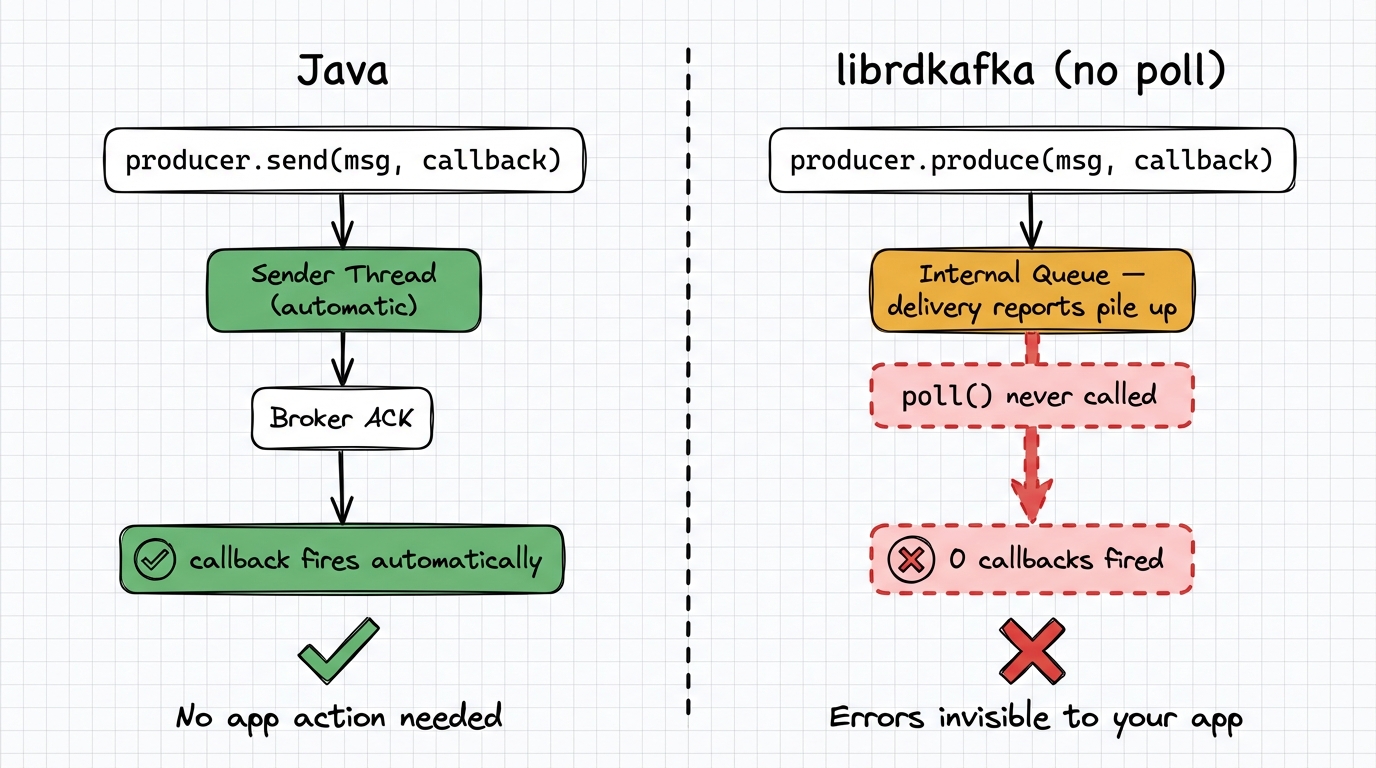
We produced 10 messages to a dead broker without calling poll(). After 2 seconds: 0 error callbacks. After calling flush(): all 10 errors surfaced at once. Until that flush(), the application had no indication anything was wrong.
Call
producer.poll(0)after everyproduce()call, or at minimum in a regular loop. Callflush()before shutdown. In Python,producer.flush()is your safety net, but it blocks.
9. Timeout model: one clock vs two
Java has one timeout: delivery.timeout.ms (default 120s). It caps the total time from send() to acknowledgment, including retries. Each individual request gets a fixed request.timeout.ms (default 30s).
librdkafka has two: message.timeout.ms (default 300s) as the total cap, and socket.timeout.ms (default 60s) for each individual request. The per-request timeout adapts to the remaining message time: a message at 4m50s gets only 10 seconds for its last request. Java always gives a fixed 30s per request.
| Java | librdkafka | |
|---|---|---|
| Total timeout | delivery.timeout.ms = 120s | message.timeout.ms = 300s |
| Per-request timeout | request.timeout.ms = 30s (fixed) | min(socket.timeout.ms, remaining) |
librdkafka accepts
delivery.timeout.msas an alias formessage.timeout.ms, so you can use the Java name. Just set it explicitly: the default is 300s in librdkafka vs 120s in Java.
10. Config names are lies
Some configs work in both clients. Others don't exist, or exist under a different name.
| Concept | Java | librdkafka | Same name works? |
|---|---|---|---|
| Max message size | max.request.size | message.max.bytes | no |
| Producer buffer | buffer.memory (bytes) | queue.buffering.max.kbytes (KB) + queue.buffering.max.messages | no |
| Delivery timeout | delivery.timeout.ms | message.timeout.ms | yes (alias) |
| Retry count | retries | message.send.max.retries | yes (alias) |
| Batch wait time | linger.ms | queue.buffering.max.ms | yes (alias) |
librdkafka-only configs (no Java equivalent)
enable.auto.offset.store— Separate offset storage from commitqueued.min.messages— Per-partition consumer queue depthqueued.max.messages.kbytes— Per-partition consumer queue bytesbatch.num.messages— Batch message count limitsocket.timeout.ms— Per-request socket timeoutbroker.address.ttl— DNS cache TTLenable.sparse.connections— Lazy broker connectionsdelivery.report.only.error— Only fire callbacks on failuresticky.partitioning.linger.ms— Sticky partition time window
Java-only configs (no librdkafka equivalent)
partitioner.adaptive.partitioning.enable— Load-based partition selectionpartitioner.availability.timeout.ms— Partition availability detectionpartitioner.ignore.keys— Skip key-based partitioning
Use the librdkafka configuration reference as your source of truth, not the Kafka docs. In Python, enable
log_level=7ordebug=allduring development to catch unknown config warnings.
The migration checklist
If you're moving between Java and librdkafka (in either direction), audit these configs:
| Priority | Config | Action |
|---|---|---|
| Critical | partitioner | Set murmur2_random to match Java's key hashing |
| Critical | enable.idempotence | Set true explicitly in librdkafka |
| Critical | message.timeout.ms | Match to Java's delivery.timeout.ms |
| High | queued.min.messages | Reduce from 100K based on partition count |
| High | partition.assignment.strategy | Set cooperative-sticky in librdkafka |
| High | enable.auto.offset.store | Set false, use manual store after processing |
| Medium | batch.size / batch.num.messages | Tune for your latency/throughput needs |
| Medium | message.max.bytes | Match to Java's max.request.size |
| Low | sticky.partitioning.linger.ms | Decrease for better null-key distribution across partitions |
Conduktor Console monitors consumer lag, producer throughput, and group rebalances across client types from a single dashboard: useful for catching these differences before they become incidents.