
Watermarks and Triggers in Stream Processing
Stream processing systems face a challenge that batch processing never encounters: how to measure the passage of time when events arrive continuously, potentially out of order, and from multiple distributed sources. Watermarks and triggers are two mechanisms that solve this problem, enabling accurate time-based operations like windowing and aggregations in frameworks such as Apache Flink and Kafka Streams. 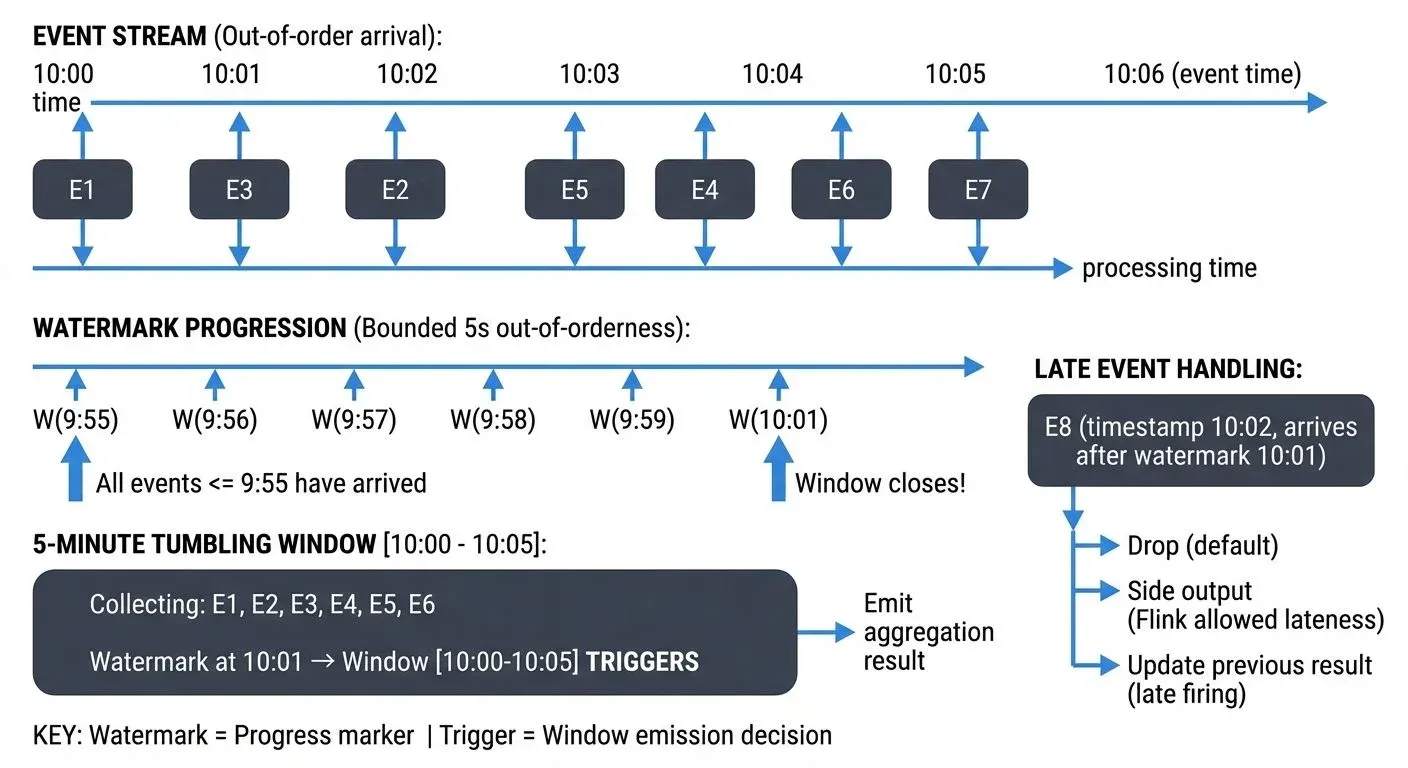
The Challenge of Time in Stream Processing
Unlike batch processing where all data is available upfront, stream processing deals with unbounded data that arrives continuously. This creates several timing challenges:
Events often arrive out of order due to network delays, clock skew between devices, or processing at different speeds across distributed systems. An event that occurred at 10:00:01 might arrive after an event that occurred at 10:00:05.
When performing time-based operations like "calculate the average temperature every 5 minutes," the system needs to know when it has received enough data to compute an accurate result. Should it wait indefinitely for late events? How does it know when a time window is complete?
Stream processing frameworks distinguish between three types of time. Event time is when the event actually occurred in the real world, typically embedded in the event payload. Processing time is when the streaming system processes the event. Ingestion time is when the event first enters the streaming system. Each serves different purposes, but event time is essential for accurate business logic since it reflects reality rather than system characteristics. For an in-depth exploration of event time concepts in Flink, see Event Time and Watermarks in Flink.
Understanding Watermarks: Measuring Progress in Event Time
A watermark is a special marker in the data stream that carries a timestamp and declares: "I have seen all events up to this point in time." More precisely, a watermark with timestamp t asserts that no more events with timestamps less than or equal to t should arrive.
Watermarks flow through the stream alongside regular events. As data flows through operators, each operator tracks the watermarks it receives and uses them to measure event time progress. This allows the system to process events based on when they actually occurred, not when they were processed.
The most common watermark strategy is bounded out-of-orderness watermarking. This approach acknowledges that events may arrive late, but assumes the delay is bounded by some maximum duration, essentially setting a "patience threshold" for the system. For example, a watermark generator might emit a watermark for time t after seeing an event with timestamp t + 5 seconds, effectively saying "I'm allowing up to 5 seconds of lateness before moving on."
Consider a temperature sensor sending readings every second. If the sensor's clock shows 10:00:00, 10:00:01, 10:00:02, but due to network conditions they arrive at 10:00:01, 10:00:03, 10:00:02, the watermark generator tracks the highest timestamp seen (10:00:03) and emits a watermark of 10:00:03 minus the configured delay (perhaps 2 seconds), resulting in a watermark of 10:00:01. This tells downstream operators: "You can safely process all events up to 10:00:01."
Triggers: Deciding When to Emit Results
While watermarks track time progression, triggers determine when window computations should actually execute and emit results. A trigger defines the conditions under which a window is considered ready for computation.
Triggers can be based on several criteria. Watermark-based triggers fire when the watermark passes the end of the window, ensuring all expected events have arrived. Count-based triggers fire after a specific number of elements arrive in the window. Processing-time triggers fire at regular wall-clock intervals, regardless of event time. Custom triggers can combine multiple conditions.
For a 5-minute tumbling window (fixed, non-overlapping time intervals) that starts at 10:00:00 and ends at 10:05:00, a watermark-based trigger waits until the watermark reaches 10:05:00 before computing the window result. This ensures the window contains all events that occurred during that period, accounting for the configured out-of-orderness. Session windows, which group events separated by periods of inactivity, present unique watermarking challenges since the window end is data-dependent. For detailed coverage of different window types and their behaviors, see Windowing in Apache Flink.
Advanced trigger configurations support early and late firings. Early firings emit speculative results before the watermark reaches the window end, useful for providing preliminary insights. Late firings handle events that arrive after the window has already fired, updating previous results with late data.
Watermarks and Triggers in Apache Flink and Kafka Streams
Apache Flink provides explicit watermark generation through the WatermarkStrategy API introduced in Flink 1.11. Developers specify both a TimestampAssigner to extract event timestamps from records and a WatermarkGenerator to produce watermarks based on those timestamps.
// Flink 1.11+ WatermarkStrategy API
DataStream<Event> stream = env.addSource(new KafkaSource<>(...))
    .assignTimestampsAndWatermarks(
        WatermarkStrategy
            .<Event>forBoundedOutOfOrderness(Duration.ofSeconds(5))
            .withTimestampAssigner((event, timestamp) -> event.getEventTime())
    );
When consuming from Kafka, Flink supports partition-aware watermark generation. Each Kafka partition maintains its own watermark, which are then merged using the minimum watermark across all partitions when consumed in parallel. This conservative approach ensures correctness, the overall stream time can only advance as fast as the slowest partition, while preserving ordering guarantees within partitions.
Flink's window operators use watermarks to determine when to trigger computations. A tumbling window closes and fires when the watermark passes the window's end time. During this period, Flink maintains windowed state (aggregates, counts, etc.) that gets updated as events arrive and is finalized when the trigger fires. Triggers can be customized using the Trigger API for more complex scenarios. For more on how Flink manages state across windows and checkpoints, see Flink State Management and Checkpointing.
Kafka Streams handles watermarks implicitly through a concept called stream-time, which serves the same purpose as watermarks but works behind the scenes. The framework automatically tracks the maximum timestamp observed across all partitions and uses this to advance stream time. Windows trigger when stream time passes their boundaries. This means developers don't need to explicitly configure watermark strategies, Kafka Streams infers them from message timestamps.
// Kafka Streams 3.0+ - watermarks handled implicitly via stream-time
StreamsBuilder builder = new StreamsBuilder();
KStream<String, SensorReading> stream = builder.stream("sensor-readings");

// Windowing automatically uses stream-time for triggers
stream
    .groupByKey()
    .windowedBy(TimeWindows.ofSizeWithNoGrace(Duration.ofMinutes(5)))
    .aggregate(
        () -> new TemperatureAggregate(),
        (key, value, aggregate) -> aggregate.update(value),
        Materialized.with(Serdes.String(), temperatureAggSerde)
    )
    .toStream()
    .to("temperature-averages");
In this example, the 5-minute window closes when stream-time advances past the window boundary. Kafka Streams 3.0+ introduced the ofSizeWithNoGrace() method which creates windows that close immediately when stream-time advances, while ofSizeAndGrace() allows configuring a grace period for late events, equivalent to Flink's out-of-orderness duration.
Streaming management tools like Conduktor can visualize watermark progression across pipeline stages, which helps debug timing issues and understand why windows are or are not firing as expected.
Handling Out-of-Order Data and Late Events
Real-world streams rarely arrive in perfect order. Network issues, clock skew, or processing delays cause events to arrive late. Watermark strategies must balance accuracy and latency.
A conservative watermark strategy with large delays (e.g., allowing 30 seconds of lateness) ensures most late events are included in the correct windows, but delays results by 30 seconds. An aggressive strategy with small delays (e.g., 1 second) produces faster results but may exclude more late events.
Late events that arrive after a watermark has already passed can be handled several ways. Dropping them is the simplest approach, treating them as too late to process. Side outputs in Flink route late events to a separate stream for special handling or logging, this provides a way to capture and analyze patterns in late-arriving data without disrupting main processing. Updating previous results recomputes and re-emits window results when late data arrives, though downstream systems must handle these updates. For more strategies on handling problematic events, see Dead Letter Queues for Error Handling.
A common issue occurs with idle Kafka partitions. If one partition receives no data, it produces no watermarks, which can stall watermark progression for the entire stream since the minimum watermark across all partitions determines overall progress. Flink addresses this with idle source detection, which excludes idle partitions from watermark calculations after a timeout period.
Real-World Applications and Best Practices
Consider an IoT application monitoring factory equipment. Sensors emit temperature and vibration readings every second. The system computes 1-minute averages to detect anomalies.
Without watermarks, the system would not know when to compute the average for each 1-minute window. With a watermark strategy allowing 5 seconds of out-of-orderness, the window for 10:00:00-10:01:00 fires when the watermark reaches 10:01:00, which happens approximately 5 seconds after the first event with timestamp 10:01:05 arrives.
If a sensor temporarily loses network connectivity, its events might arrive 30 seconds late. With a 5-second watermark delay, these events would be considered late. The system could configure late firings to recompute affected windows and send updated alerts.
Best practices for watermark and trigger configuration include starting with a bounded out-of-orderness strategy matching your observed latency characteristics. Monitor late event rates to validate your watermark delay is appropriate. Use early firings for dashboards requiring real-time updates, but rely on watermark triggers for accurate final results.
Enable idle source detection when consuming from Kafka to prevent idle partitions from stalling watermark progression. This is particularly important in Kafka 4.0+ deployments with KRaft mode where partition management has improved efficiency. Test watermark behavior during development using tools like Conduktor to visualize time progression and window firing across your streaming pipeline.
Align watermark granularity with window sizes. For 5-minute windows, millisecond-precision watermarks provide little benefit over second-precision while increasing overhead.
Summary
Watermarks and triggers are essential mechanisms that enable stream processing systems to reason about time and determine when to compute results over unbounded data streams. Watermarks track event time progression by marking points in the stream where all earlier events have been observed, accounting for out-of-order arrival. Triggers use watermark information to decide when windows should compute and emit results.
Together, these mechanisms allow frameworks like Apache Flink and Kafka Streams to perform accurate time-based operations such as windowing and aggregations. Understanding watermark strategies and trigger configurations is crucial for building reliable streaming applications that balance result accuracy with processing latency.
The key is choosing appropriate watermark delays based on observed lateness patterns and configuring triggers that match business requirements for timeliness versus completeness. With proper configuration and monitoring, watermarks and triggers enable streaming systems to process event-time data as accurately as batch systems while maintaining real-time performance.
Related Concepts
- Event Time and Watermarks in Flink - Deep dive into Flink-specific watermark strategies and implementation details
- Handling Late-Arriving Data in Streaming - Comprehensive strategies for managing events that arrive after watermarks
- Session Windows in Stream Processing - How watermarks interact with dynamic session window boundaries