
Clickstream Analytics with Kafka
Every click, scroll, and interaction on a website or mobile app generates useful data. Understanding this user behavior in real-time can drive personalization, detect fraud, and improve customer experiences. Clickstream analytics with Apache Kafka lets organizations capture, process, and act on this data at scale. 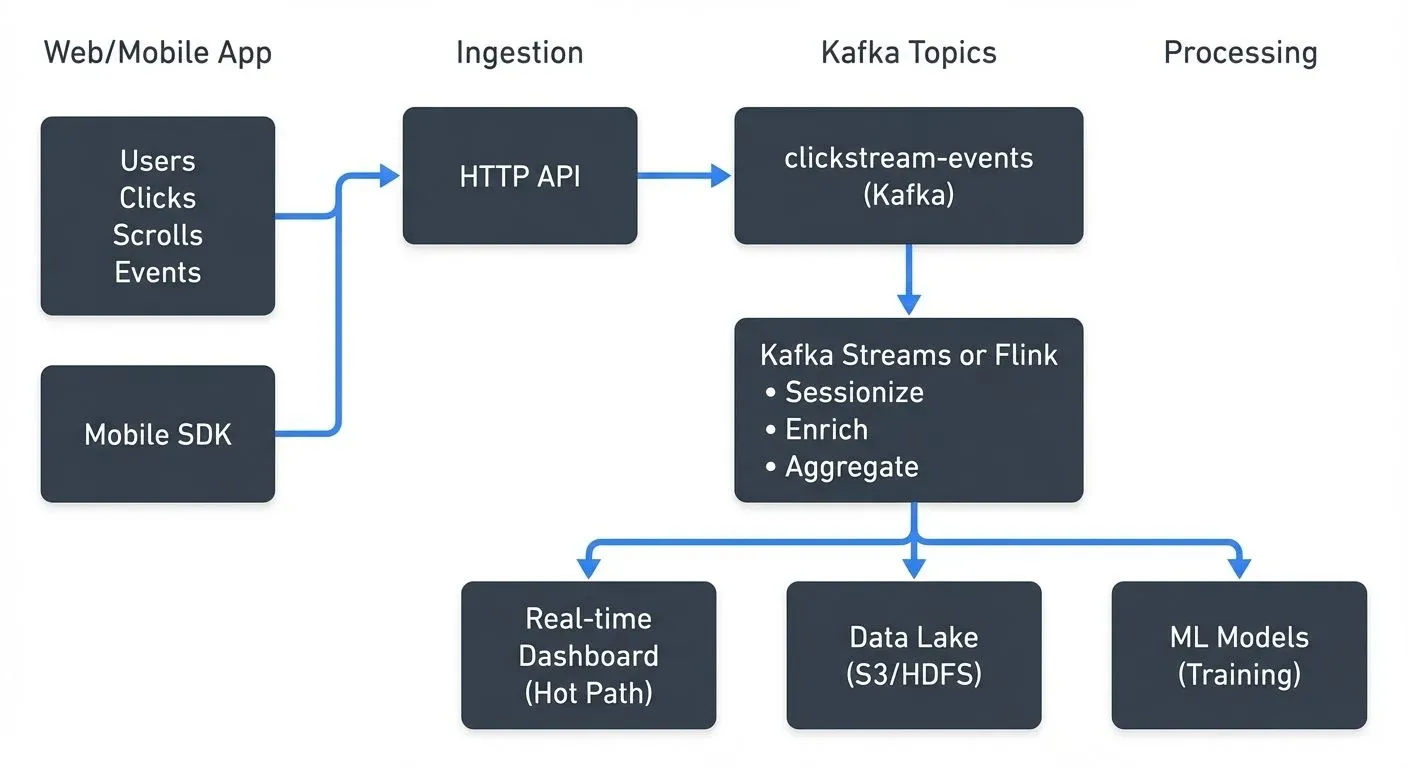
What is Clickstream Analytics?
Clickstream analytics involves tracking and analyzing the sequence of user interactions with digital platforms. Each event, page views, button clicks, video plays, cart additions, creates a data point that reveals user intent and behavior patterns.
Traditional analytics systems process this data in batches, often with delays of hours or days. But modern applications need immediate insights. A user browsing products expects personalized recommendations now, not tomorrow. Fraud detection systems must identify suspicious patterns in seconds, not after the damage is done.
This shift from batch to real-time processing is where streaming platforms become essential.
The Challenge of Real-Time Clickstream Processing
Clickstream data presents several challenges that make traditional databases and batch systems inadequate.
- Volume and velocity are the first obstacles. Popular websites generate millions of events per minute. A single user session might produce dozens of events within seconds. Any system handling clickstream data must ingest and process this continuous flood without dropping events or creating bottlenecks.
- Event ordering and timing matter significantly. Understanding user journeys requires preserving the sequence of actions. Did the user add items to cart before or after viewing the pricing page? These temporal relationships are critical for funnel analysis and session reconstruction.
- Multiple consumers need access to the same data. The marketing team wants to track campaign effectiveness. Product teams analyze feature usage. The data science team builds recommendation models. Each group needs the raw clickstream, often with different processing requirements and latencies.
Traditional message queues struggle with these requirements. They weren't designed for persistent, replayable event streams that multiple systems can consume independently.
Kafka as the Backbone for Clickstream Data
Apache Kafka's architecture solves these clickstream challenges through several key capabilities.
Kafka treats events as an immutable, append-only log (a data structure where new entries are only added to the end, never modified or deleted) distributed across multiple servers. When a clickstream event arrives, it's written to a topic partition based on a key, typically the user ID or session ID. This ensures all events for a given user flow to the same partition, maintaining order.
The distributed log architecture provides durability and scalability. Events are replicated across brokers, protecting against hardware failures. Adding more partitions and brokers scales the system horizontally as traffic grows.
Kafka's consumer model (using consumer groups where each application can independently read events) allows multiple applications to read the same clickstream data independently. Each consumer tracks its own position in the log. The analytics team can process events in real-time while the data lake loader batches them for long-term storage, all from the same topics. For detailed coverage of consumer coordination and offset management, see Kafka Consumer Groups Explained.
- Retention policies let organizations balance storage costs with replay requirements. Clickstream topics might retain data for 7 days, allowing systems to recover from failures or reprocess events when bugs are fixed.
- Modern Kafka architecture (Kafka 3.3+ and Kafka 4.0+) has moved to KRaft mode, eliminating the ZooKeeper dependency that was previously required for cluster coordination. This simplifies operations, reduces latency, and improves scalability for high-throughput clickstream workloads. For production clickstream systems, KRaft mode is now the recommended deployment model. For deeper understanding of Kafka's core architecture, see Kafka Topics, Partitions, Brokers: Core Architecture.
Building a Clickstream Pipeline with Kafka
A typical clickstream architecture with Kafka includes several layers, each handling specific concerns.
- Data capture happens through lightweight JavaScript libraries or mobile SDKs that track user interactions. These collectors batch events and send them via HTTP to ingestion services. The ingestion layer validates events and writes them to Kafka topics.
- Topic design impacts performance and maintainability. Common patterns include:
- Single
clickstream-eventstopic with event type as a field - Separate topics per event type:
page-views,button-clicks,purchases - Partitioning by user ID to maintain ordering per user session
For comprehensive guidance on topic design decisions, see Kafka Topic Design Guidelines and Kafka Partitioning Strategies and Best Practices.
Stream processing transforms raw events into analytics-ready data. This might include:
- Sessionization: grouping events into user sessions based on time windows
- Enrichment: joining clickstream events with user profile data
- Aggregation: computing metrics like pages per session or conversion rates
Storage and serving typically involves multiple systems. Hot path analytics go to databases like Elasticsearch or ClickHouse for real-time dashboards. Cold path data flows to data lakes (S3, HDFS) for historical analysis and ML training. Modern lakehouse formats like Apache Iceberg or Delta Lake provide ACID transactions and time travel capabilities for clickstream data lakes. Kafka Connect simplifies this data movement with pre-built connectors for sinks like Elasticsearch, S3, and databases. For details on building data integration pipelines, see Kafka Connect: Building Data Integration Pipelines. For data lake architecture patterns, see Building a Modern Data Lake on Cloud Storage.
Here's a production-ready topic configuration example (Kafka 3.x/4.x):
Topic: clickstream-events
Partitions: 12
Partition Key: user_id
Replication Factor: 3
Retention: 7 days (168 hours)
Min In-Sync Replicas: 2
Compression Type: lz4
Max Message Bytes: 1MB
Cleanup Policy: delete
This configuration ensures:
- Events for each user maintain order (via partition key)
- High availability and fault tolerance (replication factor 3, min ISR 2)
- Efficient storage and network usage (lz4 compression)
- Balanced load across consumer instances
- Protection against data loss with at least 2 in-sync replicas
Stream Processing for Clickstream Analytics
Raw clickstream events require processing to become useful insights. Stream processing frameworks like Kafka Streams (3.x+), Apache Flink (1.18+), and ksqlDB excel at this transformation. The choice depends on complexity: Kafka Streams for moderate stateful processing, Flink for complex event-time operations, and ksqlDB for SQL-based transformations.
- Sessionization is a fundamental operation. It groups events into sessions based on inactivity gaps. If a user stops interacting for 30 minutes, the current session closes and a new one begins with their next action. This allows calculation of session duration, pages per session, and bounce rates.
- Funnel analysis tracks user progression through defined steps, for example, product view → add to cart → checkout → purchase. Stream processing can compute conversion rates at each step in real-time, alerting teams when drop-off rates spike.
- Personalization engines consume clickstream data to update user profiles and recommendation models. When a user browses winter coats, the system immediately adjusts product suggestions for subsequent page loads. For comprehensive coverage of streaming-based personalization, see Building Recommendation Systems with Streaming Data.
Here's a Kafka Streams example for sessionization (Kafka Streams 3.x+):
import org.apache.kafka.streams.StreamsBuilder;
import org.apache.kafka.streams.kstream.*;
import java.time.Duration;

// Define the stream from clickstream-events topic
KStream<String, ClickEvent> clicks = builder.stream("clickstream-events");

// Create session windows with 30-minute inactivity gap
KTable<Windowed<String>, Long> sessionCounts = clicks
    .groupByKey()
    .windowedBy(SessionWindows.ofInactivityGapWithNoGrace(Duration.ofMinutes(30)))
    .count(Materialized.as("session-counts-store"));

// Write session metrics to output topic
sessionCounts
    .toStream()
    .map((windowedKey, count) -> {
        String userId = windowedKey.key();
        long sessionStart = windowedKey.window().start();
        long sessionEnd = windowedKey.window().end();
        return KeyValue.pair(userId,
            new SessionMetrics(userId, sessionStart, sessionEnd, count));
    })
    .to("session-metrics");
This implementation:
- Groups events by user ID (the key)
- Creates session windows with 30-minute inactivity gaps
- Counts events per session and materializes state for queries
- Emits session metrics with timing information to a downstream topic
For exactly-once processing guarantees in clickstream pipelines (preventing duplicate event counting), configure Kafka Streams with processing.guarantee=exactly_once_v2. For details, see Exactly-Once Semantics in Kafka. For deeper coverage of Kafka Streams patterns, see Introduction to Kafka Streams.
Alternative: ksqlDB for SQL-based processing
For teams preferring SQL over Java/Scala code, ksqlDB provides a SQL interface for stream processing:
-- Create stream from clickstream topic
CREATE STREAM clickstream_events (
  user_id VARCHAR KEY,
  event_type VARCHAR,
  page_url VARCHAR,
  event_timestamp BIGINT
) WITH (
  KAFKA_TOPIC='clickstream-events',
  VALUE_FORMAT='JSON'
);

-- Compute session counts with 30-minute windows
CREATE TABLE session_counts AS
  SELECT user_id,
         COUNT(*) AS event_count,
         WINDOWSTART AS session_start,
         WINDOWEND AS session_end
  FROM clickstream_events
  WINDOW SESSION (30 MINUTES)
  GROUP BY user_id
  EMIT CHANGES;
For comprehensive ksqlDB coverage, see ksqlDB for Real-Time Data Processing.
Data Quality and Governance in Clickstream Pipelines
Production clickstream systems must handle schema evolution, data quality issues, and operational visibility.
- Schema management becomes critical as event formats evolve. Adding new fields to track additional user interactions shouldn't break downstream consumers. Schema registries enforce compatibility rules and version schemas as they change.
- Data quality issues are inevitable. Client-side code might send malformed events. Network issues can cause duplicates. Processing bugs might corrupt data. Validation at ingestion time, dead letter queues for invalid events, and monitoring for anomalies help maintain quality. For comprehensive coverage of handling invalid events, see Dead Letter Queues for Error Handling. For data quality dimensions and testing approaches, see Data Quality Dimensions: Accuracy, Completeness, and Consistency.
- Operational visibility requires monitoring throughout the pipeline. Are events flowing at expected rates? Are consumers keeping up with producers? Are there spikes in error rates or latency?
Modern tooling for clickstream pipeline observability (2025) includes:
- Conduktor Platform: Comprehensive Kafka management (Topics, Monitoring), schema registry UI, data quality monitoring, and access control
- Kafka Lag Exporter: Prometheus-based consumer lag monitoring with alerting capabilities
- Kafka UI: Open-source web interface for cluster management and topic inspection
- Distributed tracing: OpenTelemetry integration for end-to-end event flow visibility
For comprehensive monitoring strategies, see Kafka Cluster Monitoring and Metrics and Distributed Tracing for Kafka Applications. This observability layer is particularly valuable for large organizations where multiple teams produce and consume clickstream data.
Real-World Use Cases and Best Practices
Major technology companies have proven clickstream analytics with Kafka at massive scale.
- Netflix uses Kafka to process hundreds of billions of events daily, tracking viewing behavior to power recommendations and detect streaming issues in real-time.
- LinkedIn built its real-time analytics infrastructure on Kafka, processing member interactions to personalize feeds and suggest connections.
- E-commerce platforms use clickstream data for dynamic pricing, inventory optimization, and fraud detection. When patterns suggest a bot attack or payment fraud, systems can block transactions within milliseconds.
- Best practices from these implementations include:
- Start with a simple topic design and evolve based on actual access patterns
- Partition by user ID to maintain event ordering within user sessions
- Monitor consumer lag metrics to ensure consumers keep pace with producers (use Kafka Lag Exporter or Conduktor)
- Implement sampling for ultra-high-volume scenarios where 100% processing isn't necessary
- Use separate topics for sensitive events requiring stricter access controls (PII, payment data)
- Enable compression (lz4 or zstd) to reduce storage and network costs
- Configure exactly-once semantics for critical metrics (session counts, conversion rates)
- Implement dead letter queues for malformed events to prevent processing failures
- Test failure scenarios: What happens when consumers fall behind? When brokers restart?
- Consider tiered storage (Kafka 3.6+) for long-term retention without excessive disk costs
- Use KRaft mode (Kafka 3.3+/4.0+) for simplified operations and better scalability
For event-driven architecture patterns applicable to clickstream systems, see Event-Driven Architecture. For e-commerce specific patterns, see E-commerce Streaming Architecture Patterns.
Summary
Clickstream analytics with Kafka enables real-time understanding of user behavior at scale. Kafka's distributed log architecture handles the volume, velocity, and multiple-consumer requirements that clickstream data demands. By combining Kafka (3.x/4.x with KRaft mode) with stream processing frameworks like Kafka Streams, Apache Flink, or ksqlDB, organizations can transform raw click events into actionable insights, powering personalization, fraud detection, and analytics.
Building production-grade clickstream pipelines requires attention to data quality, schema evolution, and operational monitoring. Modern tooling (2025) like Kafka Lag Exporter, Conduktor Platform, and distributed tracing with OpenTelemetry provides comprehensive observability. Exactly-once semantics prevent duplicate processing, while dead letter queues handle invalid events gracefully. The architecture patterns and best practices developed by companies processing billions of events daily provide a proven foundation for implementing clickstream analytics.
As digital experiences grow more interactive and users expect immediate personalization, real-time clickstream processing becomes more important. Kafka's modern architecture with KRaft, tiered storage, and enhanced monitoring provides the infrastructure to make this practical at any scale.
Related Concepts
- Apache Kafka - Distributed streaming platform for clickstream data ingestion
- Kafka Connect: Building Data Integration Pipelines - Integrate clickstream data with downstream systems
- Exactly-Once Semantics - Guarantee accurate event counting in clickstream pipelines
Sources and References
- Confluent - Clickstream Analysis - Architecture patterns and best practices for Kafka-based clickstream analytics
- Netflix Tech Blog - Keystone Real-time Stream Processing Platform - Netflix's experience processing billions of events with Kafka
- LinkedIn Engineering - Brooklin: Near Real-Time Data Streaming at Scale - LinkedIn's approach to real-time member behavior analytics
- Apache Kafka Documentation - Official documentation covering core concepts and stream processing
- Designing Data-Intensive Applications by Martin Kleppmann - Foundational concepts for stream processing and event-driven architectures
Written by Stéphane Derosiaux · Last updated April 29, 2026